



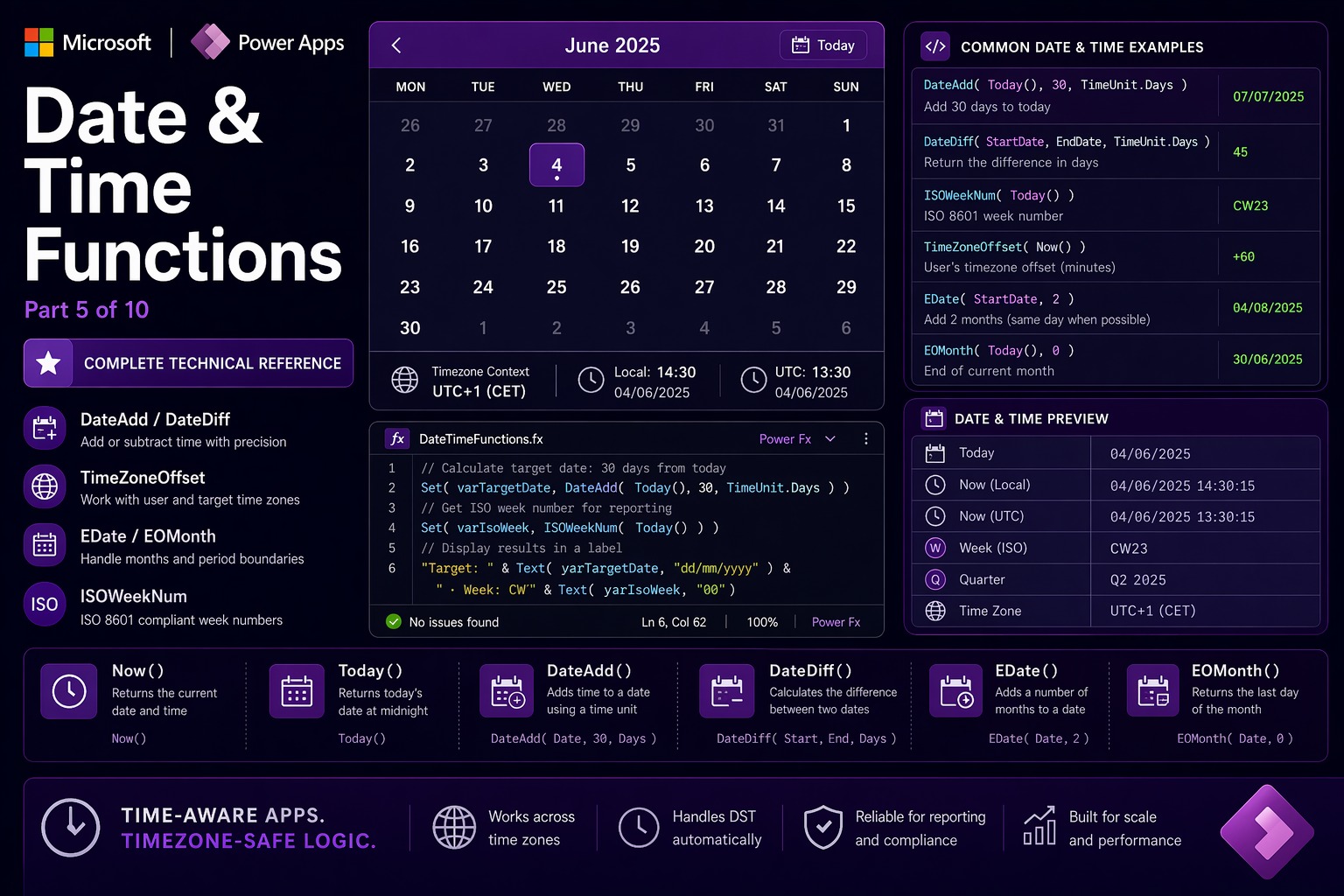
📌 This is Part 5 of the complete Power Apps Canvas Functions series. Screenshots are illustrative.
📚 Power Apps Canvas Functions — Complete Series
- Part 1 — Text Functions
- Part 2 — Number & Math Functions
- Part 3 — Logical & Conditional Functions
- Part 4 — Table & Record Functions
- Part 5 — Date & Time Functions (this post)
- Part 6 — Navigation, App Control & Forms
- Part 7 — Variables, Collections & Data Sources
- Part 8 — Color, Type Conversion, AI & Signals
- Part 9 — Utility, Testing & Context Keywords
- Part 10 — Master Index, Delegation Table & Performance Patterns
Date & Time Functions
Date and time handling in Power Apps is one of the most misunderstood areas of the platform. The questions come up constantly in every project: why does a timestamp look different for users in different countries? Why does a date filter return no results even though the records are clearly there? Why does adding one month to January 31 produce February 28 instead of March 2?
The answers are all in this section. Three foundational concepts explain most of the confusion.
📌 Three things to know before writing a single date formula
1. Local time by default. Canvas Apps run in the user’s local time zone. Now() and Today() reflect local time — not UTC. This is different from Power Automate, which operates on UTC internally. When Canvas Apps write datetimes to Dataverse, the platform converts local → UTC for storage and converts back on read. For multi-timezone apps, use UTCNow() for audit timestamps.
2. Three date types. Date holds only the calendar day. DateTime holds date + time. Time holds only time of day. Today() returns a Date; Now() returns a DateTime. Mixing types in arithmetic promotes the lower type automatically.
3. TimeUnit enumeration. All date arithmetic functions accept a TimeUnit parameter. Valid values: TimeUnit.Milliseconds, TimeUnit.Seconds, TimeUnit.Minutes, TimeUnit.Hours, TimeUnit.Days, TimeUnit.Months, TimeUnit.Quarters, TimeUnit.Years. Always use the enumeration — not a plain string like "Days".
Now / Today / UTCNow / UTCToday
Now() → DateTime
Today() → Date
UTCNow() → DateTime
UTCToday() → Date
The four “current moment” functions. Now() and Today() reflect the user’s local time zone. UTCNow() and UTCToday() return the current time and date in UTC — timezone-independent, the same value regardless of where the user is located.
When to use which: Now() for user-facing timestamps (“Created at 14:30 by Vincenzo”). UTCNow() for audit logs and system timestamps that must be consistent across time zones. Today() for date comparisons and filter boundaries. UTCToday() for checking whether a stored UTC date falls on today from any user’s perspective.
Now()— current local datetime, e.g.,6/7/2025 14:30:00Today()— today’s date, no time component:6/7/2025UTCNow()— current UTC datetime (2h behind Italian CET)Text(Now(), "[$-en-US]dd/MM/yyyy HH:mm")— formatted for displayPatch(AuditLog, Defaults(AuditLog), {Timestamp: UTCNow(), User: User().Email})— UTC for cross-timezone consistency
⚠️ Watch out: Now() and Today() re-evaluate every time the formula is recalculated — which happens frequently. Inside a ForAll loop, each Patch call with Now() may get a slightly different millisecond. Capture the timestamp in a variable first: Set(varBatchTimestamp, UTCNow()), then use varBatchTimestamp inside the loop. All records in the batch get exactly the same timestamp.
🔗 Works well with — UTCNow + Set — batch approval with a consistent timestamp across all records
// "Approve all selected" button OnSelect:
Set(varApprovalTimestamp, UTCNow());  // capture once — all records get this exact value
ForAll(
  colSelectedRequests,
  Patch(
    LeaveRequests,
    LookUp(LeaveRequests, ID = ThisItem.ID),
    {
      Status:       "Approved",
      ApprovedBy:   User().Email,
      ApprovedOn:   varApprovalTimestamp,  // same for all — not Now() per row
      ApprovalNote: ApprovalNoteInput.Text
    }
  )
);
Notify(Text(CountRows(colSelectedRequests)) & " requests approved.", NotificationType.Success)
🔗 Works well with — Today + IsToday — conditional gallery row formatting
// Gallery template Fill — three visual states based on date:
If(
  IsToday(ThisItem.DueDate),
  RGBA(255, 244, 206, 1),         // amber — due today
  ThisItem.DueDate < Today(),
  RGBA(253, 231, 233, 1),         // red — overdue
  RGBA(255, 255, 255, 1)          // white — future
)
DateAdd / DateDiff
DateAdd(dateTime: DateTime, addition: Number, units?: TimeUnit) → DateTime
DateDiff(startDateTime: DateTime, endDateTime: DateTime, units?: TimeUnit) → Number
DateAdd adds — or subtracts with negative values — a number of time units to a date. DateDiff returns the signed numeric difference between two dates in the specified unit. Positive = end is after start; negative = end is before start. Both functions delegate on Dataverse date columns when used in Filter conditions.
DateAdd(Today(), 30, TimeUnit.Days)— 30-day payment deadlineDateAdd(Today(), -7, TimeUnit.Days)— 7 days ago (look-back window)DateAdd(ContractStart, 1, TimeUnit.Years)— one year from contract startDateDiff(HireDate, Today(), TimeUnit.Days)— employee tenure in daysDateDiff(Today(), DueDate, TimeUnit.Days)— days until due (negative if overdue)DateDiff(StartDate, EndDate, TimeUnit.Months)— project duration in months
⚠️ Watch out: DateAdd(someDate, 1, TimeUnit.Months) on the last day of a month rounds to the last valid day of the result month. DateAdd(Date(2025,1,31), 1, TimeUnit.Months) returns February 28 — not March 2. For billing scenarios where “one month from January 31” must be March 2, add explicit logic: If(Day(EDate(d,1)) < Day(d), DateAdd(EDate(d,1), 1, TimeUnit.Days), EDate(d,1)).
🔗 Works well with — DateDiff + With — human-readable employee tenure label
// "3y 4m — since Feb 2022" style label:
With(
  {
    totalDays: DateDiff(ThisItem.HireDate, Today(), TimeUnit.Days),
    years:     RoundDown(DateDiff(ThisItem.HireDate, Today(), TimeUnit.Days) / 365.25, 0),
    remDays:   Mod(DateDiff(ThisItem.HireDate, Today(), TimeUnit.Days), 365)
  },
  Text(years) & "y " & Text(RoundDown(remDays / 30, 0)) & "m — since " &
  Text(ThisItem.HireDate, "[$-en-US]MMM yyyy")
)
🔗 Works well with — DateAdd — delegable sliding window filter on Dataverse
// Gallery Items — last 30 days, fully delegable:
Filter(
  Orders,
  OrderDate >= DateAdd(Today(), -30, TimeUnit.Days),  // delegable
  OrderDate <= Today(),                                // delegable
  AssignedTo = User().Email
)
Date / Time / DateTime
Date(year: Number, month: Number, day: Number) → Date
Time(hour: Number, minute: Number, second: Number) → Time
DateTime(year: Number, month: Number, day: Number, hour: Number, minute: Number, second: Number) → DateTime
Construct date, time, or datetime values from individual numeric components. Used when you need to build a specific date from parts — slider values, dropdowns, computed year/month combinations, or fixed reference boundaries in formulas.
Date(2025, 12, 31)— December 31, 2025Date(Year(Today()), 1, 1)— January 1st of the current year (YTD boundary)Date(Year(Today()), Month(Today()), 1)— first day of current month (MTD boundary)Date(Year(Today()), Month(Today()) + 1, 0)— last day of current month (day 0 trick)Time(9, 0, 0)— 09:00:00 for business hours logic
⚠️ Watch out: Date handles overflow automatically. Date(2025, 13, 1) returns January 1, 2026 — month 13 rolls over. Date(2025, 3, 0) returns February 28 — day 0 = last day of the previous month. This is useful (last day of month pattern) but can also produce surprising results on unvalidated input.
🔗 Works well with — Date — YTD, MTD and month-end filter boundaries for dashboard screens
// Set boundaries on screen OnVisible:
Set(varYTDStart,   Date(Year(Today()), 1, 1));          // Jan 1 this year
Set(varMTDStart,   Date(Year(Today()), Month(Today()), 1)); // 1st of this month
Set(varMonthEnd,   Date(Year(Today()), Month(Today()) + 1, 0)); // last day of month

// MTD completed orders filter — delegable on Dataverse:
Filter(
  Orders,
  OrderDate >= varMTDStart,
  OrderDate <= Today(),
  Status = "Completed"
)
DateValue / TimeValue / DateTimeValue
DateValue(text: Text, languageTag?: Text) → Date
TimeValue(text: Text, languageTag?: Text) → Time
DateTimeValue(text: Text, languageTag?: Text) → DateTime
Parse text strings into typed date, time, or datetime values. Used when data arrives as strings — from HTTP connector responses, SharePoint text columns storing dates, user-typed inputs, or imported CSV data — and needs to be treated as a proper date for arithmetic or comparison.
DateValue("2025-09-15", "en-US")— parses ISO date → September 15, 2025DateValue("15/09/2025", "it-IT")— parses Italian format → September 15, 2025DateTimeValue("2025-09-15T08:30:00Z", "en-US")— parses ISO 8601 datetime
⚠️ Watch out: The languageTag parameter is critical. Without it, Power Apps uses the current user’s locale, which may not match the format of the incoming string. DateValue("15/09/2025") in an en-US locale tries to interpret day 15 as month 15 — invalid — and errors silently. Always specify the language tag when the input format is known.
🔗 Works well with — DateTimeValue — parse a datetime from an HTTP API response
// HTTP response JSON: {"createdAt": "2025-06-07T14:30:00Z"}
With(
  {parsed: DateTimeValue(Text(ParseJSON(httpBody).createdAt), "en-US")},
  {
    DisplayDate: Text(parsed, "[$-en-US]dd/MM/yyyy"),
    DisplayTime: Text(parsed, "[$-en-US]HH:mm"),
    DaysSince:   DateDiff(DateValue(parsed), Today(), TimeUnit.Days),
    IsRecent:    DateDiff(DateValue(parsed), Today(), TimeUnit.Days) <= 7
  }
)
Year / Month / Day / Hour / Minute / Second / Weekday / WeekNum / ISOWeekNum
Year(dateTime: DateTime) → Number
Month(dateTime: DateTime) → Number
Day(dateTime: DateTime) → Number
Hour(dateTime: DateTime) → Number
Minute(dateTime: DateTime) → Number
Second(dateTime: DateTime) → Number
Weekday(dateTime: DateTime, startOfWeek?: StartOfWeek) → Number
WeekNum(dateTime: DateTime, startOfWeek?: StartOfWeek) → Number
ISOWeekNum(dateTime: DateTime) → Number
Extract individual components from a date or datetime. All return numbers. Used for scheduling logic, conditional formatting based on calendar position, generating display text, and building date-part-based filter conditions.
Weekday return values depend on StartOfWeek:
StartOfWeek.Sunday(default): Sunday=1, Monday=2 … Saturday=7StartOfWeek.Monday: Monday=1, Tuesday=2 … Sunday=7 — use this for European appsStartOfWeek.MondayZero: Monday=0, Tuesday=1 … Sunday=6
ISOWeekNum returns the ISO 8601 week number — the European enterprise standard where week 1 is the week containing the first Thursday of January. Used in financial reporting, project tracking, and manufacturing apps across Europe.
Year(Today())— returns2025Month(ContractDate)— returns 1–12Weekday(Today(), StartOfWeek.Monday)— returns 1 for Monday, 7 for SundayWeekNum(Today(), StartOfWeek.Monday)— calendar week number e.g., 23ISOWeekNum(Today())— ISO week number for European reporting
⚠️ Watch out: Weekday with the default StartOfWeek.Sunday returns Monday = 2, Sunday = 1. European apps almost always need StartOfWeek.Monday where Monday = 1. Not specifying this and assuming Monday = 1 is a classic off-by-one bug that causes weekend detection and week navigation to behave incorrectly for users in most of the world.
🔗 Works well with — Weekday — weekend blocking and next business day calculation
// Submit button disabled on weekends:
If(
  Weekday(Today(), StartOfWeek.Monday) <= 5,  // 1=Mon through 5=Fri
  DisplayMode.Edit,
  DisplayMode.Disabled
)

// Calculate next business day:
With(
  {dow: Weekday(Today(), StartOfWeek.Monday)},
  If(
    dow = 5, DateAdd(Today(), 3, TimeUnit.Days),  // Friday → Monday
    dow = 6, DateAdd(Today(), 2, TimeUnit.Days),  // Saturday → Monday
    DateAdd(Today(), 1, TimeUnit.Days)             // any other day → tomorrow
  )
)
🔗 Works well with — ISOWeekNum + Year — CW label for European enterprise reports
// Report header week label:
"CW" & Text(ISOWeekNum(Today()), "00") & " " & Text(Year(Today()), "0000")
// Result: "CW23 2025"

// Week range: "Mon 02 Jun – Sun 08 Jun 2025"
With(
  {
    monday: DateAdd(Today(), -(Weekday(Today(), StartOfWeek.Monday) - 1), TimeUnit.Days),
    sunday: DateAdd(Today(),  7 - Weekday(Today(), StartOfWeek.Monday), TimeUnit.Days)
  },
  Text(monday, "[$-en-GB]ddd dd MMM") & " – " & Text(sunday, "[$-en-GB]ddd dd MMM yyyy")
)
EDate / EOMonth
EDate(date: Date, months: Number) → Date
EOMonth(date: Date, months: Number) → Date
EDate adds a specified number of months to a date, preserving the day of the month and adjusting to the last valid day when necessary. EOMonth returns the last day of the month that is N months from the given date. Both are essential for financial calculations where monthly periods drive the data model — subscription renewals, quarterly reviews, end-of-month billing runs.
EDate(ContractStart, 12)— same day, one year laterEDate(Today(), -1)— same day last monthEDate(Date(2025, 1, 31), 1)— returns February 28, 2025EOMonth(Today(), 0)— last day of the current monthEOMonth(Today(), 1)— last day of next monthEOMonth(Today(), -1)— last day of last month
⚠️ Watch out: EDate(Date(2025,1,31), 1) returns February 28 — it adjusts to the last valid day. For billing where “January 31 + 1 month” contractually means March 2 (skipping the invalid date), add explicit logic: If(Day(EDate(invoiceDate, 1)) < Day(invoiceDate), DateAdd(EDate(invoiceDate, 1), 1, TimeUnit.Days), EDate(invoiceDate, 1)).
🔗 Works well with — EOMonth — last-month date range for financial reports
// Precise "last calendar month" boundaries — no hardcoded day counts:
Set(varLastMonthStart, DateAdd(EOMonth(Today(), -2), 1, TimeUnit.Days));
Set(varLastMonthEnd,   EOMonth(Today(), -1));

// When today is July 7:
// varLastMonthStart = June 1
// varLastMonthEnd   = June 30

// Filter for last month:
Filter(Orders, OrderDate >= varLastMonthStart, OrderDate <= varLastMonthEnd)
🔗 Works well with — EDate — subscription expiry and renewal badges
// Gallery row expiry display — works for any subscription term length:
With(
  {
    expiry:   EDate(ThisItem.SubscriptionStart, ThisItem.TermMonths),
    daysLeft: DateDiff(Today(), EDate(ThisItem.SubscriptionStart, ThisItem.TermMonths), TimeUnit.Days)
  },
  {
    ExpiryText:  Text(expiry, "[$-en-US]dd MMM yyyy"),
    StatusBadge: If(daysLeft < 0, "⛔ Expired", daysLeft <= 30, "⚠️ Expiring soon", "✅ Active"),
    DaysLabel:   If(daysLeft < 0, Abs(daysLeft) & " days ago", daysLeft & " days remaining")
  }
)
TimeZoneOffset
TimeZoneOffset(dateTime?: DateTime) → NumberReturns the difference in minutes between the user’s local time zone and UTC. The result is positive when the user is west of UTC (e.g., EST = +300) and negative when east of UTC (e.g., Italian CET = -60). This reversed sign convention surprises developers coming from standard timezone representations.
TimeZoneOffset()— returns-60for a user in CET (UTC+1)TimeZoneOffset()— returns-120for CEST (UTC+2, summer time)TimeZoneOffset()— returns300for EST (UTC-5)DateAdd(UTCNow(), -TimeZoneOffset(), TimeUnit.Minutes)— convert UTC to user local time
⚠️ Watch out: The sign is inverted from what most developers expect. UTC+1 (Italy) returns -60, not +60. Think of it as: “how many minutes do you subtract from local time to get UTC.” Italian time minus 60 minutes = UTC. When using it in DateAdd, negate: DateAdd(utcTime, -TimeZoneOffset(), TimeUnit.Minutes) converts UTC → local.
🔗 Works well with — TimeZoneOffset — display a UTC-stored timestamp in the user’s local time
// Convert a UTC datetime to the user's local time for display:
DateAdd(
  storedUTCTimestamp,
  -TimeZoneOffset(storedUTCTimestamp),  // negate: inverted convention
  TimeUnit.Minutes
)
// CET user: DateAdd(13:30 UTC, -(-60 min), Minutes)
//         = DateAdd(13:30, +60, Minutes)
//         = 14:30 local time
Calendar / Clock utilities
Calendar.MonthsLong() → Table     [column: Value]
Calendar.MonthsShort() → Table    [column: Value]
Calendar.WeekdaysLong() → Table   [column: Value]
Calendar.WeekdaysShort() → Table  [column: Value]
Clock.AmPm() → Table
Clock.IsClock24() → Boolean
Locale-aware calendar and clock utilities. These return correctly localized strings for the user’s language and region — month names in Italian for Italian users, in German for German users, automatically. All calendar functions return a single-column table with a Value column. No translation table required.
Index(Calendar.MonthsLong(), Month(Today())).Value— current month name in user’s language (e.g., “giugno”)Index(Calendar.MonthsShort(), Month(Today())).Value— abbreviated (e.g., “giu”)Clock.IsClock24()—truefor Italian users,falsefor US usersIf(Clock.IsClock24(), Text(Now(), "HH:mm"), Text(Now(), "h:mm AM/PM"))— locale-appropriate time format
⚠️ Watch out: Calendar.WeekdaysLong() returns 7 rows in the order Sunday=1, Monday=2 … Saturday=7 — matching the default Weekday() with StartOfWeek.Sunday. For Monday-first UIs, remap: Index(Calendar.WeekdaysLong(), If(Weekday(date)=1, 7, Weekday(date)-1)).Value.
🔗 Works well with — Calendar.MonthsLong + Sequence — localized month picker gallery
// Month picker gallery Items — shows correct language automatically:
AddColumns(
  Sequence(12),
  "MonthName",   Index(Calendar.MonthsLong(), Value).Value,
  "MonthNumber", Value,
  "IsSelected",  Value = Month(DatePickerDate)
)
// Italian user sees: gennaio, febbraio, marzo...
// English user sees: January, February, March...
// No translation table — Calendar handles it automatically
Text — date format specifiers
Text(value: DateTime, formatString: Text, languageTag?: Text) → TextCovered fully in Part 1, but the date-specific format specifiers are important enough to list here. Use these in Text() calls whenever you need a date displayed in a specific format.
| Specifier | Meaning | Example |
|---|---|---|
| d | Day of month, no leading zero | 7 |
| dd | Day of month, leading zero | 07 |
| ddd | Abbreviated weekday name | Sat |
| dddd | Full weekday name | Saturday |
| M | Month number, no leading zero | 6 |
| MM | Month number, leading zero | 06 |
| MMM | Abbreviated month name | Jun |
| MMMM | Full month name | June |
| yy | 2-digit year | 25 |
| yyyy | 4-digit year | 2025 |
| HH | 24-hour clock, leading zero | 09 |
| hh | 12-hour clock, leading zero | 09 |
| mm | Minutes, leading zero | 05 |
| ss | Seconds, leading zero | 03 |
| [$-en-US] | Locale prefix — forces English output | Put before the rest of the format string |
⚠️ Watch out: MM (uppercase) = month. mm (lowercase) = minutes. HH = 24-hour. hh = 12-hour. Text(Now(), "HH:MM") returns hours and months — not hours and minutes. The correct time format is "HH:mm". This is the most common date-formatting bug in Power Apps.
🔗 Works well with — Text — locale-adaptive date display for international apps
// Adapts format to user's locale automatically:
If(
  Left(Language(), 2) = "it",
  Text(ThisItem.DueDate, "[$-it-IT]dd/MM/yyyy"),
  Left(Language(), 2) = "de",
  Text(ThisItem.DueDate, "[$-de-DE]dd.MM.yyyy"),
  Text(ThisItem.DueDate, "[$-en-US]MM/dd/yyyy")  // default: US format
)
Quick Reference — Date & Time Functions
| Function | Returns | Use when |
|---|---|---|
| Now() | DateTime | Current local datetime — capture in Set before loops |
| Today() | Date | Current local date — no time component |
| UTCNow() | DateTime | Current UTC — audit logs, cross-timezone consistency |
| UTCToday() | Date | Current UTC date — multi-timezone today check |
| DateAdd(dt, n, unit) | DateTime | Add/subtract time — delegable on Dataverse dates |
| DateDiff(start, end, unit) | Number | Signed difference — negative if end before start |
| Date(y, m, d) | Date | Construct from components — overflow handled |
| Time(h, m, s) | Time | Construct time value |
| DateTime(y,m,d,h,m,s) | DateTime | Construct full datetime |
| DateValue(text, locale?) | Date | Parse date string — always specify locale |
| TimeValue(text, locale?) | Time | Parse time string |
| DateTimeValue(text, locale?) | DateTime | Parse datetime string — for API responses |
| Year(dt) | Number | Year component |
| Month(dt) | Number | Month 1–12 |
| Day(dt) | Number | Day of month 1–31 |
| Hour / Minute / Second | Number | Time components |
| Weekday(dt, startOfWeek?) | Number | Day of week — use StartOfWeek.Monday for European apps |
| WeekNum(dt, startOfWeek?) | Number | Calendar week number 1–53 |
| ISOWeekNum(dt) | Number | ISO 8601 week — European enterprise standard |
| EDate(date, months) | Date | Add months — adjusts at month end |
| EOMonth(date, months) | Date | Last day of target month — financial boundaries |
| TimeZoneOffset(dt?) | Number | UTC offset in minutes — sign is inverted (East = negative) |
| IsToday(dt) | Boolean | Date is today local — not delegable |
| IsUTCToday(dt) | Boolean | Date is today UTC |
| Calendar.MonthsLong() | Table | Localized month names — column Value |
| Calendar.WeekdaysLong() | Table | Localized weekday names — column Value |
| Clock.IsClock24() | Boolean | True for 24-hour locales (EU), false for 12-hour (US) |
| Text(dt, format, locale?) | Text | Format date/time — MM=month, mm=minutes (critical!) |
What’s Next
Part 6 covers Navigation, App Control & Form Functions — Navigate, Back, Launch, Notify, Confirm, SubmitForm, SetFocus, Reset, Errors, RecordInfo, and more. These are the behavioral tools that control how users move through your app and how data gets written and validated.
