



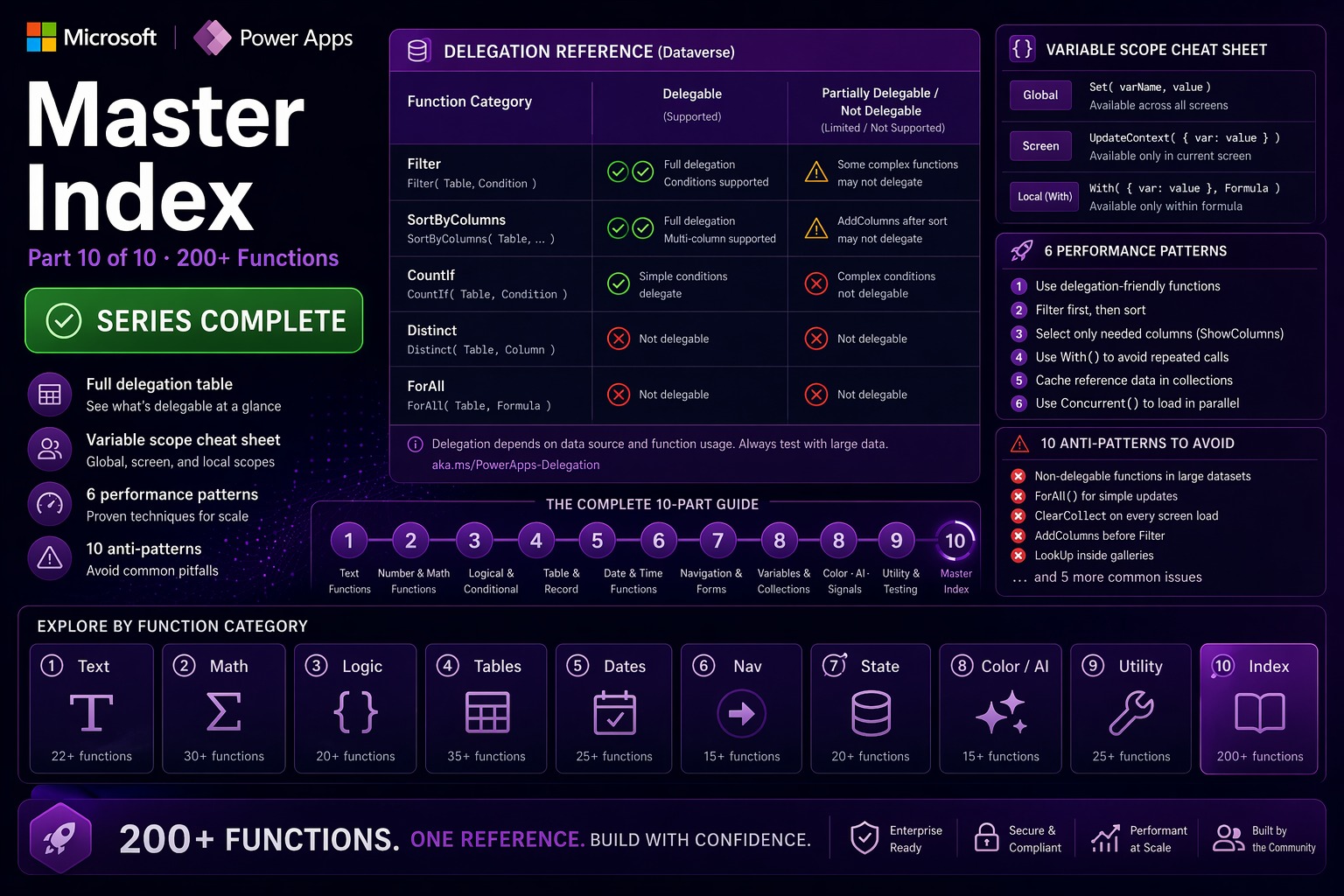
📌 This is Part 10 — the final post in the complete Power Apps Canvas Functions series. Use it as your day-to-day reference cheat sheet.
📚 Power Apps Canvas Functions — Complete Series
- Part 1 — Text Functions
- Part 2 — Number & Math Functions
- Part 3 — Logical & Conditional Functions
- Part 4 — Table & Record Functions
- Part 5 — Date & Time Functions
- Part 6 — Navigation, App Control & Forms
- Part 7 — Variables, Collections & Data Sources
- Part 8 — Color, Type Conversion, AI & Signals
- Part 9 — Utility, Testing & Context Keywords
- Part 10 — Master Index, Delegation Table & Performance Patterns (this post)
9 Parts. 200+ Functions. One Reference.
You made it to the end of the series. This final post is structured differently from the previous nine — it’s a reference document, not a tutorial. No narrative introduction. No worked example per function. Just the consolidated tables you’ll want open when you’re building.
Three things live here: a full index of what each part covers and which functions you’ll find there, the delegation quick-reference for Dataverse and SharePoint, and the performance patterns that separate apps that scale from apps that crawl at 500 records. Bookmark this page. It’s the one you’ll come back to.
Series Index — What’s in Each Part
| Part | Title | Key functions covered |
|---|---|---|
| 1 | Text Functions | Char, Code, Concatenate / &, Concat, Left, Right, Mid, Len, Find, Search, Replace, Substitute, Trim, TrimEnds, Upper/Lower/Proper, StartsWith/EndsWith, Split, EncodeUrl, PlainText, Value, Text, IsMatch/Match/MatchAll |
| 2 | Number & Math Functions | Abs, Round/RoundUp/RoundDown, Int/Trunc, Sqrt/Power/Exp/Ln/Log, Dec2Hex/Hex2Dec, Mod, Sum/Average/Max/Min/StdevP/VarP, Rand/RandBetween, Pi, full trig suite (Sin/Cos/Tan/Asin/Acos/Atan/Atan2/Cot/Acot/Degrees/Radians) |
| 3 | Logical & Conditional Functions | If, Switch, And/Or/Not, IsBlank/IsBlankOrError, IsEmpty, Coalesce, IsError/IfError, IsNumeric, IsToday/IsUTCToday, IsType/AsType, Blank |
| 4 | Table & Record Functions | Filter, LookUp, Sort/SortByColumns, Collect/ClearCollect/Clear, Patch, Remove/RemoveIf, UpdateIf, AddColumns/DropColumns/RenameColumns/ShowColumns, GroupBy/Ungroup, Distinct, Count/CountA/CountIf/CountRows, ForAll, With, Index, Sequence |
| 5 | Date & Time Functions | Now/Today/UTCNow/UTCToday, DateAdd/DateDiff, Date/Time/DateTime, DateValue/TimeValue/DateTimeValue, Year/Month/Day/Hour/Minute/Second, Weekday/WeekNum/ISOWeekNum, EDate/EOMonth, TimeZoneOffset, Calendar/Clock utilities |
| 6 | Navigation, App Control & Forms | Navigate, Back, Exit, Launch, Notify, Confirm, RequestHide, SubmitForm/ResetForm/NewForm/EditForm/ViewForm, Reset, SetFocus, Errors, Defaults, RecordInfo, Revert |
| 7 | Variables, Collections & Data Sources | Set, UpdateContext, SaveData/LoadData/ClearData, Refresh, DataSourceInfo, Concurrent, ReadNFC, Print |
| 8 | Color, Type Conversion, AI & Signals | RGBA, Color enum, ColorValue, ColorFade, Boolean, GUID, JSON, ParseJSON, User(), Language(), Param(), App signal, Connection, Location, Acceleration/Compass, AIClassify/AIExtract/AIReply/AISentiment/AISummarize/AITranslate |
| 9 | Utility, Testing & Context Keywords | ThisItem, ThisRecord, Self, Parent, in/exactin operators, Copy, Download, PDF, EncodeHTML, Hash, Relate/Unrelate, Enable/Disable, BarcodeReader, Trace, Assert |
Delegation Quick Reference
Delegation determines whether a formula operates on all rows in the data source (server-side execution, scales to millions) or only the first 500–2000 rows loaded into memory (client-side, silently incomplete on large tables). Check this before building any gallery, filter, or aggregate on a large Dataverse or SharePoint table.
💡 The delegation limit is configurable up to 2000 rows in File → Settings → Advanced → Data row limit for non-delegable queries. The default is 500. But 2000 is still a hard cap — it’s not a solution for genuinely large data sources.
| Function / Operator | Dataverse | SharePoint | Notes |
|---|---|---|---|
| Filter with =, <>, <, >, <=, >= | ✅ Delegable | ✅ Delegable (indexed columns) | SharePoint: only indexed columns delegate; others are local |
| Filter with StartsWith | ✅ Delegable | ✅ Delegable | The only delegable text search on SP; use it for search bars |
| Filter with EndsWith | ✅ Delegable | ❌ Not delegable | Available on Dataverse only |
| Filter with Contains | ❌ Not delegable | ❌ Not delegable | Load to collection first, then Contains |
| Filter with in operator | ❌ Not delegable | ❌ Not delegable | Use Or(F=”A”, F=”B”, F=”C”) as delegable alternative |
| Filter with IsBlank | ❌ Not delegable | ❌ Not delegable | Use eq null in OData filter for Dataverse via connector |
| Filter with IsToday | ❌ Not delegable | ❌ Not delegable | Use DateAdd range: >= Today(), < DateAdd(Today(),1,Days) |
| LookUp | ✅ Delegable | ✅ Delegable | Same delegation rules as Filter apply to the condition |
| SortByColumns | ✅ Delegable | ✅ Delegable | Use logical column names (cr_xxx) for Dataverse |
| Sort | ❌ Not delegable | ❌ Not delegable | Always use SortByColumns for remote data sources |
| Search | ❌ Not delegable | ❌ Not delegable | Use StartsWith for delegable prefix search |
| CountRows (data source) | ✅ Delegable | ❌ Not delegable | SP: only counts up to delegation limit |
| CountIf | ✅ Delegable | ❌ Not delegable | SP: use a cached collection or Power Automate flow |
| Sum, Average, Max, Min | ✅ Delegable | ❌ Not delegable | SP: aggregate via Power Automate and store result |
| Distinct | ❌ Not delegable | ❌ Not delegable | Use a dedicated lookup table for filter options |
| AddColumns, DropColumns | ❌ Not delegable | ❌ Not delegable | Always wrap in ClearCollect |
| GroupBy, Ungroup | ❌ Not delegable | ❌ Not delegable | Always operate on a collection |
| ForAll | ❌ Not delegable | ❌ Not delegable | Never run on a large remote table directly |
🎯 The golden rule for large tables
Filter and sort at the server using delegable operations only. Load the result into a collection with ClearCollect. Then apply any non-delegable operation freely on the collection — no delegation limits on in-memory data.
// Pattern — delegable load, then non-delegable freely:
ClearCollect(
  colMyProjects,
  Filter(Projects, Owner = User().Email, Status <> "Archived")  // delegable
);
Set(varGrouped, GroupBy(colMyProjects, "Region", "RegionProjects"));  // non-delegable — fine on collection
Set(varDistinctStatuses, Distinct(colMyProjects, Status));            // non-delegable — fine on collection
Variable Scope Quick Reference
| Mechanism | Scope | Lifetime | Create with | Naming convention | Use for |
|---|---|---|---|---|---|
| Global variable | All screens | App session | Set(varName, value) | var prefix | Cross-screen data: current user, selected record, config values |
| Screen-local variable | Current screen only | Until navigated away | UpdateContext({locName: value}) | loc prefix | UI state: active tab, panel open, sort direction, dirty flag |
| Collection | All screens | App session | ClearCollect(colName, …) | col prefix | In-memory tables: cached data, selections, shopping carts |
| Local device storage | Current device only | Across app sessions | SaveData(col, “key”) | string key | Offline cache, user preferences that survive app restarts |
Performance Patterns Quick Reference
Six patterns that have the biggest impact on app load time, responsiveness, and scalability. Every Canvas App architect should be able to apply all six without looking them up.
1 — Parallel data load with Concurrent
The single highest-impact optimization in Canvas Apps. Five sequential ClearCollect calls take ~5 seconds. The same five inside Concurrent take ~1 second — the time of the slowest single call.
Rule: every independent data load on App.OnStart or screen OnVisible must be inside Concurrent. Dependent operations — those that use the result of a previous load — run sequentially after the Concurrent block.
// Correct — independent loads in parallel:
Concurrent(
  ClearCollect(colProjects, Filter(Projects, Owner = User().Email)),
  ClearCollect(colTasks,    Filter(Tasks, AssignedTo = User().Email)),
  Set(varCurrentUser,       LookUp(Employees, Email = Lower(User().Email))),
  ClearCollect(colConfig,   AppSettings)
);
// After Concurrent — runs once all four complete:
Set(varUserRole, Coalesce(varCurrentUser.AppRole, "Viewer"));
Set(varAppReady, true)
2 — Cache and work locally
Load data from the server using only delegable operations. Store the result in a collection. Then apply all non-delegable operations on the collection — no limits, no warnings.
// Load with delegable Filter + SortByColumns:
ClearCollect(
  colRecentOrders,
  SortByColumns(
    Filter(Orders, OrderDate >= DateAdd(Today(), -90, TimeUnit.Days), AssignedTo = User().Email),
    "cr_orderdate", SortOrder.Descending
  )
);
// Now everything works freely on the collection:
Set(varGroupedByRegion, GroupBy(colRecentOrders, "Region", "Orders"));
Set(varTopProduct,      First(Sort(colRecentOrders, Revenue, SortOrder.Descending)).ProductName)
3 — Single LookUp with With
Every LookUp is a network round-trip. If you need three fields from the same record, call LookUp once with With and reference the result three times — not three separate LookUp calls.
// Without With: 3 network calls
// LookUp(Employees, ID = varID).FullName
// LookUp(Employees, ID = varID).Department
// LookUp(Employees, ID = varID).ManagerEmail

// With With: 1 network call
With(
  {emp: LookUp(Employees, ID = varID)},
  If(
    IsBlank(emp),
    "Employee not found",
    emp.FullName & " — " & emp.Department & " (reports to: " & emp.ManagerEmail & ")"
  )
)
4 — Parse JSON once
ParseJSON is expensive. If you need multiple fields from the same JSON response, parse it once in a With block — not once per field.
// Without With: ParseJSON runs 4 times
// Text(ParseJSON(body).token)
// Value(ParseJSON(body).expiresIn)
// Text(ParseJSON(body).userId)
// Boolean(Text(ParseJSON(body).isAdmin))

// With With: ParseJSON runs once
With(
  {api: ParseJSON(HTTPConnector.ResponseBody)},
  Set(varToken,   Text(api.token));
  Set(varExpiry,  DateAdd(Now(), Value(api.expiresIn), TimeUnit.Seconds));
  Set(varUserID,  Text(api.userId));
  Set(varIsAdmin, Boolean(Text(api.isAdmin)))
)
5 — Freeze a batch timestamp before ForAll
Now() and UTCNow() re-evaluate on every formula call. Inside a ForAll loop, each Patch call with UTCNow() may get a slightly different millisecond value. Capture it once in a variable before the loop — all records in the batch get exactly the same timestamp.
// Wrong — each row gets a different timestamp:
ForAll(colItems, Patch(Log, Defaults(Log), {TS: UTCNow(), ...}))

// Correct — one timestamp for all rows in the batch:
Set(varBatchTS, UTCNow());
ForAll(
  colItems,
  Patch(Log, Defaults(Log), {TS: varBatchTS, ItemID: ThisRecord.ID, Action: "Processed"})
)
6 — Control GPS lifecycle explicitly
Location starts GPS tracking as soon as it’s first accessed — which drains battery. In field apps that run all day, the difference is measurable. Enable GPS only while capturing a value, then disable immediately.
// "Record location" button OnSelect:
Enable(Location);
Patch(
  FieldVisits,
  Defaults(FieldVisits),
  {
    Latitude:        Location.Latitude,
    Longitude:       Location.Longitude,
    Accuracy:        Location.Accuracy,
    RecordedAt:      Now(),
    TechnicianEmail: User().Email
  }
);
Disable(Location)  // stop GPS immediately — do not leave it running
Common Anti-Patterns — What Not to Do
| Anti-pattern | Problem | Correct approach |
|---|---|---|
| LookUp inside a gallery template Text property | Runs once per row, per formula evaluation — dozens of network calls on a 20-row gallery | ClearCollect + AddColumns before the gallery. Pre-join the data, use ThisItem |
| Refresh() inside a timer every 5 seconds | Heavy network load, excessive API calls, poor performance | 30–60 second minimum interval; use Power Automate webhooks for near-real-time |
| AI functions in Text or Fill properties | Called continuously on every evaluation — credit drain + terrible performance | Only in OnSelect; capture result in a variable; show loading indicator |
| Collect() inside a ForAll loop that runs multiple times | Appends duplicates on every run — collection grows unbounded | Clear(col) before the ForAll, or use ClearCollect for a fresh load |
| Filter(BigTable, Contains(Title, Search)) | Not delegable — only first 500 rows searched, not the whole table | StartsWith(Title, Search) for prefix search; Contains only on collections |
| user.Email comparison without Lower() | Email casing varies — “Vincenzo@Contoso.com” ≠ “vincenzo@contoso.com” | Always Lower(User().Email) vs Lower(StoredEmail) |
| Param(“id”) compared directly to a Dataverse column | Param always returns Text; Dataverse ID is GUID type — comparison always false | GUID(Param(“id”)) before any Dataverse filter or LookUp |
| RGBA with alpha > 1 | Alpha range is 0–1 not 0–255; RGBA(r,g,b,255) produces wrong color | RGBA(114, 39, 116, 1) — always 0.0 to 1.0 for the alpha channel |
| ParseJSON field without type wrapper | Untyped object displayed in label shows blank, no error | Text(parsed.name), Value(parsed.count), Boolean(Text(parsed.flag)) |
| Sequential ClearCollect on App.OnStart | Load time = sum of all calls (e.g. 5 × 1s = 5s) | Concurrent(…) — load time = slowest single call (~1s) |
Naming Conventions — Enterprise Standard
| Prefix | Type | Examples |
|---|---|---|
| var | Global variable (Set) | varCurrentUser, varSelectedProject, varUserRole, varAppReady |
| loc | Screen-local variable (UpdateContext) | locActiveTab, locPanelVisible, locSortAscending, locHasChanges |
| col | Collection (ClearCollect) | colProjects, colSelectedItems, colAppConfig, colAdminEmails |
| btn | Button control | btnSave, btnCancel, btnDelete |
| lbl | Label control | lblTitle, lblStatusBadge, lblCharCount |
| inp | Text input control | inpTitle, inpBudget, inpSearchBox |
| drp | Dropdown or combo box | drpStatus, drpCategory, drpOwner |
| gal | Gallery | galProjects, galTasks, galApprovers |
| frm | Form control | frmProject, frmTask, frmEmployee |
| ico | Icon control | icoEdit, icoDelete, icoSearch |
Series Complete
That’s all 200+ Power Fx functions — documented with typed signatures, enterprise examples, Watch out blocks, and Works well with patterns. Nine parts of reference material, one index to find it all.
A few things worth saying at the end of a series like this. First: the functions are the easy part. Knowing that ClearCollect exists is one thing; knowing when to use it instead of Collect, and why that matters on a screen that loads six times a day in a warehouse, is another. That gap — between knowing a function and knowing when it’s the right tool — is what real-world projects teach you.
Second: Power Fx evolves. Microsoft adds functions, deprecates behaviors, and adjusts delegation rules across releases. The best practice today may not be the best practice in 12 months. Keep an eye on the Power Apps blog and the Power Fx GitHub repository. The documentation on Microsoft Learn is the authoritative source for anything in doubt.
Third: if you’ve worked through all ten parts and built something with these functions, leave a comment below. What were you building? What was harder than you expected? That kind of feedback shapes what comes next on this site.
Know the function. Understand the context. Build with the constraint in mind.
— vsgueradev.com
