



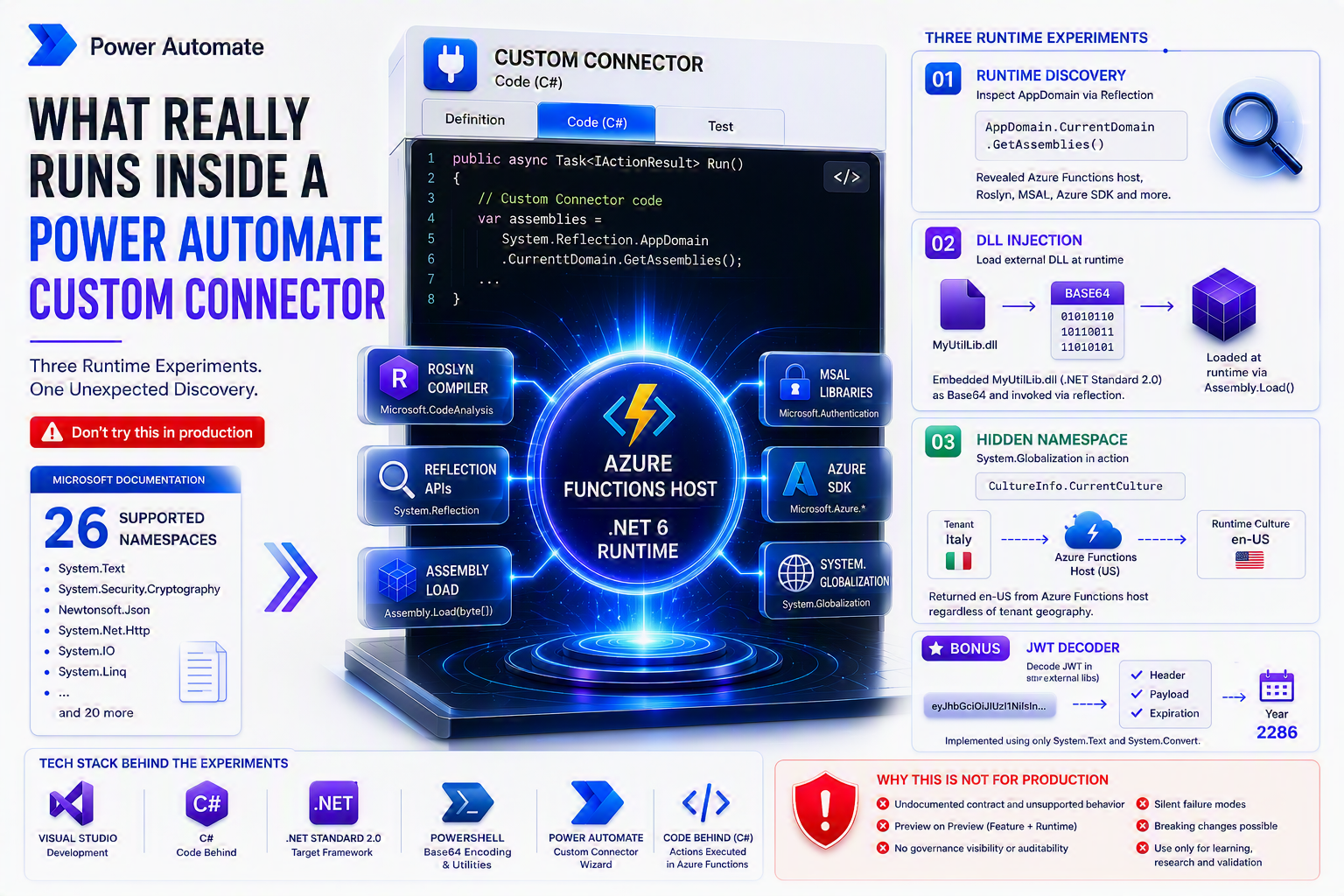
The custom connector code-behind documentation on Microsoft Learn is clear: .NET Standard 2.0, 24 supported namespaces, one script file, no external libraries. Those constraints are real. They’re enforced at compile time by Roslyn — Microsoft’s open-source C# compiler that runs your code through a validation step before saving it to the connector.
What the documentation doesn’t say is what the runtime looks like underneath those constraints. The two things are not the same. What Roslyn accepts at compile time and what the process actually has loaded at runtime can be — and as these experiments show, are — very different.
🔷 This is not a Custom Connector tutorial
If you’re looking for a step-by-step build guide, the regex connector post covers that in full. This post is for people who already know what a Custom Connector is and want to understand what’s actually running underneath the code-behind — the host, the runtime version, which assemblies are in the process, and what becomes accessible if you go looking with System.Reflection.
Three experiments. Each one raises the bar. The first asks what’s already there. The second loads something that wasn’t. The third reaches a namespace Microsoft doesn’t even acknowledge exists in this context.
⚠️ Everything described here is undocumented, unsupported, and the code-behind feature has carried a “Preview” label since roughly 2020. This is a lab exercise — not a production pattern. The final section explains why.
What Microsoft Documents
The Write code in a custom connector page on Microsoft Learn states:
The currently supported .Net version is .NET Standard 2.0.
Microsoft Learn — Write code in a custom connector
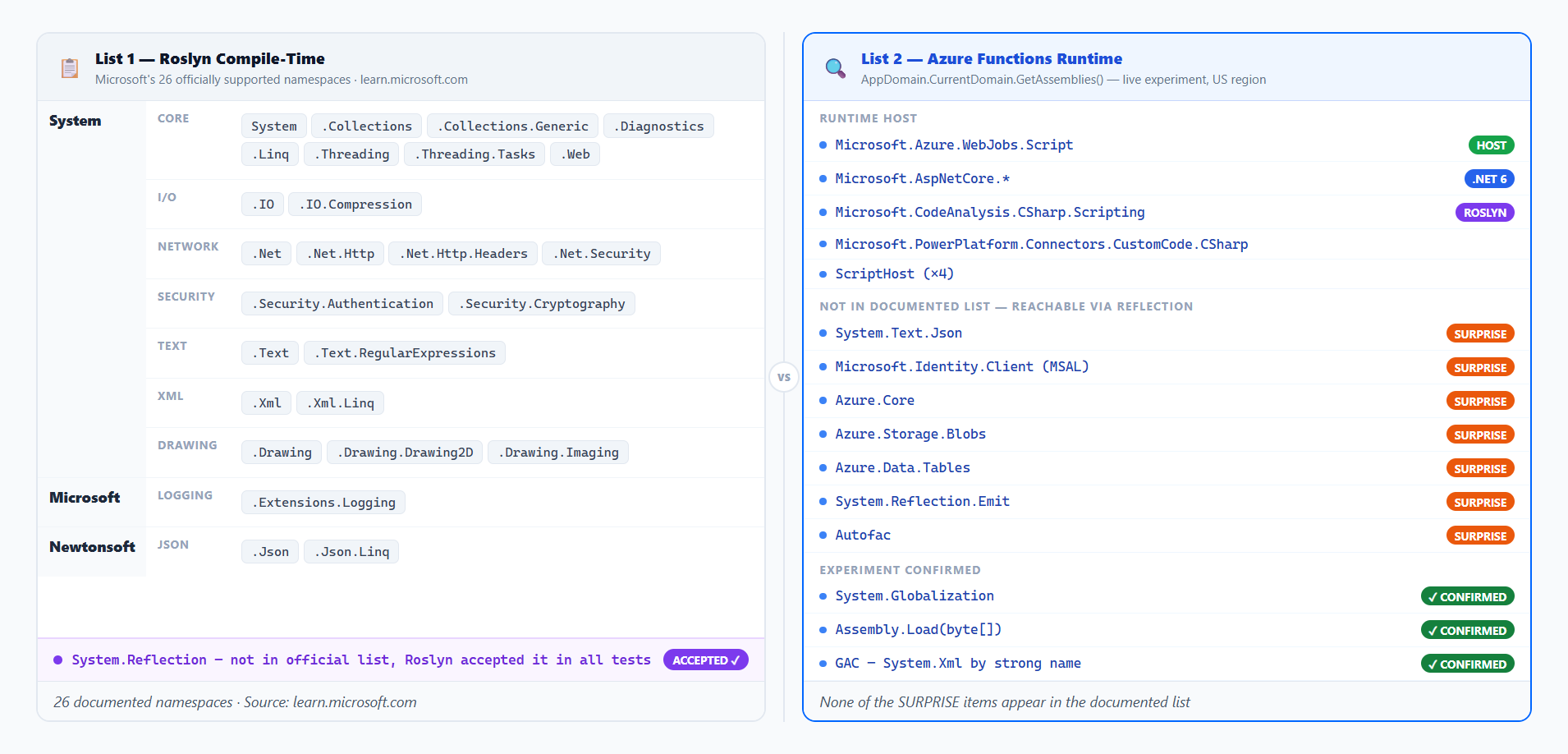
The page also lists the only namespaces Roslyn will accept when you save connector code. This is the complete list — 26 entries. Reference anything outside it and the save fails with a compile error:
// Complete list of supported namespaces — Custom Connector code-behind
// Source: learn.microsoft.com/en-us/connectors/custom-connectors/write-code

using System;                          // Core types
using System.Collections;             // Non-generic collections
using System.Collections.Generic;     // Generic collections
using System.Diagnostics;             // Stopwatch, Debug
using System.IO;                      // File, Stream, Path
using System.IO.Compression;          // GZip, Deflate
using System.Linq;                    // LINQ queries
using System.Net;                     // HttpStatusCode, WebClient
using System.Net.Http;                // HttpClient, HttpRequestMessage
using System.Net.Http.Headers;        // HTTP headers
using System.Net.Security;            // SslStream
using System.Security.Authentication; // SslProtocols
using System.Security.Cryptography;   // AES, SHA, HMAC, RSA
using System.Text;                    // Encoding, StringBuilder
using System.Text.RegularExpressions; // Regex, Match
using System.Threading;               // Thread, CancellationToken
using System.Threading.Tasks;         // Task, async/await
using System.Web;                     // HttpUtility (URL/HTML encoding)
using System.Xml;                     // XmlDocument, XmlReader
using System.Xml.Linq;                // XDocument, XElement
using System.Drawing;                 // Bitmap, Graphics, Color (GDI+)
using System.Drawing.Drawing2D;       // GraphicsPath, Matrix
using System.Drawing.Imaging;         // ImageFormat, Encoder
using Microsoft.Extensions.Logging;   // ILogger
using Newtonsoft.Json;                // JsonConvert, JsonSerializer
using Newtonsoft.Json.Linq;           // JObject, JArray, JToken
A few things worth noting before the experiments:
System.Drawingis the most underused entry on this list. Full GDI+ support means you can generate images, draw text, resize bitmaps, or read EXIF metadata directly inside a connector operation — no external library needed. Almost no tutorial ever mentions it.System.Security.Cryptographycovers AES, SHA-256, HMAC, RSA — enough for signing, hashing, and encrypting payloads without any third-party crypto library.System.Web.HttpUtilityhandles URL and HTML encoding/decoding — a small but useful utility that saves writing your own encoding logic.- Missing from this list:
System.Reflection,System.Globalization,System.Text.Json, any Azure SDK, MSAL. No external NuGet packages. No multi-file scripts.
Here is what each namespace group actually gives you:
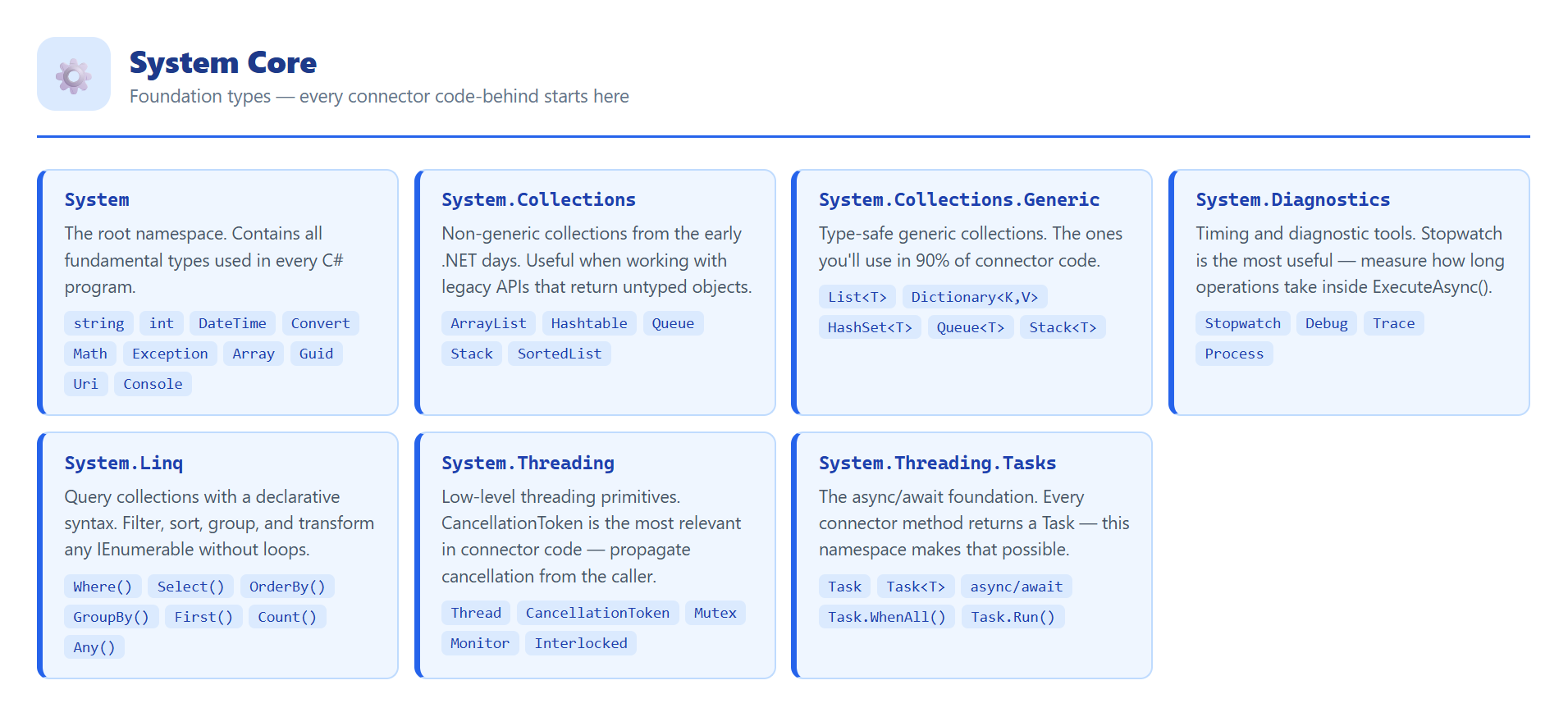
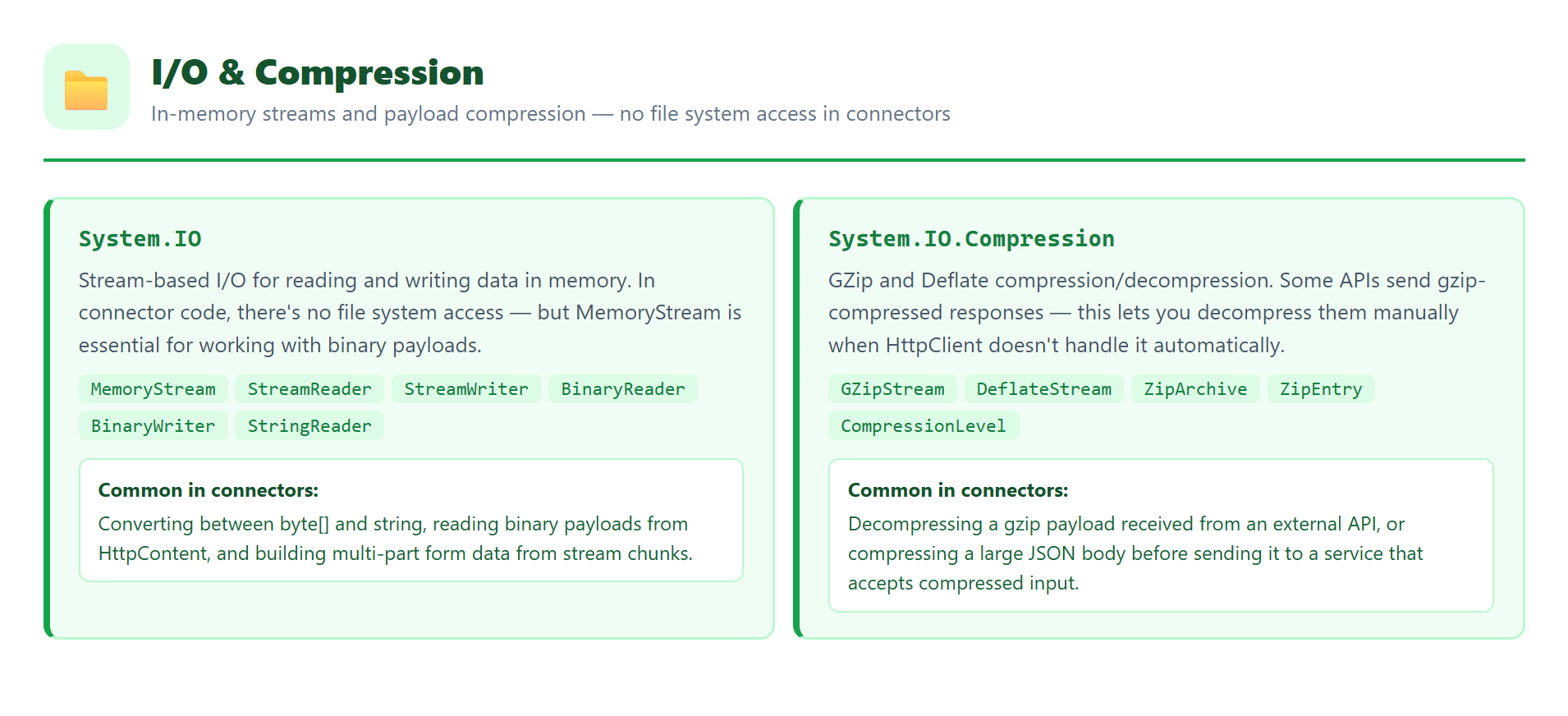
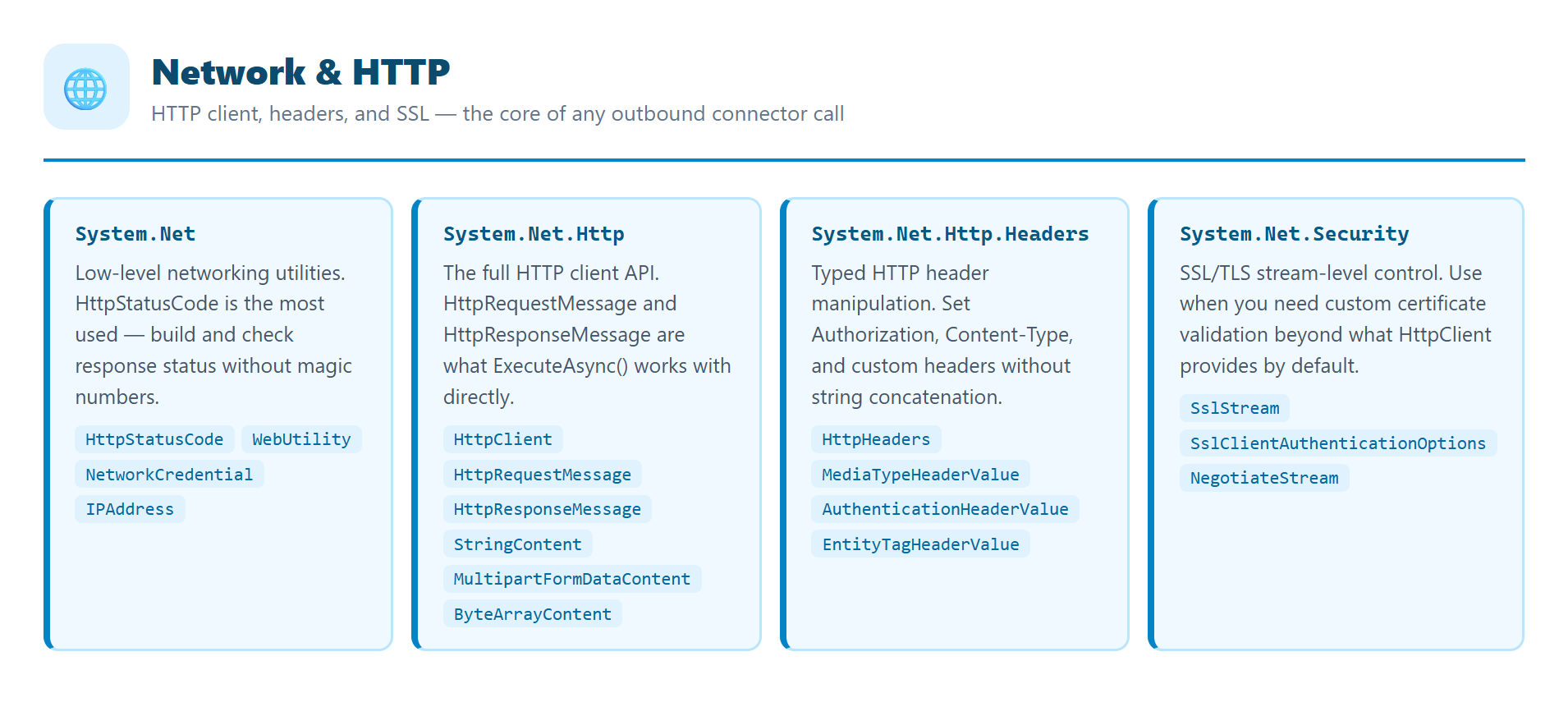
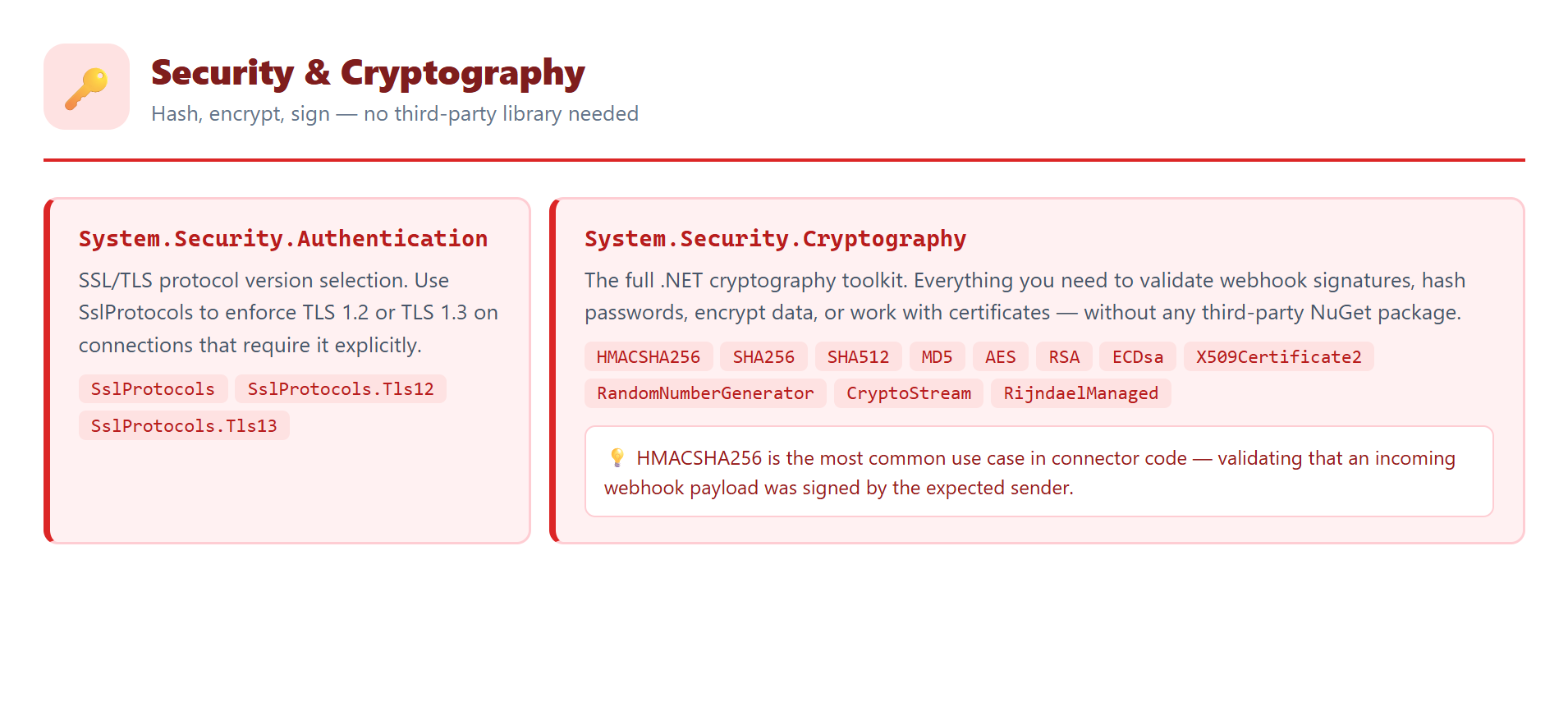
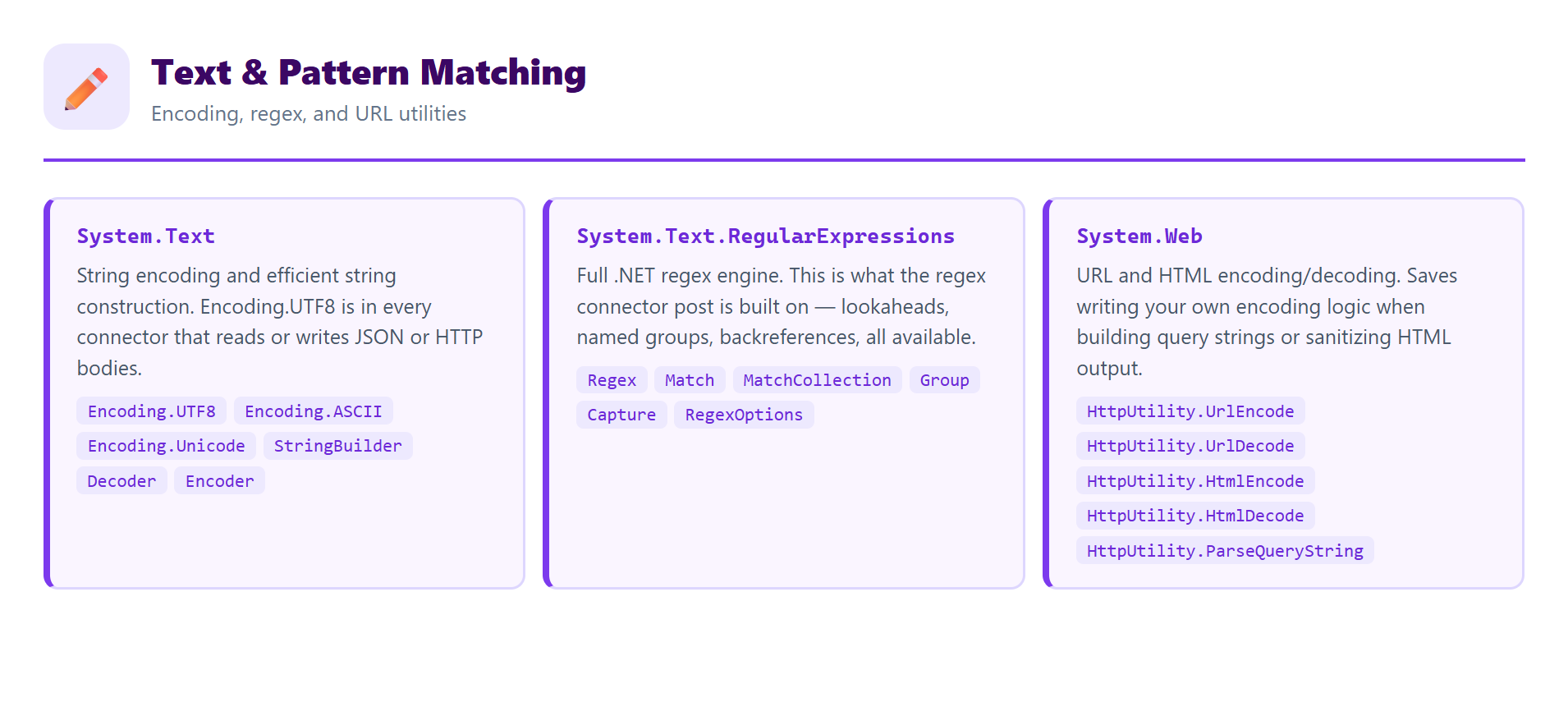
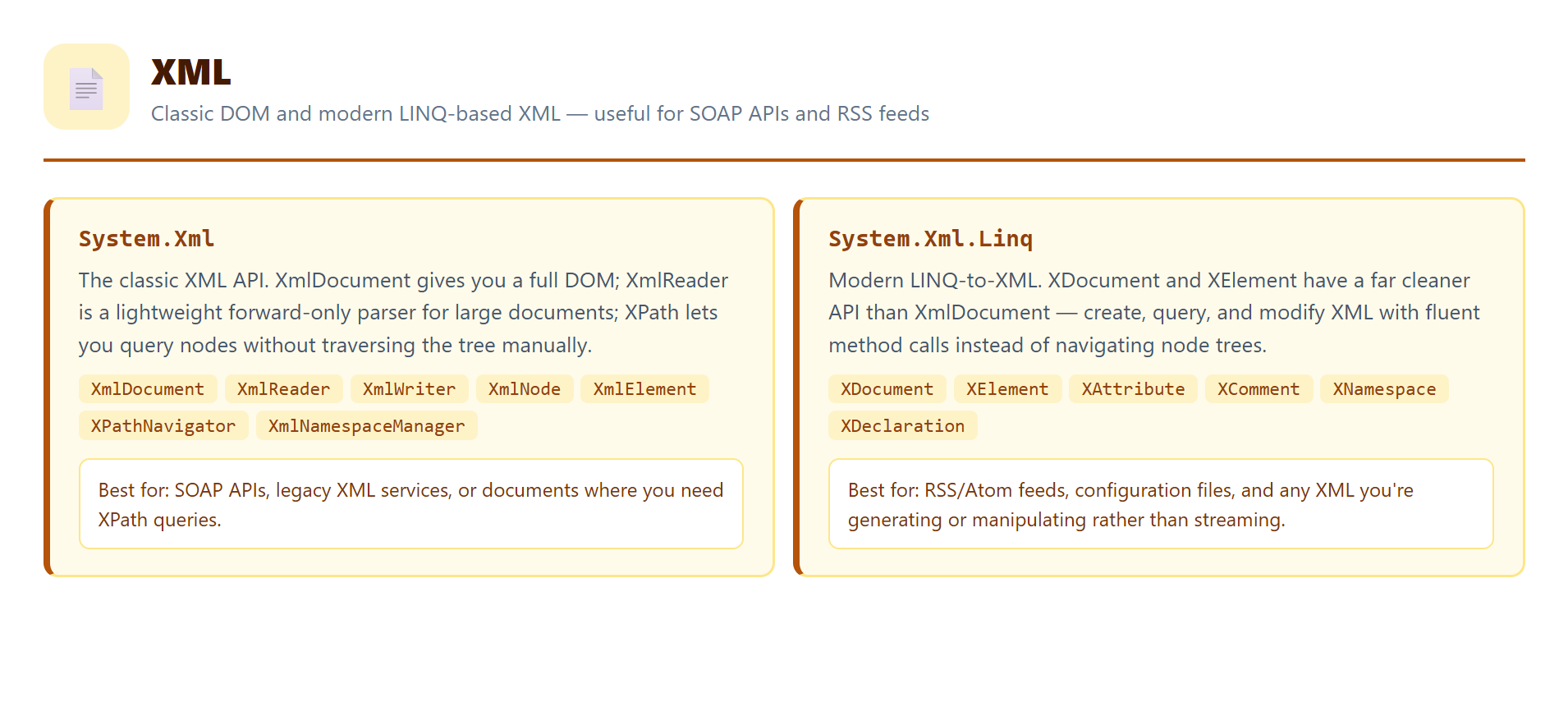
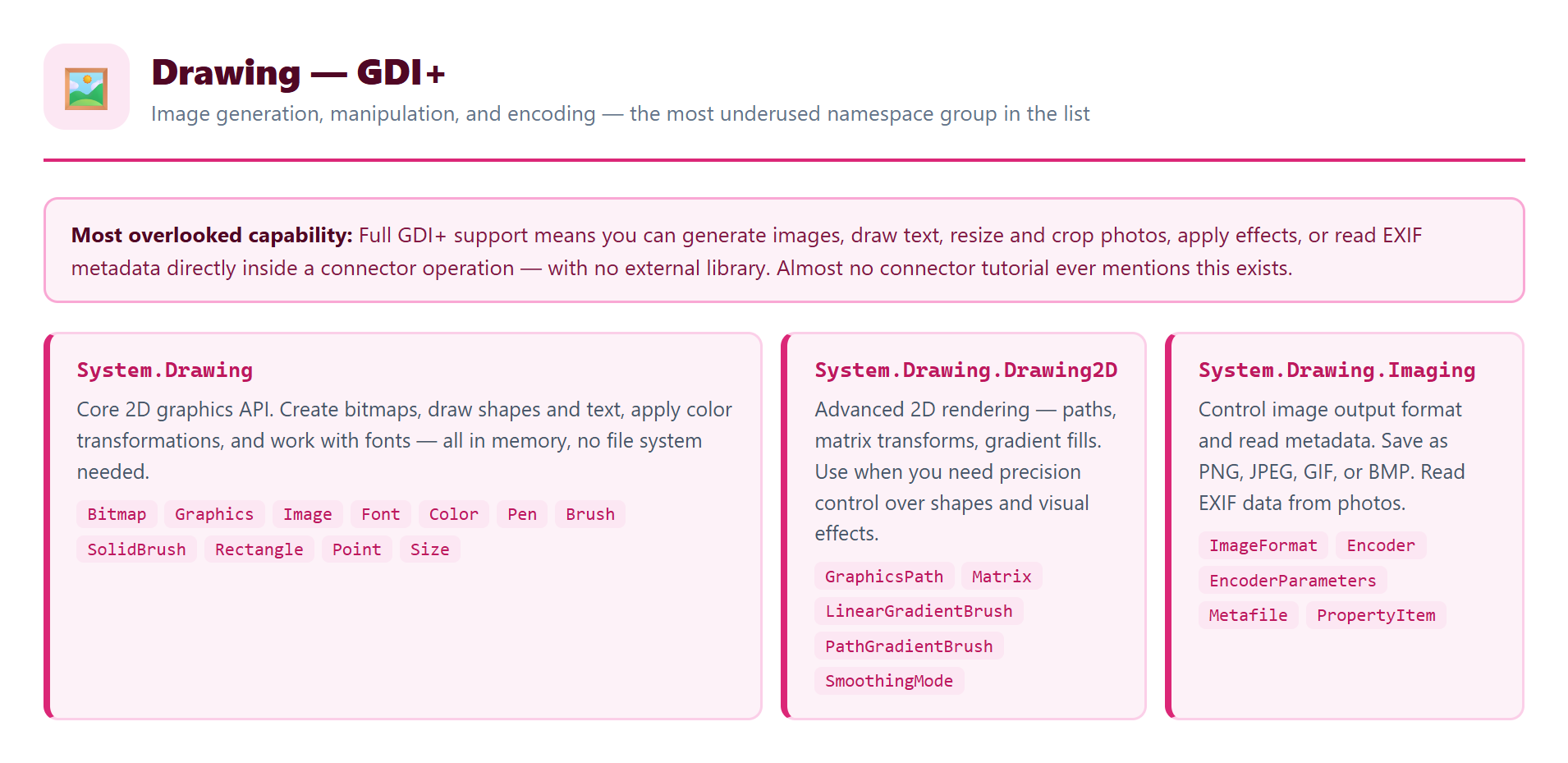
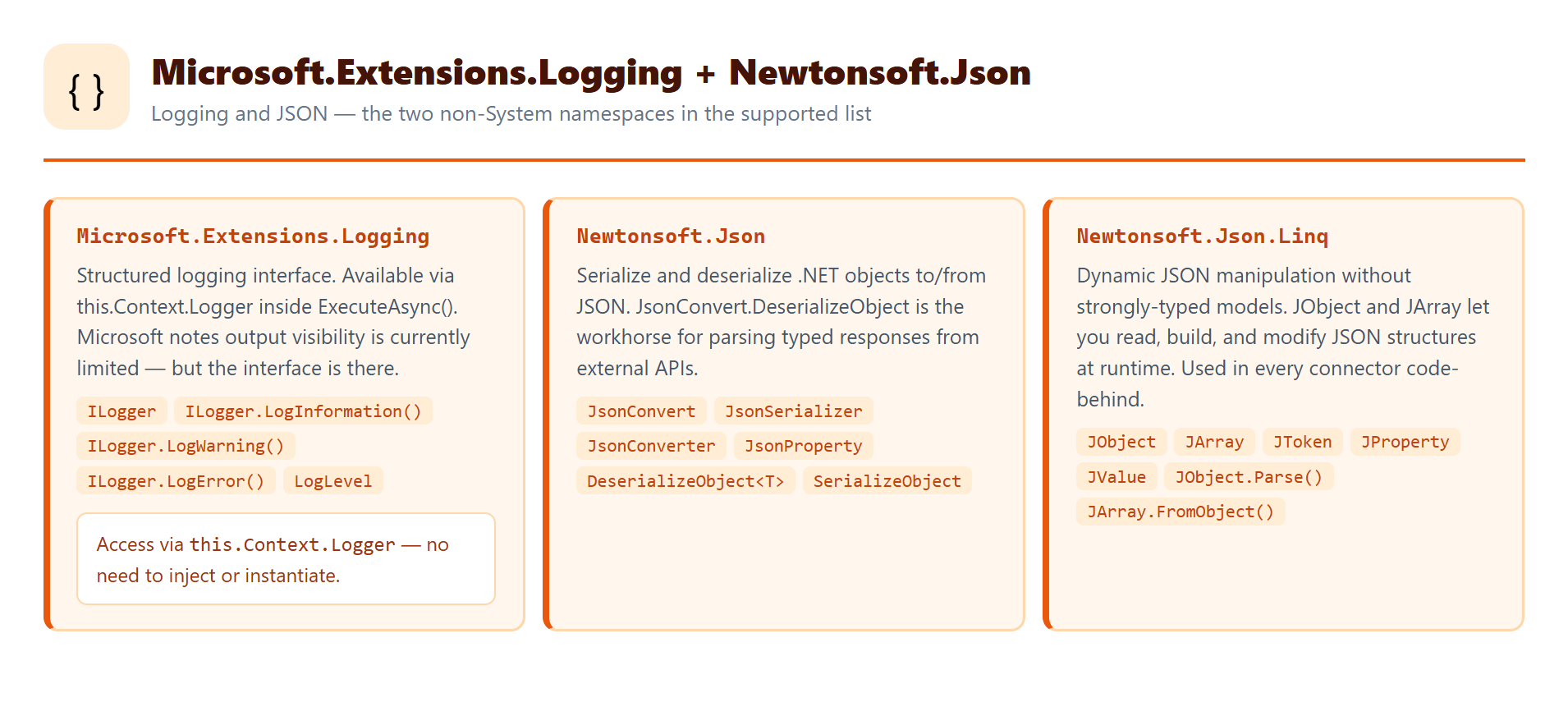
What the page doesn’t describe is what the runtime actually has loaded at the moment your ExecuteAsync() runs. That’s a different question — and the answer is what the three experiments below reveal.
The Connector Setup
All three experiments use the same connector: Reflection Lab Connector, built inside a Power Platform Solution in a DEV environment (US region). A single operation — ReflectionTest — accepts one text input and returns a JSON object whose fields grow with each experiment.
The Swagger definition for the operation. Note host: www.microsoft.com — a placeholder required by the framework even though no call ever reaches it. The code-behind intercepts every request before it would be forwarded anywhere:
swagger: "2.0"
info:
  title: Reflection Lab Connector
  description: Lab experiment — reflection and dynamic assembly loading in Power Automate code-behind.
  version: "1.0"
host: www.microsoft.com
basePath: /
schemes:
  - https
paths:
  /reflect:
    post:
      summary: Reflection Test
      operationId: ReflectionTest
      x-ms-visibility: important
      parameters:
        - in: body
          name: body
          required: true
          schema:
            type: object
            required: [input]
            properties:
              input:
                type: string
                x-ms-summary: Input
      responses:
        "200":
          description: Result
          schema:
            type: object
            properties:
              input: { type: string }
              result: { type: string }
              assembliesLoaded: { type: string }
Test 1 — What’s Already in the Room?
The first experiment doesn’t load anything external. It just looks at what’s already there.
AppDomain — the .NET concept for the current execution boundary — holds all the assemblies loaded into a running process. AppDomain.CurrentDomain.GetAssemblies() returns everything present at the moment your code runs. Not what Microsoft says is available. What’s actually there.
The test also does two more things — and the choice of which namespaces to use here is deliberate:
- HMAC-SHA256 via
MethodInfo.Invoke()—System.Security.Cryptographyis in Microsoft’s documented list, so we know it’s supposed to work. Using it via reflection instead of a direct call validates thatMethodInfo.Invoke()itself functions correctly in this runtime. If this step fails, reflection is broken at the invocation level and there’s no point going further. System.Xmlfrom the GAC by strong name —System.Xmlis also in the documented list, which means it’s expected to be available. Attempting to load it viaAssembly.Load(strong name)from the Global Assembly Cache (the machine-wide repository where .NET stores shared libraries) tests whether the runtime has a populated GAC at all. If a documented namespace loads from the GAC, undocumented ones might too.
These two steps are the control group. They use known-good namespaces to establish that the reflection mechanics work before applying those same mechanics to namespaces Microsoft has never documented.
The C# Code — Test 1
using System;
using System.Collections.Generic;
using System.Linq;
using System.Net.Http;
using System.Reflection;
using System.Security.Cryptography;
using System.Text;
using System.Threading.Tasks;
using Newtonsoft.Json.Linq;

public class Script : ScriptBase
{
    public override async Task ExecuteAsync()
    {
        if (this.Context.OperationId == "ReflectionTest")
            return await this.HandleReflectionTest().ConfigureAwait(false);

        var error = new HttpResponseMessage(System.Net.HttpStatusCode.BadRequest);
        error.Content = CreateJsonContent($"Unknown operation: {this.Context.OperationId}");
        return error;
    }
private async Task HandleReflectionTest()
{
var body = await this.Context.Request.Content
.ReadAsStringAsync().ConfigureAwait(false);
var json = JObject.Parse(body);
var input = (string)json["input"] ?? string.Empty;
// Step 1: enumerate all assemblies loaded in the current AppDomain
// This is the map of everything available at runtime — not just the documented list
var loadedAssemblies = AppDomain.CurrentDomain
.GetAssemblies()
.Select(a => a.GetName().Name)
.OrderBy(n => n)
.ToList();
// Step 2: invoke HMAC-SHA256 via reflection — CONTROL GROUP
// System.Security.Cryptography IS in the documented list.
// We invoke it via MethodInfo.Invoke() instead of calling it directly
// to validate that reflection invocation itself works in this runtime.
// If this step fails, the mechanism is broken before we test anything undocumented.
string reflectionResult, methodDescription;
try
{
var cryptoAssembly = typeof(HMACSHA256).Assembly;
var hmacType = cryptoAssembly.GetType("System.Security.Cryptography.HMACSHA256");
var key = Encoding.UTF8.GetBytes("lab-secret-key");
var hmac = (HMACSHA256)Activator.CreateInstance(hmacType, new object[] { key });
var computeHashMethod = hmacType.GetMethod("ComputeHash", new[] { typeof(byte[]) });
var hashBytes = (byte[])computeHashMethod.Invoke(hmac, new object[] {
Encoding.UTF8.GetBytes(input) });
reflectionResult = BitConverter.ToString(hashBytes).Replace("-", "").ToLowerInvariant();
methodDescription = $"HMAC-SHA256 via reflection on {hmacType.FullName}";
}
catch (Exception ex) { reflectionResult = $"Error: {ex.Message}"; methodDescription = "failed"; }
// Step 3: load System.Xml from the GAC by strong name — CONTROL GROUP
// System.Xml IS in the documented list — we expect it to be available.
// Loading it via Assembly.Load(strong name) tests whether the GAC is accessible.
// If a documented namespace loads from the GAC, undocumented assemblies may too.
string diskLoadResult;
try
{
var xmlAssembly = Assembly.Load(
"System.Xml, Version=4.0.0.0, Culture=neutral, PublicKeyToken=b77a5c561934e089");
var xmlDocType = xmlAssembly.GetType("System.Xml.XmlDocument");
diskLoadResult = xmlDocType != null
? $"Loaded System.Xml from GAC — found XmlDocument at {xmlDocType.FullName}"
: "Loaded System.Xml but XmlDocument not found";
}
catch (Exception ex) { diskLoadResult = $"GAC load failed: {ex.Message}"; }
var result = new JObject {
["input"] = input, ["result"] = reflectionResult,
["method"] = methodDescription, ["diskLoadAttempt"] = diskLoadResult,
["assembliesLoaded"] = string.Join(", ", loadedAssemblies),
};
var response = new HttpResponseMessage(System.Net.HttpStatusCode.OK);
response.Content = CreateJsonContent(result.ToString());
return response;
}
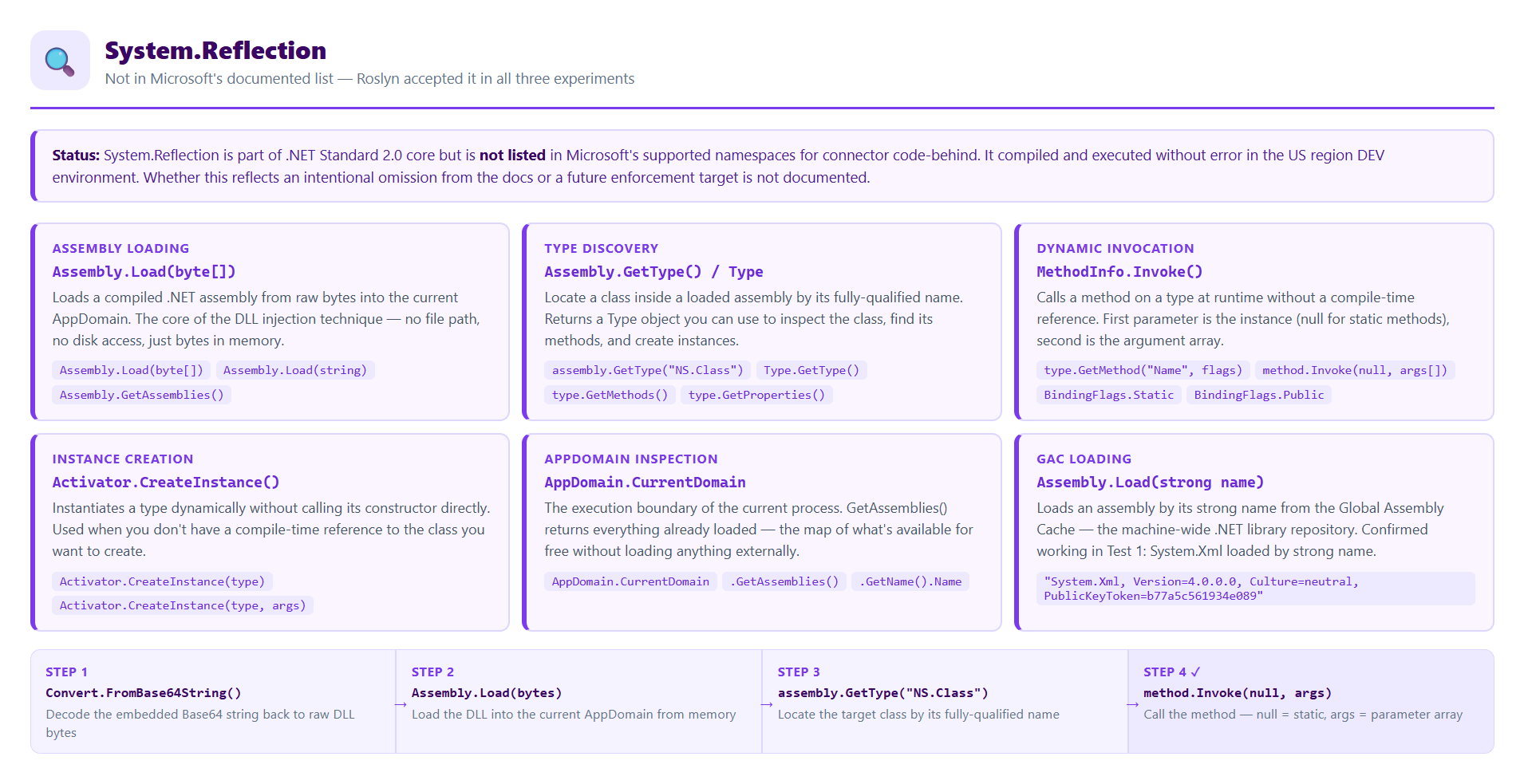
} 💡 Note on using System.Reflection
That namespace is not in Microsoft’s documented supported list. It compiled and ran without error. That observation matters — we come back to it in the conclusions.
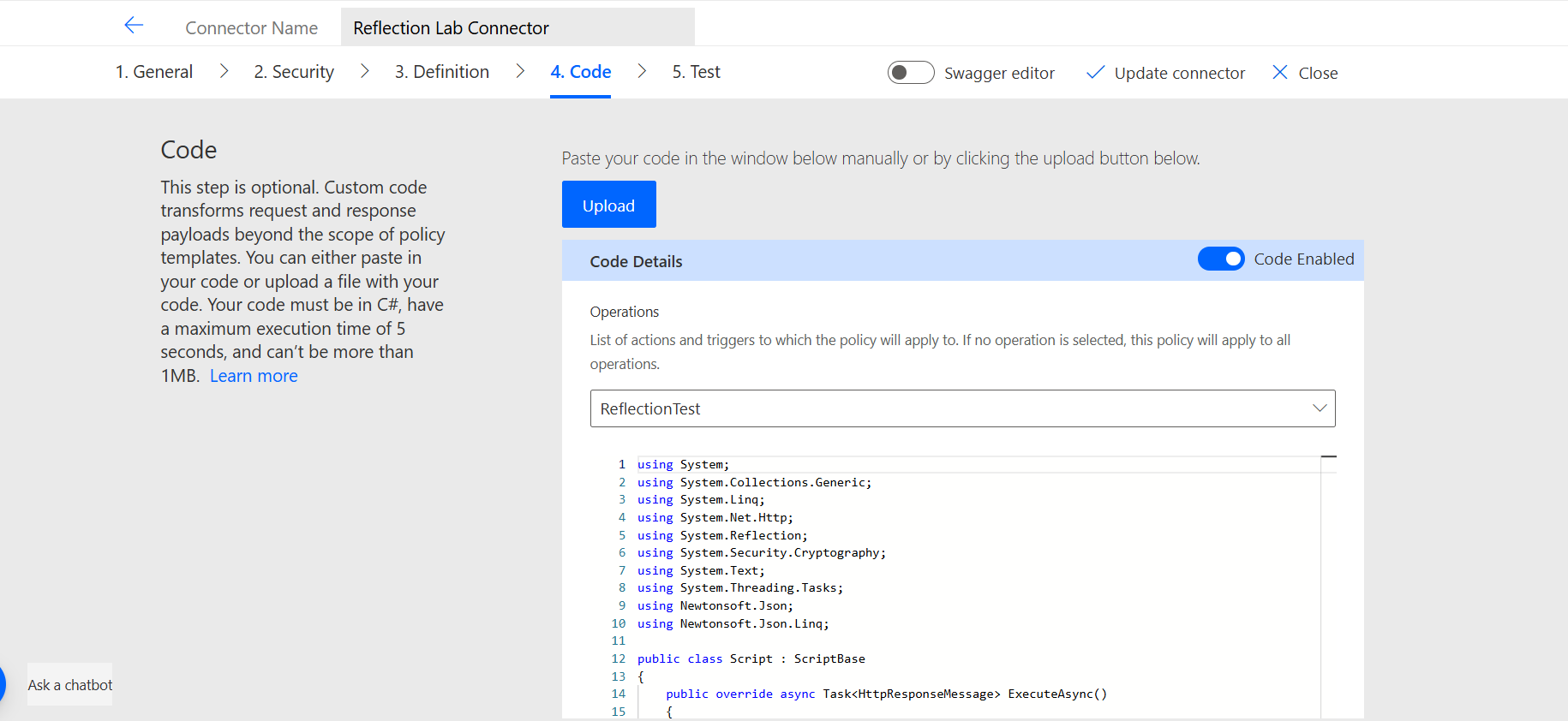
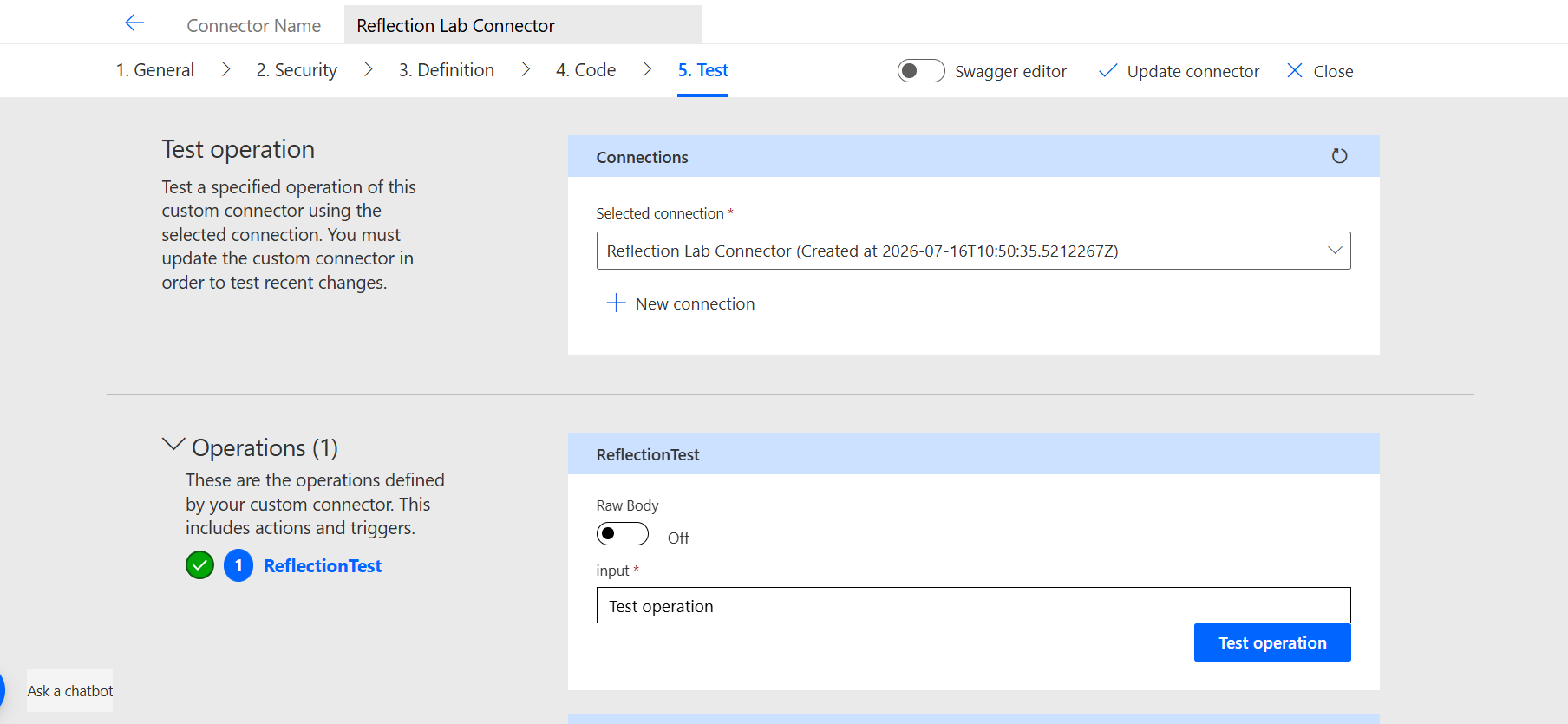
How to Run Test 1
- Open the connector in the maker portal → tab 4. Code
- Toggle Code Enabled → select
ReflectionTestin the Operations dropdown - Replace the default Hello World code with the script above
- Click Create connector — wait 20–30 seconds for the save to complete
- Tab 5. Test → + New connection → fill
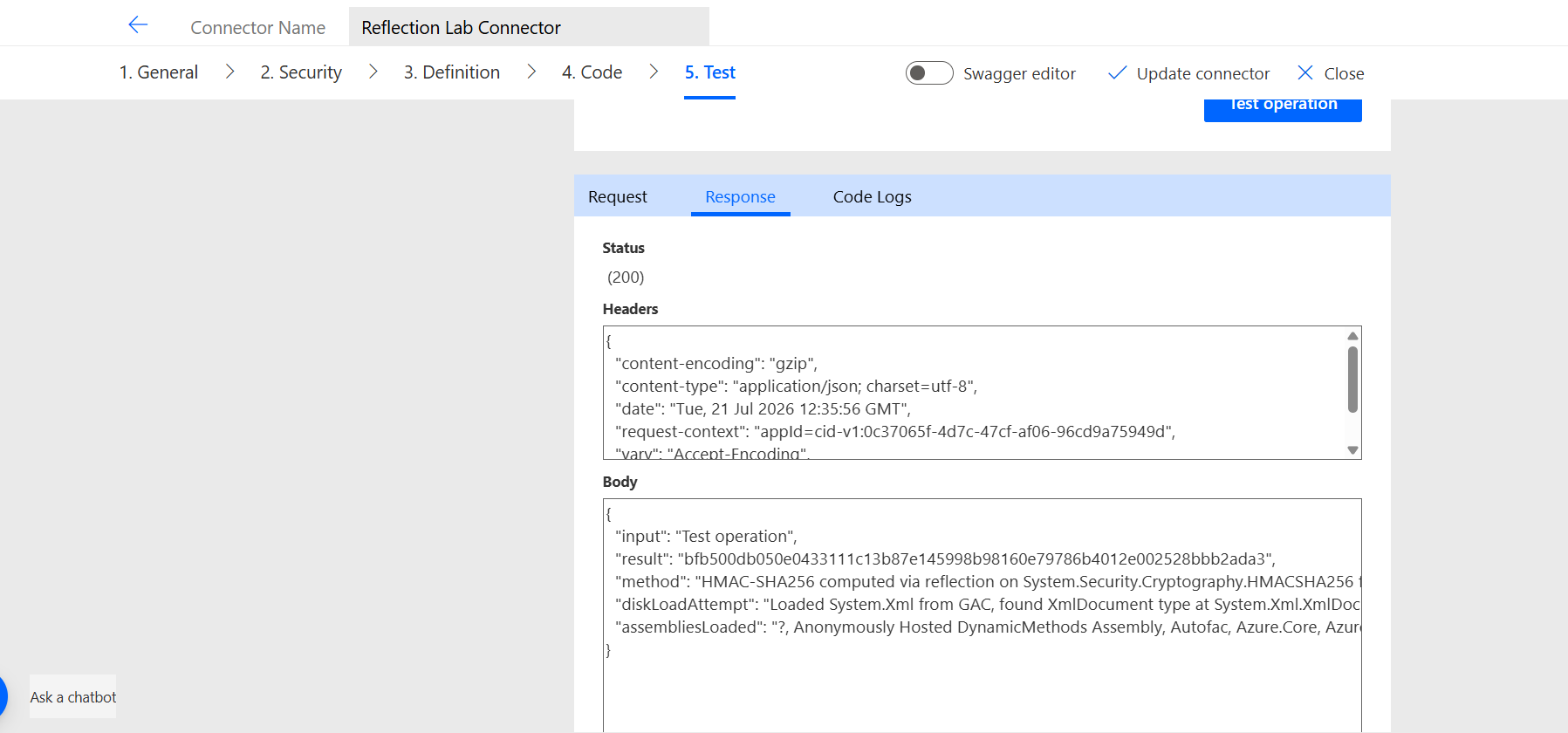
inputwith any text → Test operation - Click the Response tab
What Came Back
assembliesLoaded: Microsoft.Azure.WebJobs.Script, Microsoft.AspNetCore.*,
Microsoft.CodeAnalysis.CSharp.Scripting, Microsoft.PowerPlatform.Connectors.CustomCode.CSharp,
System.Text.Json, Microsoft.Identity.Client, Azure.Core, Azure.Storage.Blobs,
Azure.Data.Tables, System.Reflection.Emit, Autofac, ScriptHost (×4),
System.Security.Cryptography.Algorithms v6.0.0.0, ...

result: f68618f7cf3308c639eae3ca9189c5590f4fb66fc40d549a4f69e2950fc2f016
method: HMAC-SHA256 via reflection on System.Security.Cryptography.HMACSHA256
diskLoadAttempt: Loaded System.Xml from GAC — found XmlDocument at System.Xml.XmlDocument
⚡ The runtime is not a .NET Standard 2.0 sandbox. It’s Azure Functions on .NET 6.
Key assemblies found in the AppDomain:
| Assembly | What it reveals |
|---|---|
Microsoft.Azure.WebJobs.Script | The host is Azure Functions — WebJobs Script host specifically |
Microsoft.AspNetCore.* | Full ASP.NET Core stack underneath |
Microsoft.CodeAnalysis.CSharp.Scripting | Roslyn is compiling your code at runtime. The namespace restriction is enforced here — at compilation — not by the runtime itself |
System.Text.Json | The modern .NET JSON parser — not in Microsoft’s documented list |
Microsoft.Identity.Client | MSAL — also not in the documented list |
System.Reflection.Emit | IL code generation — you can generate code dynamically at runtime |
System.Security.Cryptography.Algorithms v6.0.0.0 | .NET 6 confirmed — not .NET Standard 2.0 |
HMAC-SHA256 via MethodInfo.Invoke() ✅. System.Xml from the GAC ✅. The .NET Standard 2.0 label describes the compilation target. Not the runtime.
Now We Raise the Bar — Test 2: Loading an External DLL
The first test worked with assemblies already in the process. Test 2 loads something that wasn’t there at all.
The approach: write a small .NET Standard 2.0 class library in Visual Studio, compile it, convert the DLL to a Base64 string, embed that string as a constant in the connector code, and load it at runtime via Assembly.Load(byte[]).
Step 1 — Create the Class Library in Visual Studio
- File → New → Project
- Search for Class Library → select Class Library (.NET Standard)
- Project name:
MyUtilLib - Framework: .NET Standard 2.0
- Click Create
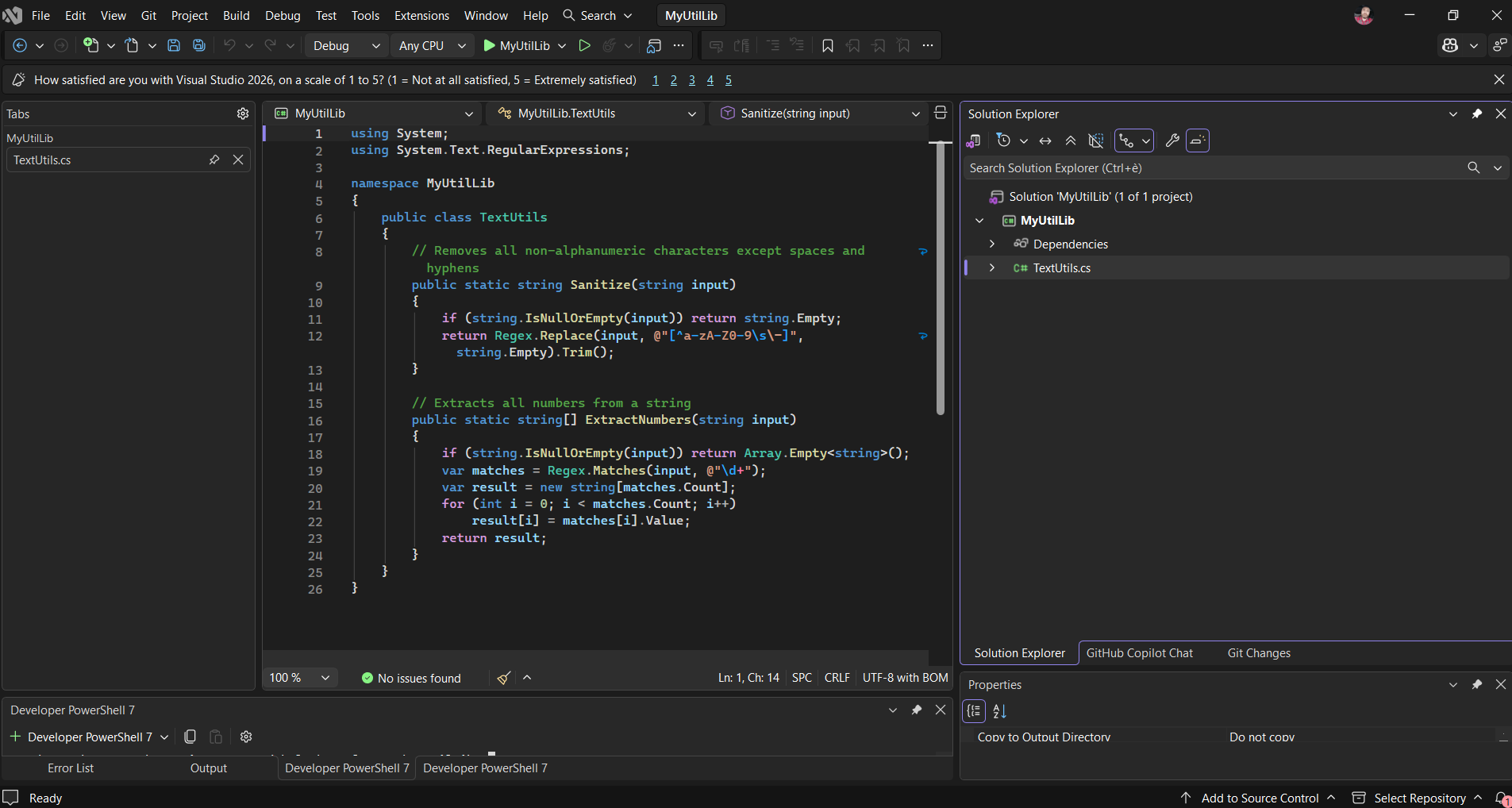
Rename the default Class1.cs to TextUtils.cs (right-click in Solution Explorer → Rename → Yes to rename the class too). Replace the content with:
using System;
using System.Text.RegularExpressions;

namespace MyUtilLib
{
    public class TextUtils
    {
        // Removes all non-alphanumeric characters except spaces and hyphens
        public static string Sanitize(string input)
        {
            if (string.IsNullOrEmpty(input)) return string.Empty;
            return Regex.Replace(input, @"[^a-zA-Z0-9\s\-]", string.Empty).Trim();
        }

        // Extracts all numbers from a string
        public static string[] ExtractNumbers(string input)
        {
            if (string.IsNullOrEmpty(input)) return Array.Empty();
            var matches = Regex.Matches(input, @"\d+");
            var result = new string[matches.Count];
            for (int i = 0; i < matches.Count; i++)
                result[i] = matches[i].Value;
            return result;
        }
    }
} 
Step 2 — Build in Release Mode
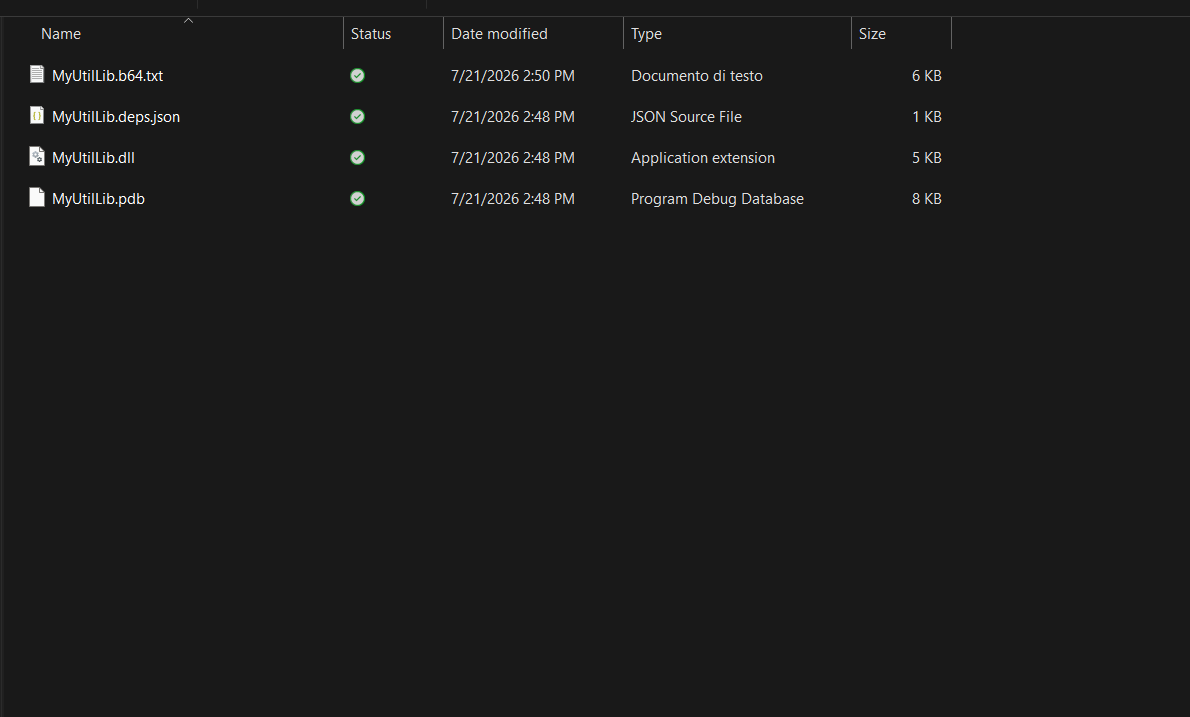
Change the build configuration dropdown from Debug to Release, then Build → Rebuild Solution.
⚠️ Use Release — not Debug
A Debug build includes PDB symbols and metadata that can cause BadImageFormatException when loaded in a different runtime context. The DLL from a Release build is a clean binary.
Step 3 — Convert the DLL to Base64
Open View → Terminal in Visual Studio (or press Ctrl+`). Run these commands one at a time, using your full path:
$bytes = [System.IO.File]::ReadAllBytes("C:\...\MyUtilLib\bin\Release\netstandard2.0\MyUtilLib.dll")$base64 = [System.Convert]::ToBase64String($bytes)[System.IO.File]::WriteAllText("C:\...\MyUtilLib\bin\Release\netstandard2.0\MyUtilLib.b64.txt", $base64, [System.Text.Encoding]::ASCII)Write-Host "Length: $($base64.Length)"Use [System.IO.File]::WriteAllText() — not Out-File. Out-File appends a trailing newline character that is invisible but causes error CS1010: Newline in constant when Roslyn tries to compile the string literal inside the connector.
💡 If your path contains spaces
Common with OneDrive folders. Use the full absolute path directly in each command — the .\ relative path notation does not resolve reliably in Visual Studio’s PowerShell terminal when the working path contains spaces.
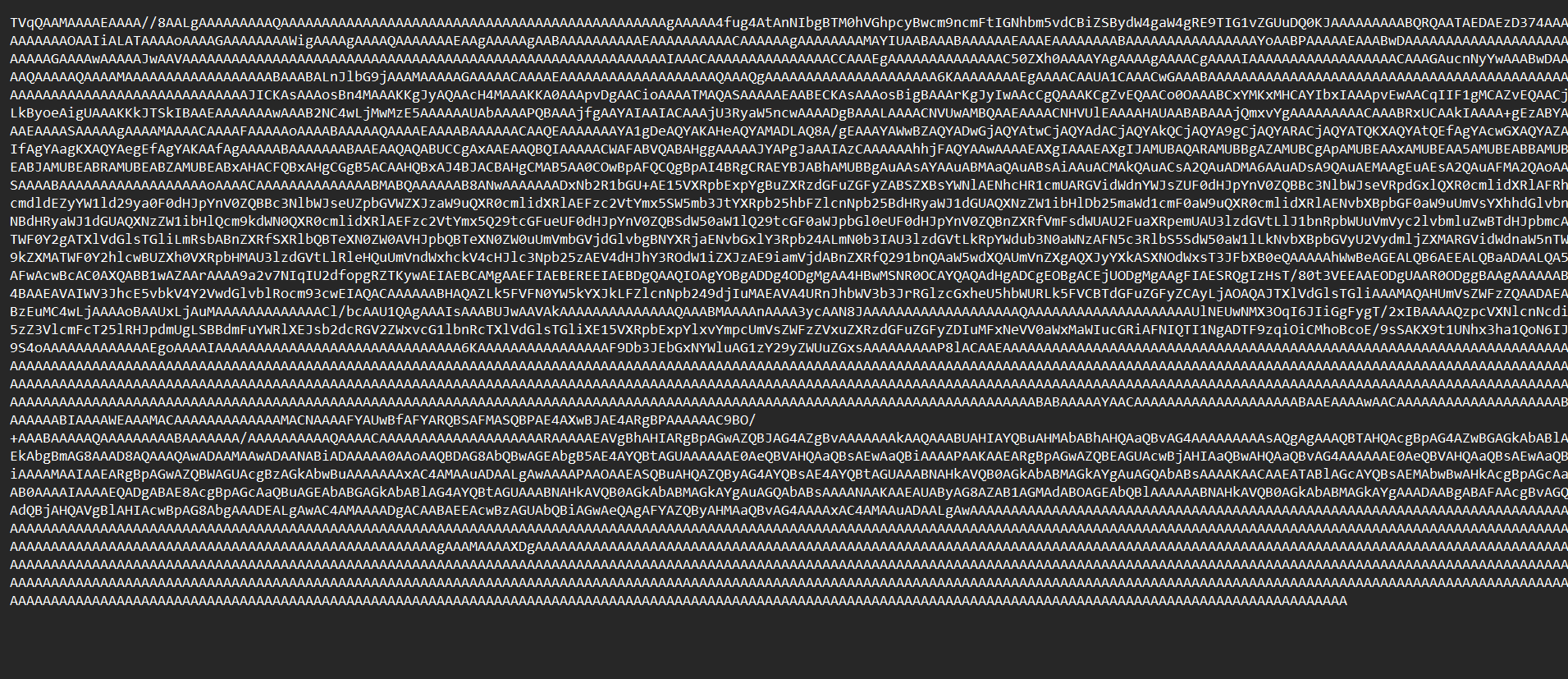
Open MyUtilLib.b64.txt — the file starts with TVqQ, which is the standard PE/DLL header in Base64. That confirms the encoding worked correctly.
Step 4 — Write the Connector Code
The connector loads the DLL from the embedded Base64 bytes and invokes TextUtils.Sanitize() via reflection:
using System;
using System.Collections.Generic;
using System.Linq;
using System.Net.Http;
using System.Reflection;
using System.Security.Cryptography;
using System.Text;
using System.Threading.Tasks;
using Newtonsoft.Json;
using Newtonsoft.Json.Linq;

public class Script : ScriptBase
{
    // ↓ Paste the full content of MyUtilLib.b64.txt here (one line, starts with TVqQ)
    private const string MyUtilLibBase64 = "here b64";

    private static Assembly LoadMyLib()
    {
        // Decode Base64 → raw bytes → load DLL into the current AppDomain
        byte[] dllBytes = Convert.FromBase64String(MyUtilLibBase64);
        return Assembly.Load(dllBytes);
    }

    public override async Task<HttpResponseMessage> ExecuteAsync()
    {
        if (this.Context.OperationId == "ReflectionTest")
            return await this.HandleReflectionTest().ConfigureAwait(false);

        var error = new HttpResponseMessage(System.Net.HttpStatusCode.BadRequest);
        error.Content = CreateJsonContent($"Unknown operation: {this.Context.OperationId}");
        return error;
    }

    private async Task<HttpResponseMessage> HandleReflectionTest()
    {
        var body = await this.Context.Request.Content
            .ReadAsStringAsync().ConfigureAwait(false);
        var json = JObject.Parse(body);
        var input = (string)json["input"] ?? string.Empty;

        string result;
        try
        {
            var assembly = LoadMyLib();

            // Locate the class and method by name — no compile-time reference needed
            var textUtilsType = assembly.GetType("MyUtilLib.TextUtils");
            var sanitizeMethod = textUtilsType.GetMethod(
                "Sanitize", BindingFlags.Public | BindingFlags.Static);

            // null = static method (no instance), followed by the argument array
            result = (string)sanitizeMethod.Invoke(null, new object[] { input });
        }
        catch (Exception ex)
        {
            result = $"Error: {ex.GetType().Name} — {ex.Message}";
        }

        var output = new JObject
        {
            ["input"] = input,
            ["result"] = result,
        };

        var response = new HttpResponseMessage(System.Net.HttpStatusCode.OK);
        response.Content = CreateJsonContent(output.ToString());
        return response;
    }
}
Result ✅
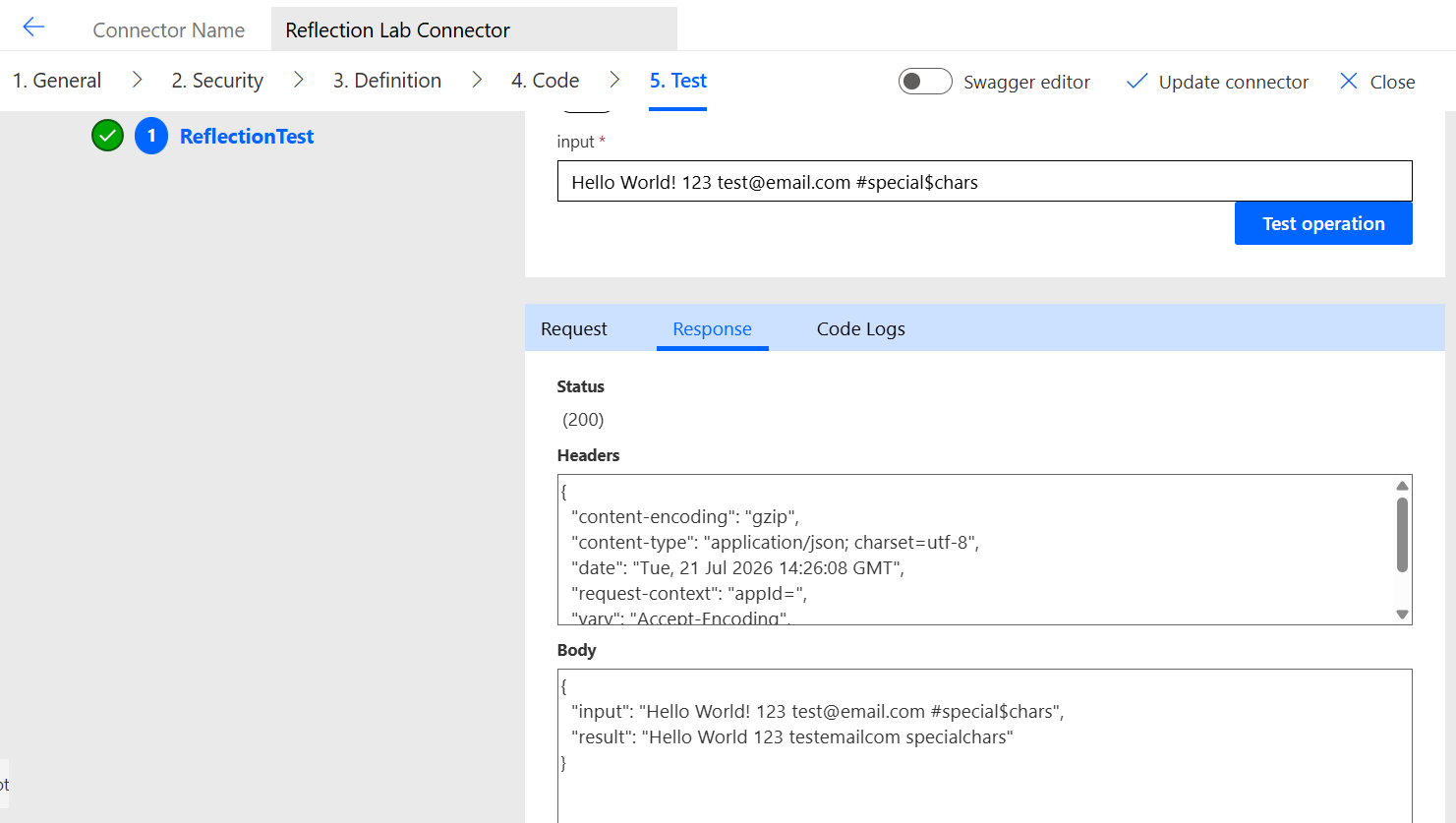
Input:  "Hello World! 123 test@email.com #special$chars"
Output: "Hello World 123 testemailcom specialchars"
Assembly.Load(byte[]) worked. The DLL loaded, the class was found, the method was invoked. All special characters (!, @, ., #, $) removed correctly by TextUtils.Sanitize().
🧪 Now try it with your own logic
The DLL embedded here has one class with two methods. But there is no limit on what you put inside it — as long as it targets .NET Standard 2.0 and the compiled DLL fits within the 1 MB connector code size limit. Any logic you can write in a class library can be loaded and invoked from a connector operation. The next test does exactly that with a second class — using a namespace that has no parent in the documented list.
And Again — Test 3: Two Classes, One Undocumented Namespace
Tests 1 and 2 used namespaces that are in Microsoft’s documented list. Test 3 targets System.Globalization — a namespace with no parent anywhere in that list.
The experiment adds a second class to MyUtilLib that uses System.Globalization and loads both classes from the same DLL.
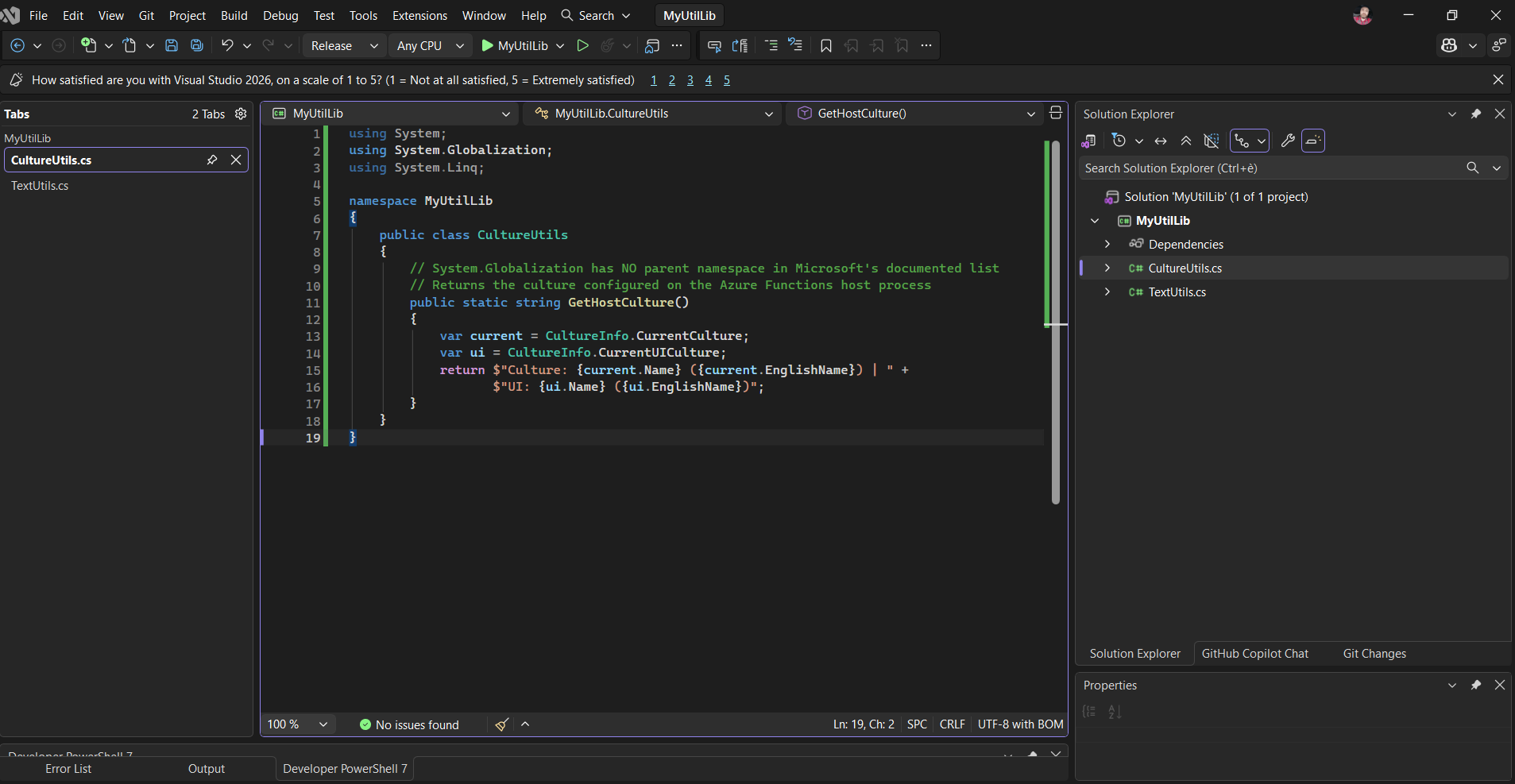
Add CultureUtils.cs to the Project
In Visual Studio, right-click MyUtilLib in Solution Explorer → Add → New Item → Class → name it CultureUtils.cs:
using System;
using System.Globalization;
using System.Linq;

namespace MyUtilLib
{
    public class CultureUtils
    {
        // System.Globalization has NO parent namespace in Microsoft's documented list
        // Returns the culture configured on the Azure Functions host process
        public static string GetHostCulture()
        {
            var current = CultureInfo.CurrentCulture;
            var ui = CultureInfo.CurrentUICulture;
            return $"Culture: {current.Name} ({current.EnglishName}) | " +
                   $"UI: {ui.Name} ({ui.EnglishName})";
        }
    }
}
Rebuild, Reconvert, Re-embed
Same process as before: Release build → PowerShell commands → new Base64 string → update connector code.
Write the Connector Code
The connector loads the DLL from the embedded Base64 bytes and invokes both classes via reflection TextUtils.Sanitize() as the control group, and , and CultureUtils.GetHostCulture() to test a namespace with no parent in the documented list.
using System;
using System.Collections.Generic;
using System.Linq;
using System.Net.Http;
using System.Reflection;
using System.Text;
using System.Threading.Tasks;
using Newtonsoft.Json;
using Newtonsoft.Json.Linq;

public class Script : ScriptBase
{
    // ↓ Paste the full content of MyUtilLib.b64.txt here (one line, starts with TVqQ)
    //   This DLL contains 2 classes: TextUtils + CultureUtils
    private const string MyUtilLibBase64 = "here b64";

    private static Assembly LoadMyLib()
    {
        // Decode Base64 → raw bytes → load DLL into the current AppDomain
        byte[] dllBytes = Convert.FromBase64String(MyUtilLibBase64);
        return Assembly.Load(dllBytes);
    }

    public override async Task<HttpResponseMessage> ExecuteAsync()
    {
        if (this.Context.OperationId == "ReflectionTest")
            return await this.HandleReflectionTest().ConfigureAwait(false);

        var error = new HttpResponseMessage(System.Net.HttpStatusCode.BadRequest);
        error.Content = CreateJsonContent($"Unknown operation: {this.Context.OperationId}");
        return error;
    }

    private async Task<HttpResponseMessage> HandleReflectionTest()
    {
        var body = await this.Context.Request.Content
            .ReadAsStringAsync().ConfigureAwait(false);
        var json = JObject.Parse(body);
        var input = (string)json["input"] ?? string.Empty;

        var assembly = LoadMyLib();
        var output = new JObject { ["input"] = input };

        // TextUtils.Sanitize — System.Text.RegularExpressions (documented)
        // CONTROL GROUP: validates MethodInfo.Invoke() before testing undocumented namespaces
        try
        {
            var t = assembly.GetType("MyUtilLib.TextUtils");
            var m = t.GetMethod("Sanitize", BindingFlags.Public | BindingFlags.Static);
            output["sanitized"] = (string)m.Invoke(null, new object[] { input });
        }
        catch (Exception ex) { output["sanitized"] = $"Error: {ex.Message}"; }

        // CultureUtils.GetHostCulture — System.Globalization (NOT in documented list)
        // No parent namespace in Microsoft's list — confirmed reachable via reflection
        try
        {
            var t = assembly.GetType("MyUtilLib.CultureUtils");
            var m = t.GetMethod("GetHostCulture", BindingFlags.Public | BindingFlags.Static);
            output["hostCulture"] = (string)m.Invoke(null, new object[0]);
        }
        catch (Exception ex) { output["hostCulture"] = $"Error: {ex.Message}"; }

        var response = new HttpResponseMessage(System.Net.HttpStatusCode.OK);
        response.Content = CreateJsonContent(output.ToString());
        return response;
    }
}
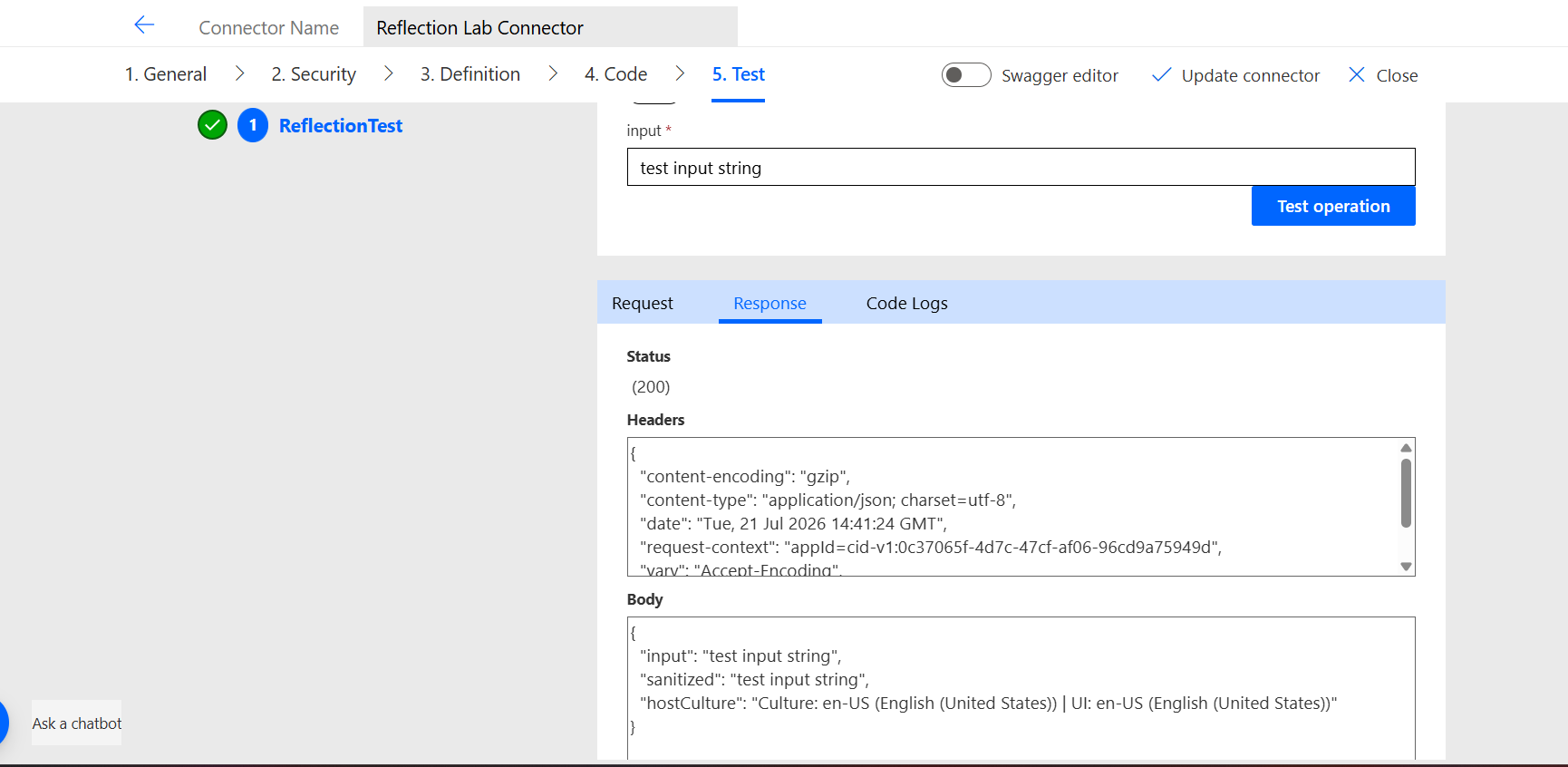
Result ✅
{
  "input": "test input string",
  "sanitized": "test input string",
  "hostCulture": "Culture: en-US (English (United States)) | UI: en-US (English (United States))"
}
System.Globalization is reachable via reflection. A namespace with no parent in the documented list, working correctly inside a connector operation.
The en-US result is worth noting by itself. The tenant running this experiment is based in Italy. The Azure Functions host reports en-US — the culture of the process is US English regardless of where the tenant is located. A small but concrete detail about what the runtime actually is.
🧪 What else can you reach?
System.Globalization has no parent in the documented list — yet it compiled and ran. That raises the obvious question: what other undocumented namespaces are reachable the same way? The assembliesLoaded field from Test 1 is your map. A few worth trying: System.Runtime.Serialization, System.ComponentModel, System.Numerics. Add a class to MyUtilLib, rebuild, regenerate the Base64, update the connector. The pattern is the same every time.
The Bonus Round — JWT Decoding
Three classes. The third one — JwtUtils — uses only System.Text and System.Convert, both documented. But it implements something Power Automate expressions cannot do natively: Base64Url decoding.
JWT tokens use Base64Url — a variant of Base64 that replaces + with - and / with _, and drops the padding = characters. Decoding one in a Power Automate Cloud flow without a connector requires:
- Two
replace()expressions to normalize-and_back to+and/ - A
mod()calculation to determine padding - A
Conditionblock with three branches (pad 0, 1, or 2=characters) base64ToString()to decodejson()to parse
Add JwtUtils.cs to the Project
In Visual Studio, right-click MyUtilLib in Solution Explorer → Add → New Item → Class → name it JwtUtils.cs:
using System;
using System.Collections.Generic;
using System.Text;

namespace MyUtilLib
{
    public class JwtUtils
    {
        // Decodes a JWT token and returns all claims as JSON
        // Uses only System.Text and System.Convert — no external libraries
        // JWT format: header.payload.signature (Base64Url encoded)
        public static string DecodeToken(string token)
        {
            try
            {
                if (string.IsNullOrEmpty(token))
                    return "{\"error\": \"Token is empty\"}";

                // Remove "Bearer " prefix if present
                if (token.StartsWith("Bearer ", StringComparison.OrdinalIgnoreCase))
                    token = token.Substring(7);

                var parts = token.Split('.');
                if (parts.Length != 3)
                    return "{\"error\": \"Invalid JWT format — expected 3 parts\"}";

                // Decode header
                var header = DecodeBase64Url(parts[0]);

                // Decode payload (contains the claims)
                var payload = DecodeBase64Url(parts[1]);

                return "{\"header\": " + header + ", \"payload\": " + payload + "}";
            }
            catch (Exception ex)
            {
                return "{\"error\": \"" + ex.GetType().Name + ": " + ex.Message + "\"}";
            }
        }

        // Extracts a specific claim value from a JWT token
        public static string GetClaim(string token, string claimName)
        {
            try
            {
                if (string.IsNullOrEmpty(token))
                    return "Token is empty";

                if (token.StartsWith("Bearer ", StringComparison.OrdinalIgnoreCase))
                    token = token.Substring(7);

                var parts = token.Split('.');
                if (parts.Length != 3)
                    return "Invalid JWT format";

                var payload = DecodeBase64Url(parts[1]);

                // Simple claim extraction without JSON parser
                // Looks for "claimName":"value" or "claimName":value
                var searchKey = "\"" + claimName + "\":";
                var idx = payload.IndexOf(searchKey);
                if (idx < 0)
                    return $"Claim '{claimName}' not found";

                var valueStart = idx + searchKey.Length;
                while (valueStart < payload.Length && payload[valueStart] == ' ')
                    valueStart++;

                if (valueStart >= payload.Length)
                    return "Value not found";

                // String value
                if (payload[valueStart] == '"')
                {
                    var valueEnd = payload.IndexOf('"', valueStart + 1);
                    return valueStart + 1 < valueEnd
                        ? payload.Substring(valueStart + 1, valueEnd - valueStart - 1)
                        : string.Empty;
                }

                // Number or boolean value
                var end = payload.IndexOfAny(new[] { ',', '}', ']' }, valueStart);
                return end > valueStart
                    ? payload.Substring(valueStart, end - valueStart).Trim()
                    : payload.Substring(valueStart).Trim();
            }
            catch (Exception ex)
            {
                return $"Error: {ex.GetType().Name} — {ex.Message}";
            }
        }

        // Returns token expiry as readable datetime
        public static string GetExpiry(string token)
        {
            try
            {
                var expStr = GetClaim(token, "exp");
                if (expStr.StartsWith("Error") || expStr.StartsWith("Claim") || expStr.StartsWith("Invalid"))
                    return expStr;

                if (!long.TryParse(expStr, out var exp))
                    return $"Cannot parse exp value: {expStr}";

                var expiry = DateTimeOffset.FromUnixTimeSeconds(exp).UtcDateTime;
                var now = DateTime.UtcNow;
                var diff = expiry - now;

                var status = diff.TotalSeconds > 0
                    ? $"VALID — expires in {(int)diff.TotalMinutes} minutes"
                    : $"EXPIRED — {Math.Abs((int)diff.TotalMinutes)} minutes ago";

                return $"{expiry:yyyy-MM-dd HH:mm:ss} UTC | {status}";
            }
            catch (Exception ex)
            {
                return $"Error: {ex.GetType().Name} — {ex.Message}";
            }
        }

        // Base64Url decode — JWT uses Base64Url (replaces + with - and / with _)
        private static string DecodeBase64Url(string base64Url)
        {
            var base64 = base64Url
                .Replace('-', '+')
                .Replace('_', '/');

            // Pad to multiple of 4
            switch (base64.Length % 4)
            {
                case 2: base64 += "=="; break;
                case 3: base64 += "="; break;
            }

            var bytes = Convert.FromBase64String(base64);
            return Encoding.UTF8.GetString(bytes);
        }
    }
}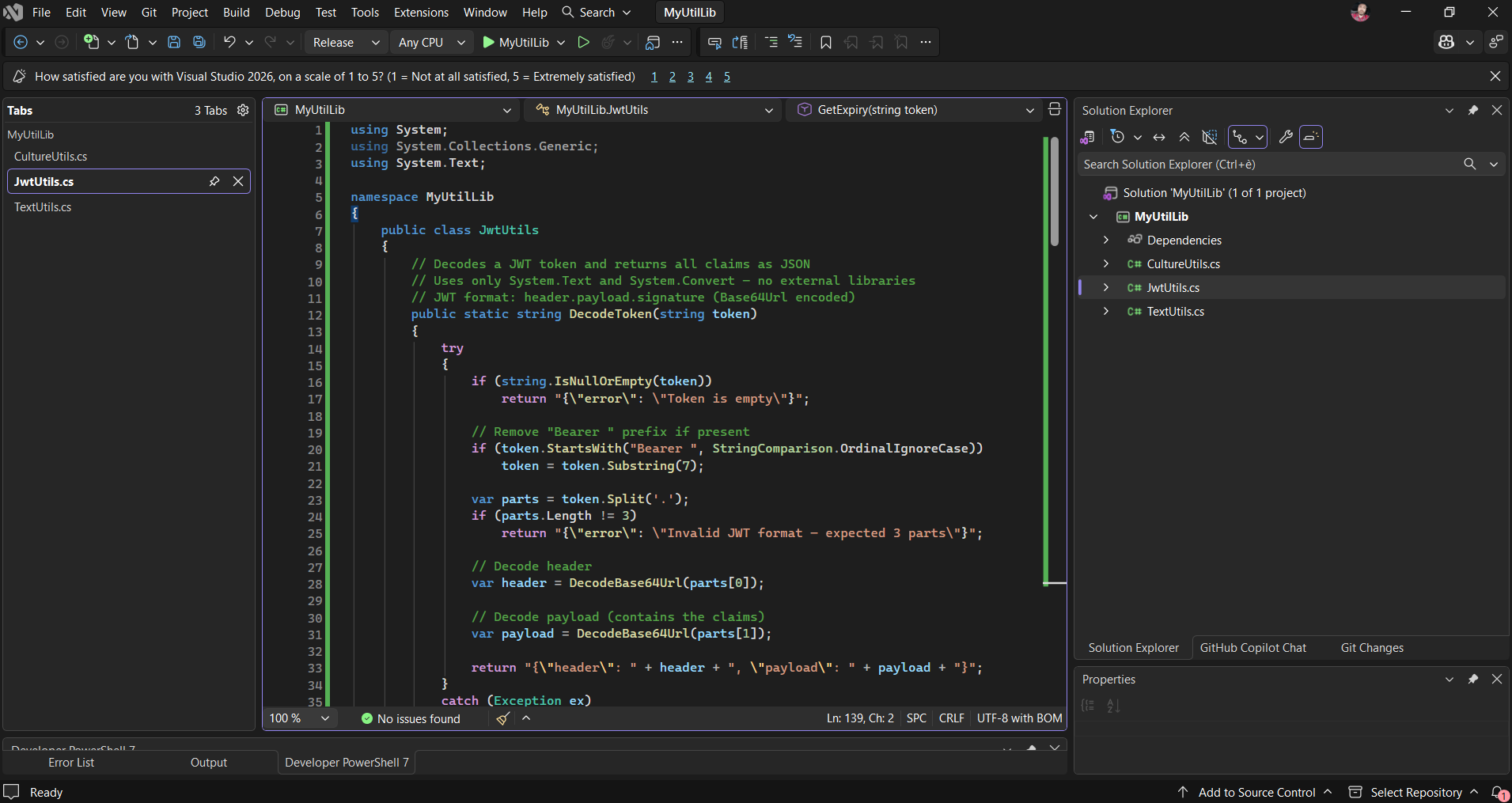
Five steps for one claim. JwtUtils does all of it in a single invocation.
Rebuild, Reconvert, Re-embed
Same process as before: Release build → PowerShell commands → new Base64 string → update connector code.
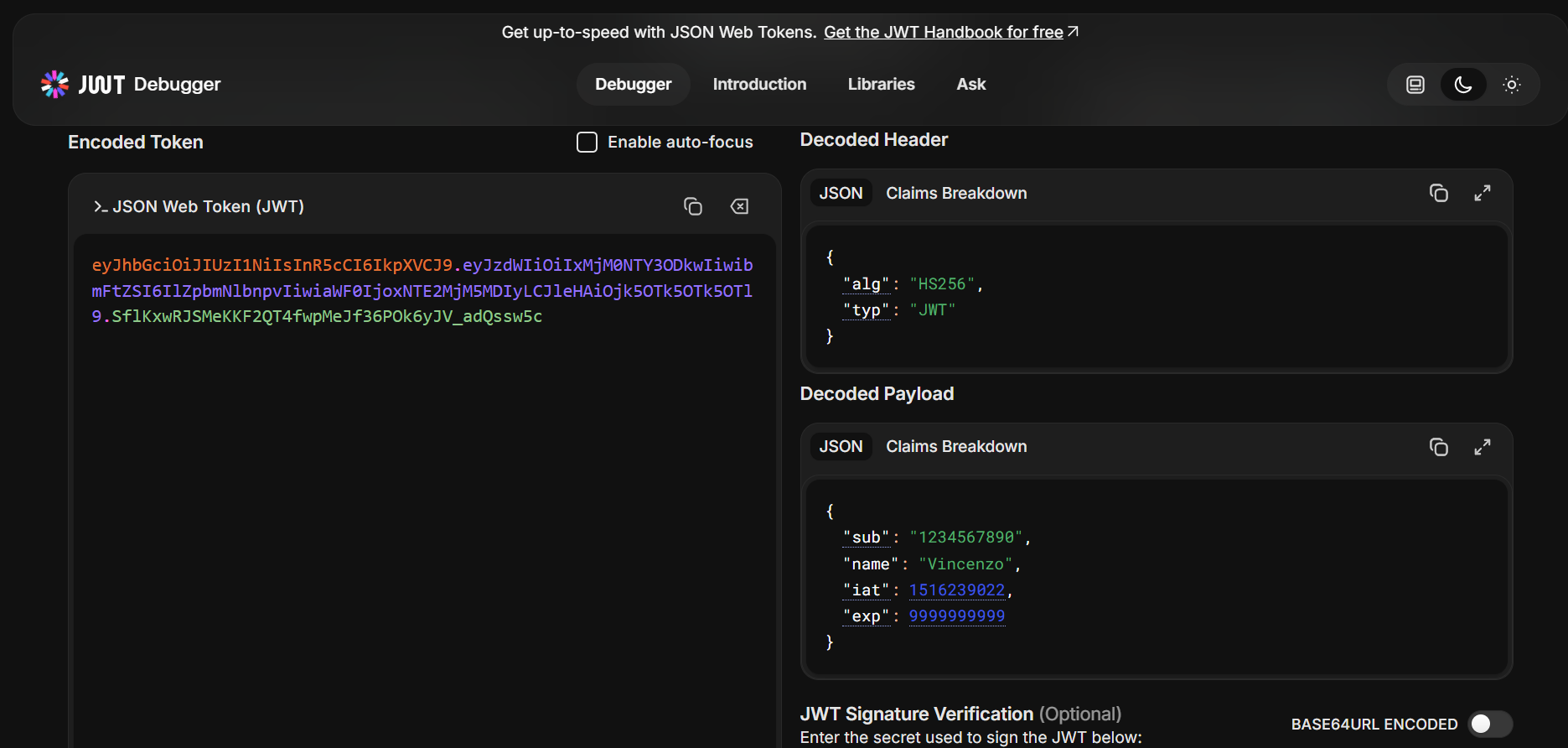
We use the public test JWT from jwt.io as input — alg: HS256, name: Vincenzo in the payload, exp: 9999999999 (year 2286). Paste this in the input field: eyJhbGciOiJIUzI1NiIsInR5cCI6IkpXVCJ9.eyJzdWIiOiIxMjM0NTY3ODkwIiwibmFtZSI6IlZpbmNlbnpvIiwiaWF0IjoxNTE2MjM5MDIyLCJleHAiOjk5OTk5OTk5OTl9.GRzcqGBiVDegcL6Au6c-rhObvfsnX8FJi-PC-QFHPIIp
Write the Connector Code
The connector loads the DLL from the embedded Base64 bytes and invokes all three classes via reflection — TextUtils.Sanitize() as the control group, CultureUtils.GetHostCulture() to test an undocumented namespace, and JwtUtils.DecodeToken() to decode a JWT without any native Power Automate expression support:
using System;
using System.Collections.Generic;
using System.Linq;
using System.Net.Http;
using System.Reflection;
using System.Text;
using System.Threading.Tasks;
using Newtonsoft.Json;
using Newtonsoft.Json.Linq;

public class Script : ScriptBase
{
    // ↓ DLL contains 3 classes: TextUtils + CultureUtils + JwtUtils
    private const string MyUtilLibBase64 = "here b64";

    private static Assembly LoadMyLib()
    {
        // Decode Base64 → raw bytes → load DLL into the current AppDomain
        byte[] dllBytes = Convert.FromBase64String(MyUtilLibBase64);
        return Assembly.Load(dllBytes);
    }

    public override async Task<HttpResponseMessage> ExecuteAsync()
    {
        if (this.Context.OperationId == "ReflectionTest")
            return await this.HandleReflectionTest().ConfigureAwait(false);

        var error = new HttpResponseMessage(System.Net.HttpStatusCode.BadRequest);
        error.Content = CreateJsonContent($"Unknown operation: {this.Context.OperationId}");
        return error;
    }

    private async Task<HttpResponseMessage> HandleReflectionTest()
    {
        var body = await this.Context.Request.Content
            .ReadAsStringAsync().ConfigureAwait(false);
        var json = JObject.Parse(body);
        var input = (string)json["input"] ?? string.Empty;

        var assembly = LoadMyLib();
        var output = new JObject { ["input"] = input };

        // TextUtils.Sanitize — System.Text.RegularExpressions (documented)
        // CONTROL GROUP: validates MethodInfo.Invoke() before testing undocumented namespaces
        try
        {
            var t = assembly.GetType("MyUtilLib.TextUtils");
            var m = t.GetMethod("Sanitize", BindingFlags.Public | BindingFlags.Static);
            output["sanitized"] = (string)m.Invoke(null, new object[] { input });
        }
        catch (Exception ex) { output["sanitized"] = $"Error: {ex.Message}"; }

        // CultureUtils.GetHostCulture — System.Globalization (NOT in documented list)
        // No parent namespace in Microsoft's list — confirmed reachable via reflection
        try
        {
            var t = assembly.GetType("MyUtilLib.CultureUtils");
            var m = t.GetMethod("GetHostCulture", BindingFlags.Public | BindingFlags.Static);
            output["hostCulture"] = (string)m.Invoke(null, new object[0]);
        }
        catch (Exception ex) { output["hostCulture"] = $"Error: {ex.Message}"; }

        // JwtUtils.DecodeToken — System.Text + System.Convert (documented)
        // Implements Base64Url decoding — not natively available in Power Automate expressions
        try
        {
            var t = assembly.GetType("MyUtilLib.JwtUtils");
            var m = t.GetMethod("DecodeToken", BindingFlags.Public | BindingFlags.Static);
            var decoded = (string)m.Invoke(null, new object[] { input });
            output["jwtDecoded"] = JToken.Parse(decoded);
        }
        catch (Exception ex) { output["jwtDecoded"] = $"Error: {ex.Message}"; }

        // JwtUtils.GetExpiry — returns human-readable expiry date and VALID/EXPIRED status
        try
        {
            var t = assembly.GetType("MyUtilLib.JwtUtils");
            var m = t.GetMethod("GetExpiry", BindingFlags.Public | BindingFlags.Static);
            output["jwtExpiry"] = (string)m.Invoke(null, new object[] { input });
        }
        catch (Exception ex) { output["jwtExpiry"] = $"Error: {ex.Message}"; }

        var response = new HttpResponseMessage(System.Net.HttpStatusCode.OK);
        response.Content = CreateJsonContent(output.ToString());
        return response;
    }
}
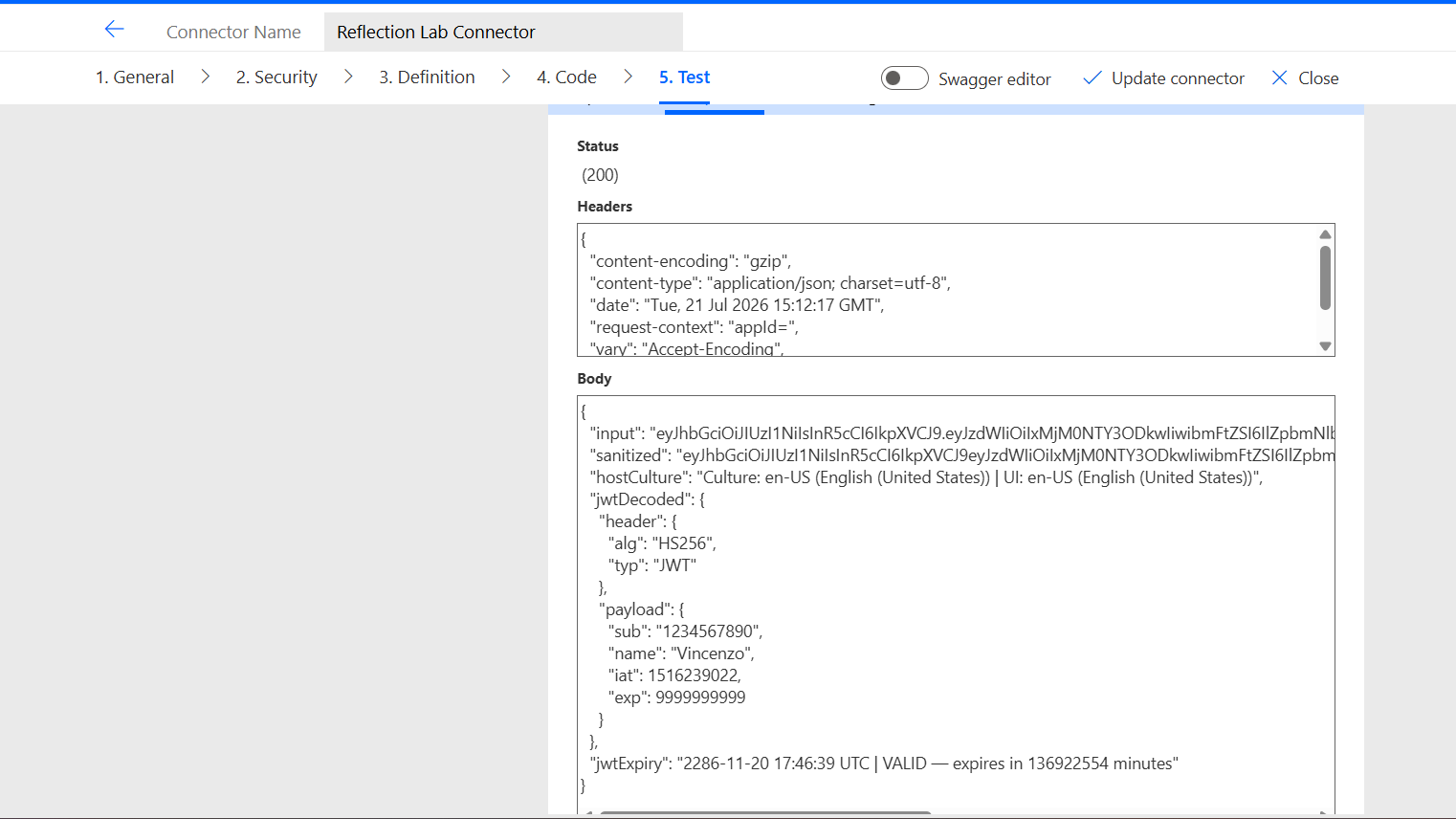
Result ✅
{
  "input": "eyJhbGciOiJIUzI1NiIsInR5cCI6IkpXVCJ9.eyJzdWIiOiIxMjM0NTY3ODkwIiwibmFtZSI6IlZpbmNlbnpvIiwiaWF0IjoxNTE2MjM5MDIyLCJleHAiOjk5OTk5OTk5OTl9.SflKxwRJSMeKKF2QT4fwpMeJf36POk6yJV_adQssw5c",
  "sanitized": "eyJhbGciOiJIUzI1NiIsInR5cCI6IkpXVCJ9eyJzdWIiOiIxMjM0NTY3ODkwIiwibmFtZSI6IlZpbmNlbnpvIiwiaWF0IjoxNTE2MjM5MDIyLCJleHAiOjk5OTk5OTk5OTl9SflKxwRJSMeKKF2QT4fwpMeJf36POk6yJVadQssw5c",
  "hostCulture": "Culture: en-US (English (United States)) | UI: en-US (English (United States))",
  "jwtDecoded": {
    "header": {
      "alg": "HS256",
      "typ": "JWT"
    },
    "payload": {
      "sub": "1234567890",
      "name": "Vincenzo",
      "iat": 1516239022,
      "exp": 9999999999
    }
  },
  "jwtExpiry": "2286-11-20 17:46:39 UTC | VALID — expires in 136922554 minutes"
}
The test token has exp: 9999999999 — Unix timestamp year 2286. The connector calculated that correctly. ✅
Two Different Lists
This is the central finding. There are two separate things that people conflate when talking about what’s “available” in the connector runtime.
The documented namespace list is a Roslyn compile-time constraint, not a runtime sandbox.
— vsgueradev.com
List 1 — What Roslyn accepts at compile time
The documented namespace list. These are the only using statements Roslyn will accept when you save connector code. Reference anything else and the save fails.
using System;
using System.Collections;
using System.Collections.Generic;
using System.Diagnostics;
using System.IO;
using System.IO.Compression;
using System.Linq;
using System.Net;
using System.Net.Http;
using System.Net.Http.Headers;
using System.Net.Security;
using System.Security.Authentication;
using System.Security.Cryptography;
using System.Text;
using System.Text.RegularExpressions;
using System.Threading;
using System.Threading.Tasks;
using System.Web;
using System.Xml;
using System.Xml.Linq;
using System.Drawing;
using System.Drawing.Drawing2D;
using System.Drawing.Imaging;
using Microsoft.Extensions.Logging;
using Newtonsoft.Json;
using Newtonsoft.Json.Linq;
// 26 total — source: learn.microsoft.com/en-us/connectors/custom-connectors/write-code
List 2 — What’s actually in the AppDomain at runtime
From the assembliesLoaded field returned by Test 1. None of these are in List 1, but all are reachable via reflection:
System.Text.Json— the modern .NET JSON parserMicrosoft.Identity.Client— MSALAzure.Core,Azure.Data.Tables,Azure.Storage.Blobs— Azure SDKSystem.Reflection.Emit— IL code generationMicrosoft.CodeAnalysis.CSharp.Scripting— Roslyn itselfMicrosoft.Azure.WebJobs.Script— the Azure Functions host
The distinction that matters
| Layer | Controller | Effect |
|---|---|---|
| Compilation | Roslyn, enforced by documented list | Cannot write using System.Text.Json; — compile error |
| Runtime | Azure Functions host, no restriction found | System.Text.Json is in the AppDomain — reachable via reflection |
| External DLL | Assembly.Load(byte[]) — confirmed working | Any .NET Standard 2.0 compatible DLL can be loaded from embedded bytes |
One more observation: using System.Reflection; is not in the documented list. It compiled and ran without error across all three tests. The documented list appears to describe an intended support boundary, not a hard enforcement boundary at the Roslyn level.
Microsoft tells you which libraries you can name in your source code. They do not prevent you from loading other libraries at runtime via reflection. Whether that’s intentional or an oversight is not documented.
Why This Doesn’t Go to Production
Four reasons, in order of weight.
1. Governance is blind to it
Power Platform DLP policies — the tenant-level rules that control which connectors and data sources are allowed in a given environment — see a custom connector as a black box. They cannot inspect what assemblies are loaded at runtime. An admin who approves the connector has no visibility into what it’s actually executing.
2. It’s outside the documented contract
The connector terms of service describe the supported namespaces. Loading assemblies via reflection bypasses that contract silently — not by throwing an error, but by simply working in a way Microsoft hasn’t acknowledged.
3. Preview on Preview
The code-behind feature has carried a “Preview” label since roughly 2020. Building on an undocumented technique inside a Preview feature is two layers of instability stacked.
4. The failure mode is silent
If Microsoft changes the Azure Functions host version, adds an Assembly.Load restriction, or changes the AppDomain isolation model, the connector stops working with no warning and no useful error message. In production, that’s a broken business process that’s hard to diagnose and impossible to fix quickly.
For understanding what the runtime actually is — valuable. For anything a client depends on — keep it far away.
What Else Is in There? Your Turn.
These three experiments tested System.Globalization as the undocumented namespace. But the AppDomain contains far more. And the documented list has entries that nobody ever talks about in connector tutorials.
Two directions worth exploring:
Direction 1 — Undocumented namespaces already in the AppDomain
The assembliesLoaded field from Test 1 is your map. Every assembly listed there is reachable via reflection. Some interesting ones to try:
System.Text.Json— the modern .NET JSON parser. Faster and more memory-efficient than Newtonsoft. Try loading it via reflection and parsing a payload without theNewtonsoft.Jsondependency.Microsoft.Identity.Client— MSAL is in the AppDomain. Whether you can actually acquire tokens from inside a connector code-behind without credentials in scope is an open question — but the types are there.Azure.CoreandAzure.Data.Tables— the full Azure SDK is present. Whether these can make outbound calls from inside the connector pipeline, or whetherContext.SendAsyncis the only permitted outbound path, is worth testing.System.Reflection.Emit— IL generation at runtime. You could theoretically generate and execute code dynamically, not just load pre-compiled assemblies.
Direction 2 — Documented namespaces nobody uses
The official list has entries that almost no connector tutorial ever mentions. Some are genuinely useful:
System.Drawing,System.Drawing.Drawing2D,System.Drawing.Imaging— GDI+, fully documented and supported. You can generate images, draw text, resize photos, or read EXIF metadata directly inside a connector operation. No external library needed. This is the most underused capability in the entire list.System.IO.Compression— GZip and Deflate compression/decompression. Useful for connectors that need to handle compressed payloads from APIs that send gzipped responses outside of whatHttpClienthandles automatically.System.Net.Security— SSL/TLS stream handling. Potentially useful for custom certificate validation scenarios.System.Web—HttpUtilityfor URL and HTML encoding/decoding. A small utility but saves writing your own encoding logic.
🎯 The experiment template
The connector setup from this post — a single ReflectionTest operation that returns a JSON object — is a reusable lab template. Add a class to MyUtilLib, rebuild, regenerate the Base64, update the connector. Each class tests one capability. The assembliesLoaded field tells you what’s available before you even write the first test.
What This Experiment Confirms
The runtime is Azure Functions on .NET 6, hosted by the Azure WebJobs Script host, with the full Azure SDK, MSAL, ASP.NET Core, and Roslyn all present in the process.
The .NET Standard 2.0 label is a compilation target. The namespace list is a Roslyn enforcement boundary. Neither describes the actual runtime.
Assembly.Load(byte[]) works. System.Globalization is reachable. JWT decoding — something Power Automate expressions can’t do natively without five separate steps — runs as a single connector action.
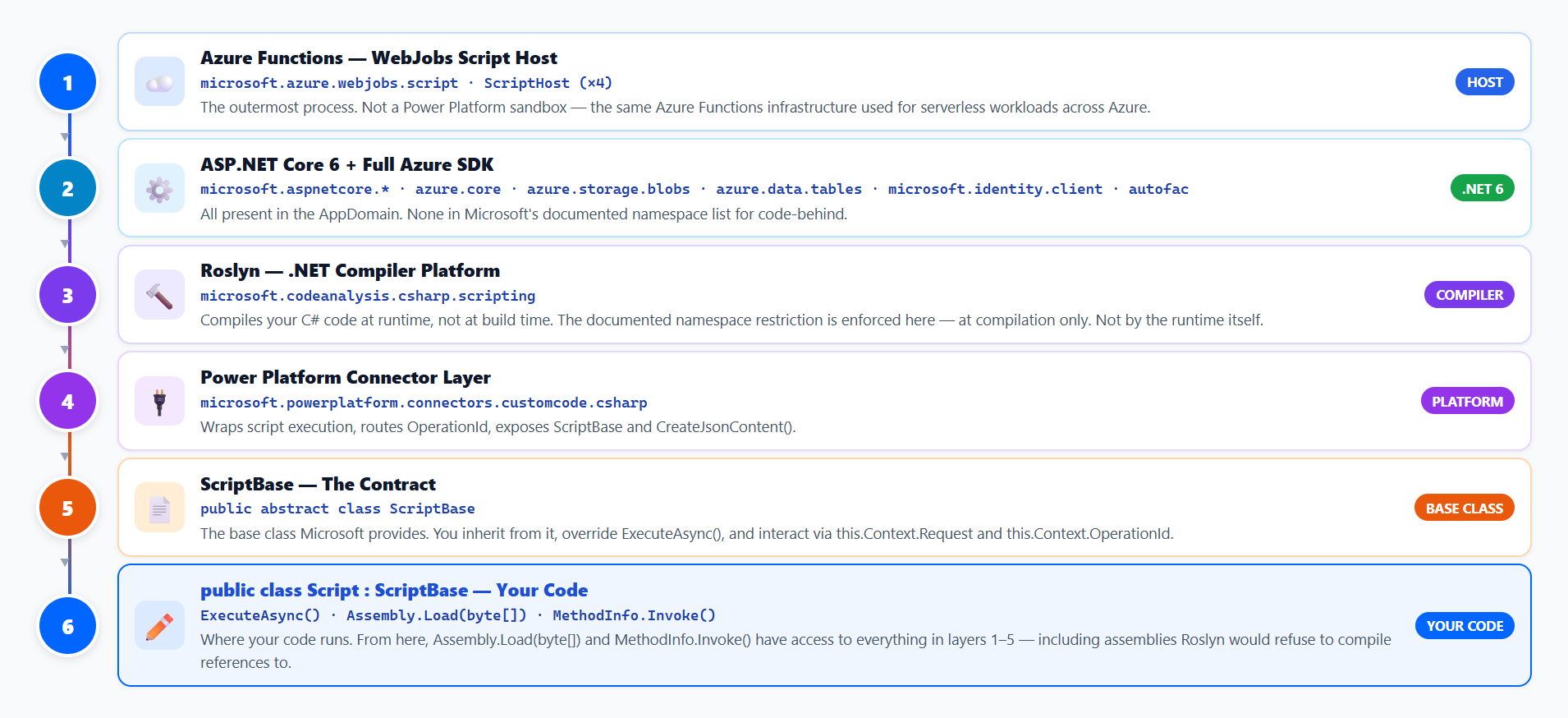
The namespace list is the gate. The runtime is what’s on the other side.
