


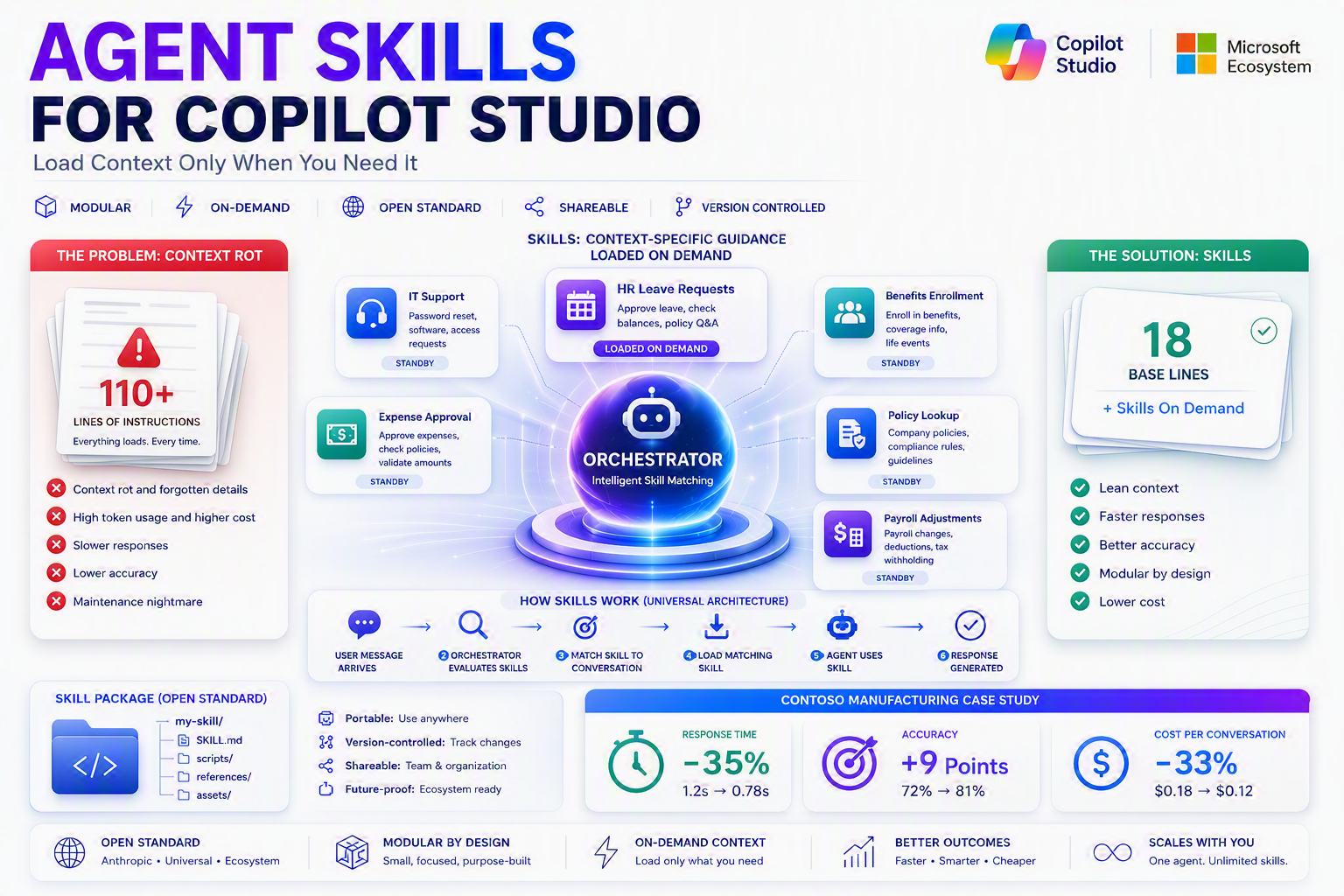
Modern AI agents face a fundamental challenge: context rot. Large language models work by loading context into a fixed attention window. The more context you load, the more tokens you burn, and the more scattered the model’s focus becomes. Skills solve this by keeping instructions lean, modular, and loaded on demand—only when the scenario matches.
Skills are not a Copilot Studio feature. They’re a universal design pattern for building agents that scale. Originally developed by Anthropic, Skills follow an open standard now adopted across the AI ecosystem—from Visual Studio to GitHub Copilot to coding agents everywhere. In Copilot Studio, Skills are your tool for building agents that stay manageable, accurate, and cost-effective as they grow.
The Problem Skills Solve
Imagine an IT support agent. It needs to handle password resets, software approvals, hardware requests, ticket escalations, and policy lookups. If you dump all of that guidance into the agent’s default instructions, every single turn loads everything: password procedures, software workflows, hardware form fields, escalation criteria, and policy documents.
A user asks “How do I reset my password?” The agent loads all 50+ steps of guidance, most of it irrelevant. The model wastes attention parsing what doesn’t apply. It costs more tokens. It’s less precise. That’s context rot. Solutions come in two shapes.
Solution 1: Build More Agents
Create a separate agent for each task: password reset agent, software approval agent, hardware request agent. Each one is lean and focused. But now you’re maintaining 10 agents instead of 1. Cross-agent coordination becomes complex. User experience suffers. This approach doesn’t scale.
Solution 2: Use Skills
Keep one agent. Move situational guidance out of the default instructions into Skills. A Skill is instructions that load only when the scenario matches. The Orchestrator reads the Skill’s name and description, decides if it’s relevant, and pulls the full instructions in only if needed. Result: one manageable agent, lean context, better accuracy, lower cost.
Context Rot: The Problem Skills Solve
Stuffing everything into Instructions works until conversation load grows. Then your agent starts forgetting details it should remember, making mistakes it didn’t make before, and costing more to run. That’s context rot — and the solution is Skills.
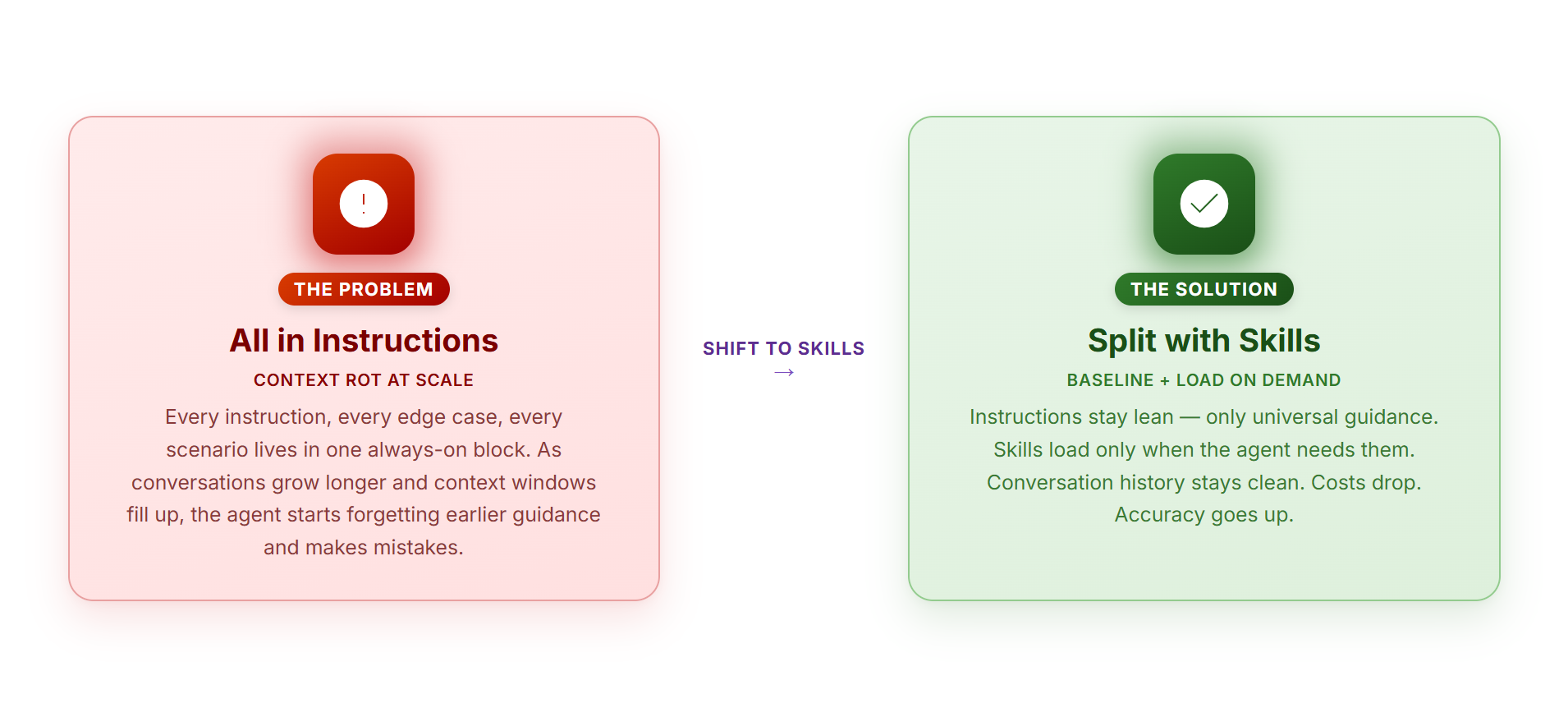
Context rot is what happens when you make Instructions your dumping ground. The agent drowns in irrelevant guidance, forgets the crucial stuff, and tokens get wasted on context it doesn’t need. Skills fix this by letting you load guidance only when the agent needs it. The result: cleaner reasoning, fewer errors, lower cost.
What Is a Skill?
A Skill is context-specific guidance that an AI agent loads on demand, only when a specific scenario comes up. Think of it this way: your agent has general instructions that are always true (“Be professional,” “Always verify data before submitting”). But your agent also needs guidance for specific situations that don’t come up every conversation. A Skill holds that situational guidance.
Structurally, a Skill is a folder that contains: a SKILL.md file with metadata (name, description, instructions); optionally scripts, templates, reference documentation, and examples; everything packed together, loaded only when the agent needs it.
The core insight: Instead of piling all guidance into the agent’s default context, Skills let you say “I only need this guidance when I’m handling X.” The agent’s Orchestrator reads the Skill’s name and description, decides if it matches the current conversation, and pulls in the full instructions only if needed.
Skills as a Design Pattern
Here’s what makes Skills powerful: they represent a fundamental change in how modern AI agents are architected. Old paradigm: Load everything into the agent’s context. One instruction blob grows larger with every new process. The agent drowns in irrelevant guidance. New paradigm: Load what you need, when you need it. Situational guidance stays out of context until the scenario matches. The agent stays lean and focused.
Skills are not a feature. They’re a design pattern for building agents that scale. Instead of one massive instruction document that becomes impossible to manage, you have modular, self-contained units of guidance. The agent pulls in the right Skill at the right moment.
Agent Skills: An Open Standard
Skills follow an open standard called Agent Skills open format, originally developed by Anthropic. This isn’t Microsoft proprietary or Copilot Studio-only.
- Portable: A Skill written in Copilot Studio can be exported as
.SKILL.mdand used anywhere. - Version-controlled: You can commit Skills to git and track changes.
- Shareable: Distribute Skills to teammates or organizations.
- Future-proof: If new tools adopt the format, your Skills work there too.
my-skill/
├── SKILL.md              # metadata + instructions
├── scripts/              # optional: code
├── references/           # optional: docs
└── assets/               # optional: templates
How Copilot Studio Implements Skills
Copilot Studio builds on the universal Skills architecture. When you create a Skill in Copilot Studio, you’re following the same design pattern every AI agent uses.
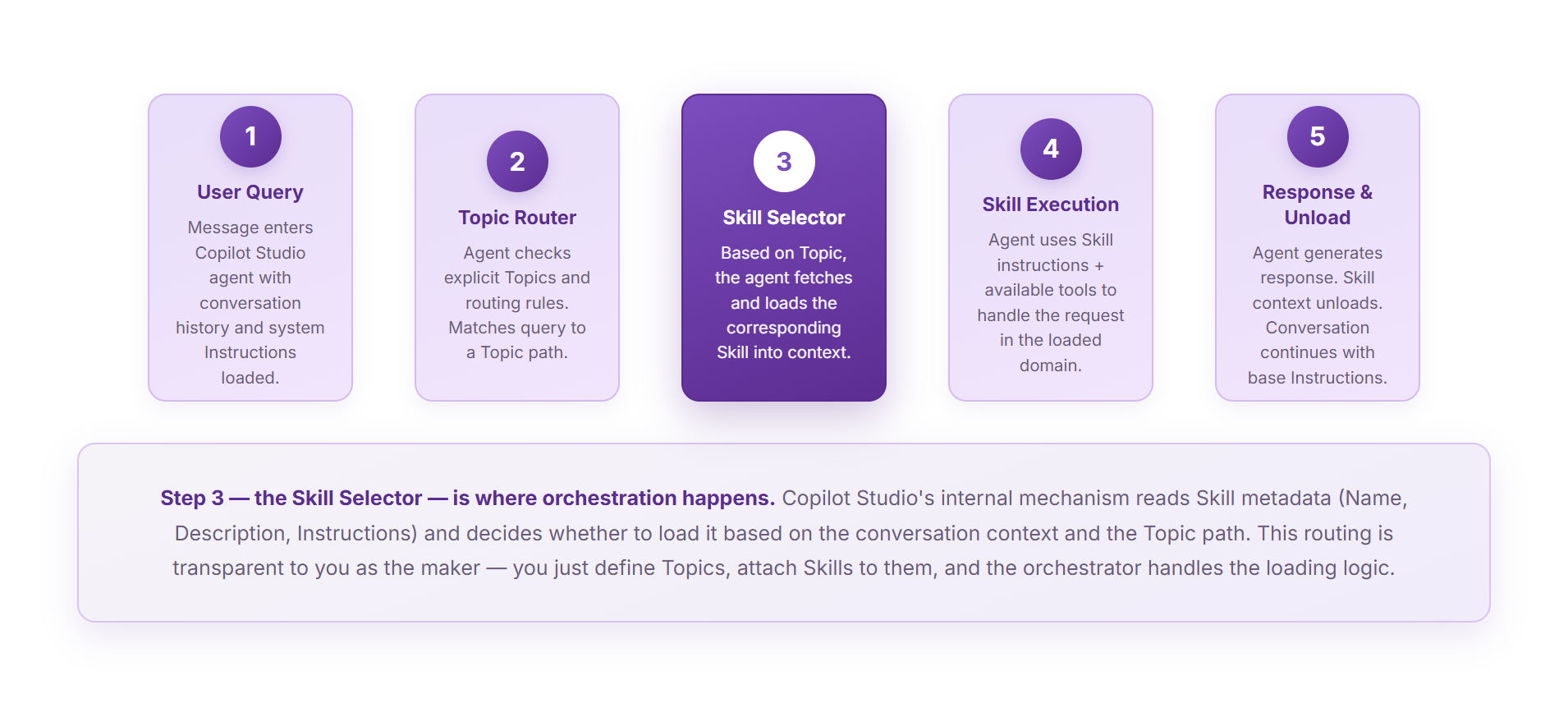
On the next user message, the Orchestrator repeats the flow. Only Skill metadata stays in default context—full instructions load on demand.
- User Message Arrives — A user sends a message to the Copilot Studio agent.
- Orchestrator Evaluates Available Skills — The Orchestrator reads the agent’s Skill list.
- Match Skill to Conversation — The Orchestrator compares the user’s message against each Skill.
- Load Matching Skill — If a Skill matches, its full instructions load into context.
- Agent Uses Skill — The agent follows the Skill’s guidance.
- Response Generated — The agent generates a response and sends it to the user.
The Universal Architecture: How Skills Work Everywhere
Every AI agent system that implements Skills follows the same basic five-step flow.
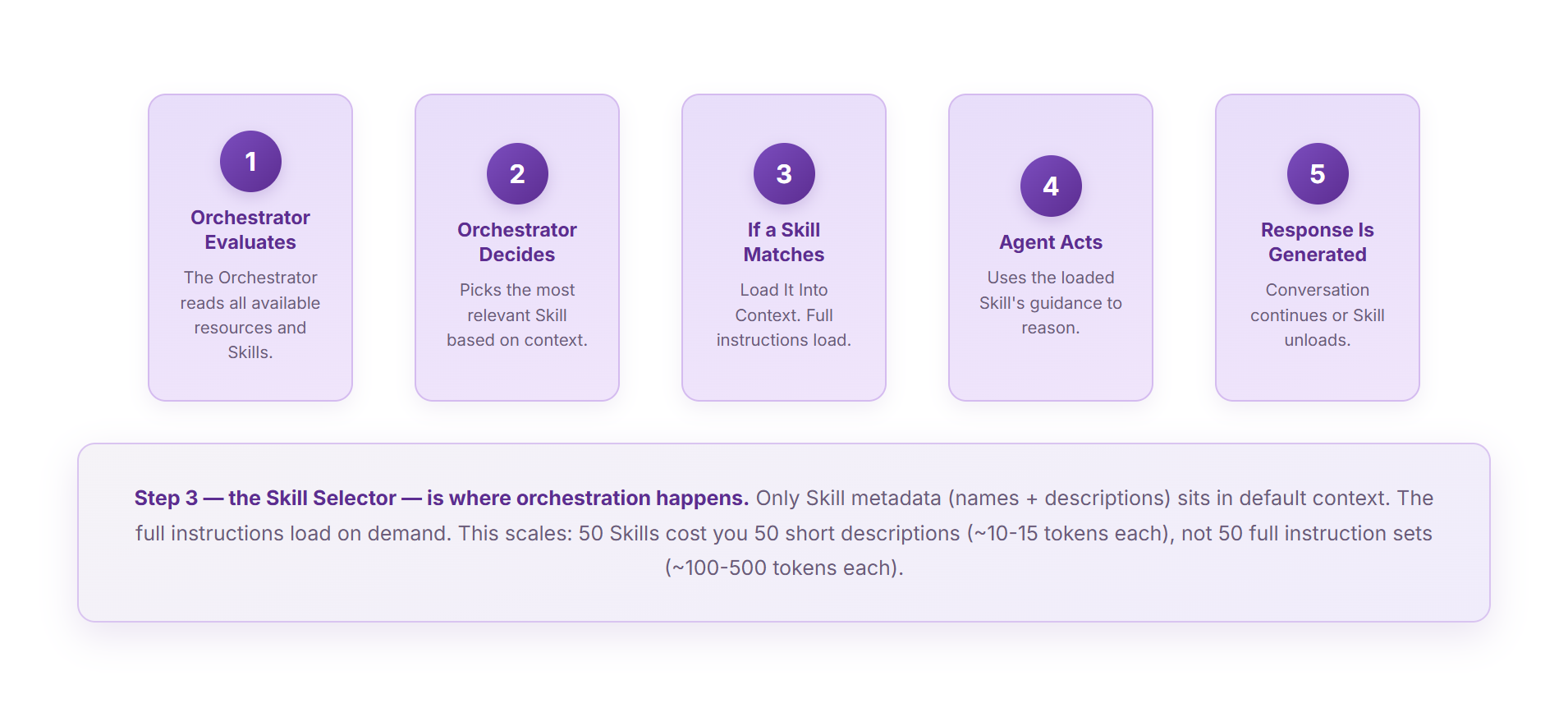
Step 3 — the Skill Selector — is where orchestration happens. Only Skill metadata (names + descriptions) sits in default context. The full instructions load on demand. This scales: 50 Skills cost you 50 short descriptions (~10-15 tokens each), not 50 full instruction sets (~100-500 tokens each).
- Orchestrator Evaluates Available Resources — The Orchestrator reads all available resources.
- Orchestrator Decides Which Skill Matches — Picks the most relevant Skill.
- If a Skill Matches, Load It Into Context — Full Skill instructions load into the context window.
- Agent Acts — The agent uses the loaded Skill’s guidance.
- Response Is Generated — The conversation continues.
Why Skills Matter
1. Manageability
Without Skills, all your operational knowledge ends up in one massive blob. Skills break that into self-contained units. Each Skill is a focused module you can review independently, update without side effects, test in isolation, and reuse in other agents.
2. Context Management
LLMs have finite attention. With Skills, the Orchestrator keeps only metadata (name + description) in default context. When a Skill matches, full instructions pull in. Token impact: 10 Skills as metadata = ~100-150 tokens. 10 Skills loaded in full = ~1000-5000 tokens. That’s a 10-50x difference.
3. Better Accuracy
When the agent has only the guidance it needs for the current scenario, it reasons more clearly. Accuracy improves because the model isn’t swimming through irrelevant instructions.
4. Faster Responses
When a Skill provides step-by-step guidance, the agent doesn’t guess. It follows the Skill’s instructions and executes faster.
Case Study: HR Leave Approval Agent at Contoso Manufacturing
Context rot isn’t theoretical. Contoso’s HR Support agent handled four distinct domains—Leave Requests, Benefits Enrollment, IT Equipment Setup, and Payroll Adjustments—all from a single instructions block containing 110 lines.
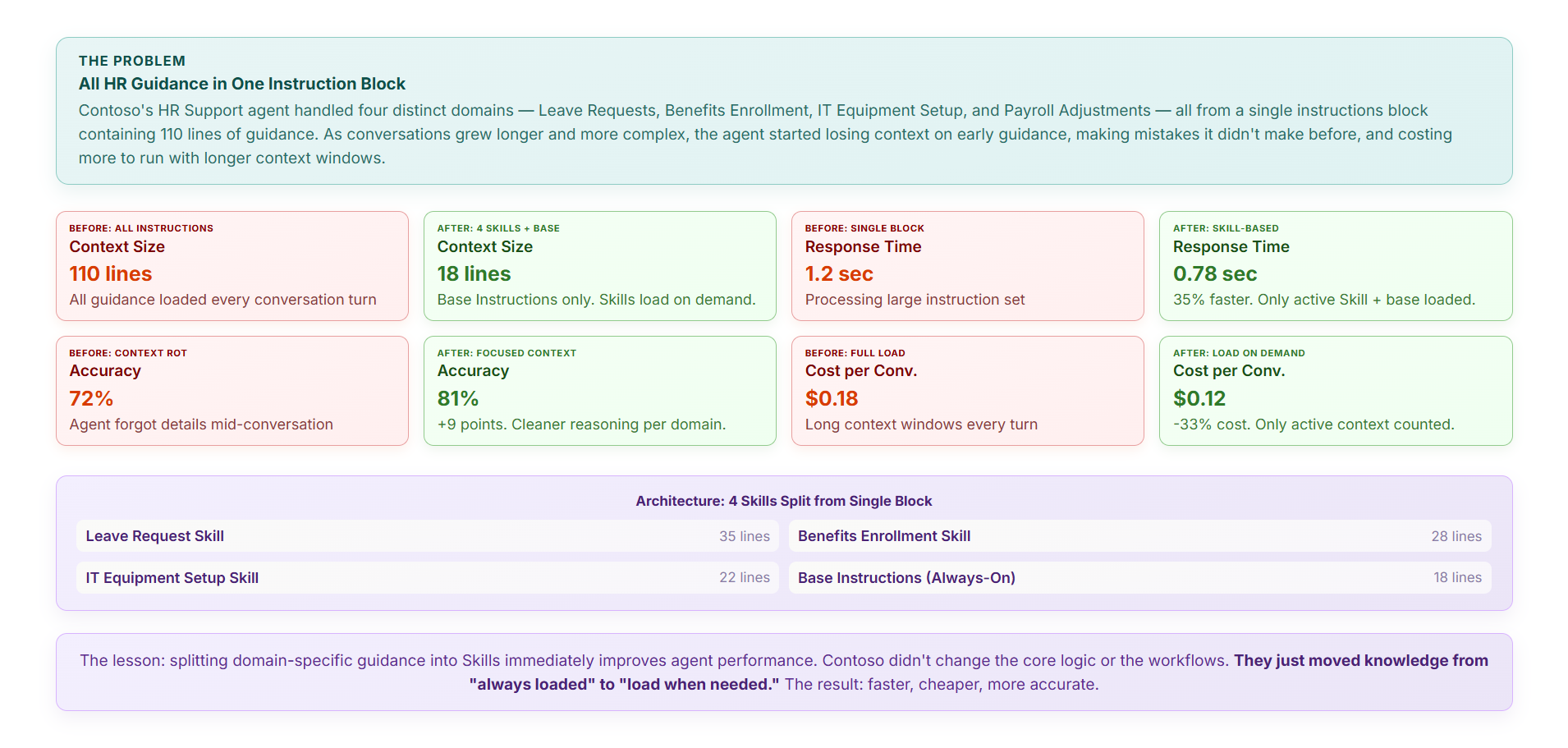
Context reduced from 110 to 18 lines (Base only; Skills on demand). Response time improved 35% (1.2 sec → 0.78 sec). Accuracy improved 9 points (72% → 81%). Cost per conversation dropped 33% ($0.18 → $0.12).
Writing Effective Skill Descriptions
The name and description of a Skill are not documentation for humans. They are the routing signal that tells the Orchestrator when to load the Skill.
Bad description: “Helps with requests.” ← Vague. Good description: “Approve leave requests, calculate leave balances, and handle leave policy questions.” ← Specific and bounded.
The SKILL.md Format
Every Skill follows the same file format—YAML front matter for metadata, Markdown for instructions:
---
name: Handle Leave Requests
description: >
  Approve leave requests, calculate leave balances, and handle questions
  about leave policy. Scope: leave only, not payroll or benefits.
---

## Instructions

When the user asks about leave...
Nine Universal Skill Types
- Procedural: Step-by-step for completing a task.
- Decision-Making: Help decide between options.
- Retrieval: Teach how to look up information.
- Validation: Verify data before acting.
- Format: Teach how to structure output.
- Tool-Specific: Teach how to use a specific tool or API.
- Policy Enforcement: Implement organizational rules.
- Context Reframing: Teach the agent to interpret ambiguous inputs.
- Multi-Step Orchestration: Coordinate across tools and sub-processes.
The Decision Tree: When to Use a Skill
Two simple questions determine whether something belongs in Instructions or a Skill.
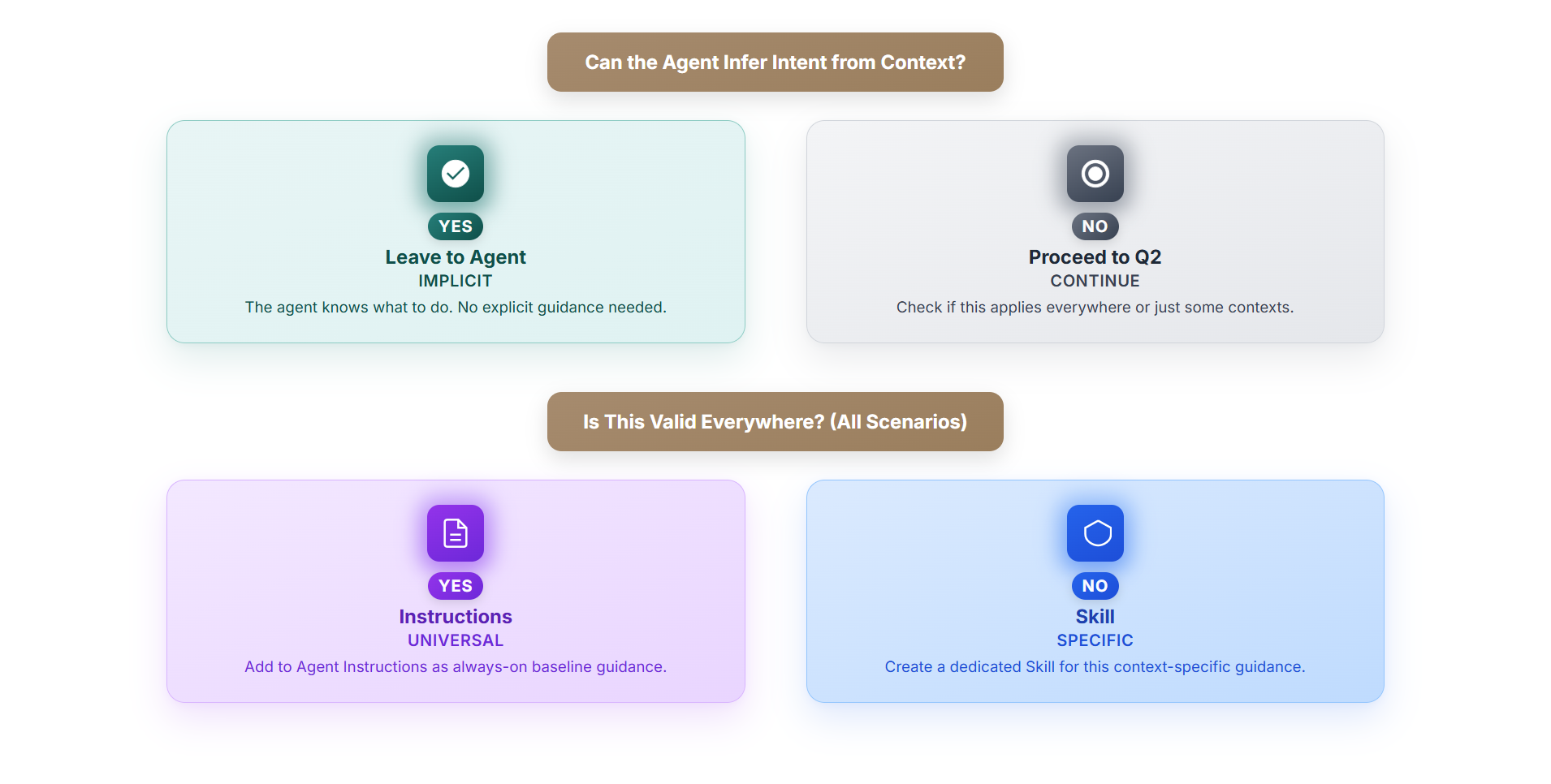
Question 1: Can the Agent Infer Intent from Context? Question 2: Is This Valid Everywhere?
Best Practices for Skills in Copilot Studio
- Write Descriptions Like Routing Metadata — Specific and bounded, not vague.
- Keep Skills Focused — One responsibility per Skill.
- Make Instructions Actionable — Step-by-step where clarity matters.
- Document Tool Choices — If a Skill uses a specific tool, say so.
- Test Your Skill with Real Scenarios — Load it into an agent.
- Version Your Skills — Track changes in source control.
Skill or New Agent in Copilot Studio?
When should you create a Skill vs. a separate agent? The decision hinges on scope and complexity.
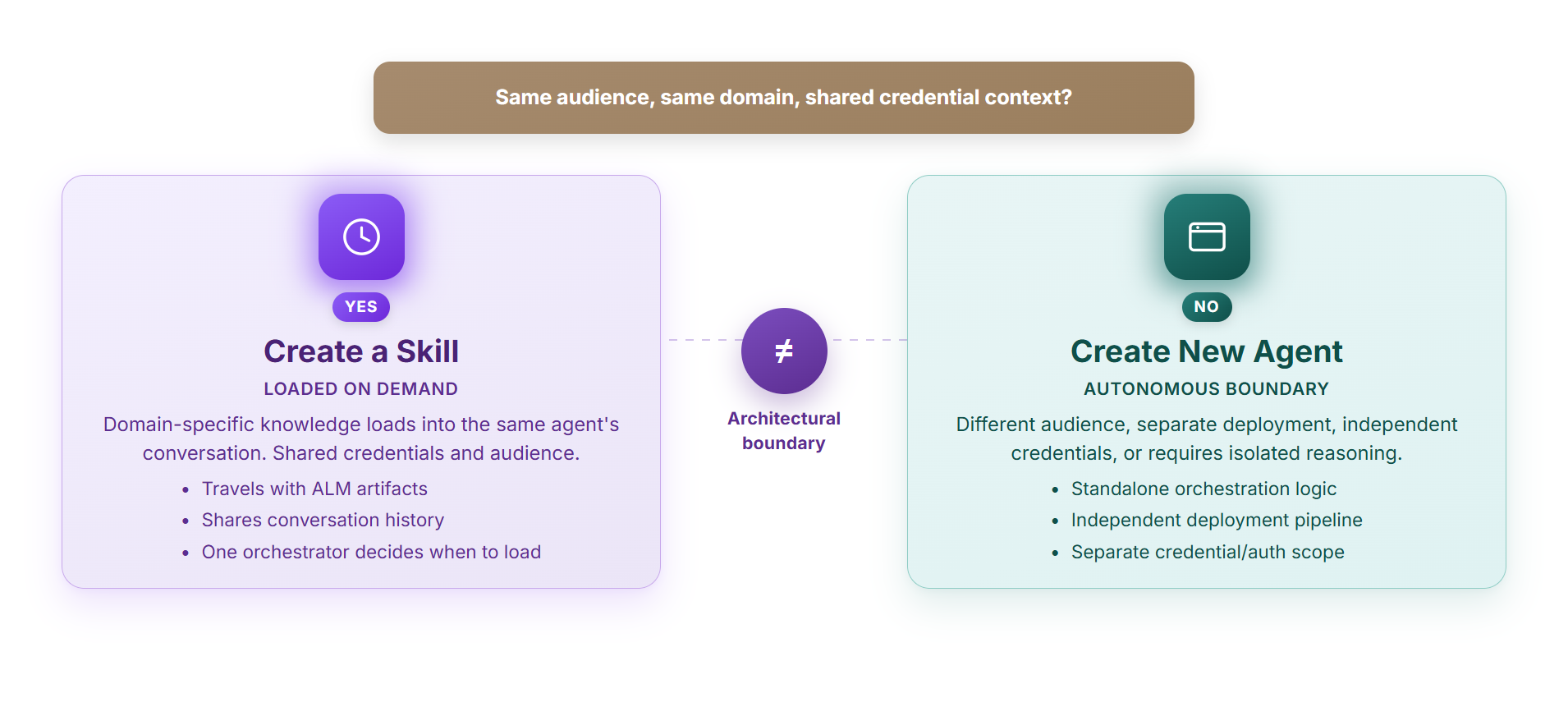
Skills live inside an agent and share its context boundary. They load on demand but assume the same audience, same foundational instructions, same credential context. New agents are separate orchestration units — they have their own reasoning loop, their own Instructions, and can operate with completely different permissions. If the knowledge needs its own deployment schedule or its own authentication model, it’s probably a new agent, not a Skill.
Copilot Studio Skills and the Open Format
Here’s what makes Copilot Studio’s implementation powerful: it doesn’t invent a proprietary format. Copilot Studio Skills follow the Agent Skills open format, an open standard originally developed by Anthropic and adopted across the AI ecosystem.
Portability
A Skill built in Copilot Studio can be exported as SKILL.md or as a .zip bundle with supporting files. The standardized format means you can version it in git, share it with teammates, and potentially move it to other platforms.
Ecosystem
If other Microsoft or third-party tools adopt the Agent Skills open format, Copilot Studio Skills could be reused there. You’re building with a standard the ecosystem is converging on.
Current Limitation: Per-Agent Scoping
As of June 2026, Skills in Copilot Studio are scoped per agent. A Skill created in Agent A stays in Agent A. Microsoft is working on a Skill catalog feature that will let you share across agents and potentially across tenants—that’s the roadmap.
Copilot Studio Skill Resources
A Copilot Studio Skill can bundle more than instructions:
my-skill/
├── SKILL.md              # metadata + instructions
├── scripts/              # optional: Python, JavaScript, Bash
│   └── my_script.py
├── references/           # optional: docs, lookups, data
│   ├── policy.md
│   └── data_matrix.xlsx
└── assets/               # optional: templates, examples
    └── template.html
Bundled Scripts
A Skill can carry executable code (Python, JavaScript, Bash) that runs when the Skill is invoked. This lets you bundle business logic alongside instructions.
Soft-Pointing at Agent Tools
A Skill can reference tools already available in the agent (actions, connectors, flows, MCP servers) without bundling them.
Skills and Agent Capabilities
In Copilot Studio, your agent has multiple resources: Tools & Actions (capabilities that let the agent do things), Knowledge (factual data and reference material), and Skills (situational guidance that tells the agent how to use those tools and knowledge).
Trust and Security
Skills are loaded into the agent’s context and followed as instructions. This means Skills represent trust boundaries. In Copilot Studio, always review Skills before deploying to production. If you upload a Skill from an external source, audit its instructions first.
Getting Started: Your First Skill
- Look at Your Instructions — Anything that starts with “For X scenario, do Y”? Candidate for a Skill.
- Name It Specifically — Not “Helps with requests.” Try “Approve Expense Reports Over $500.”
- Write a Clear Description — Imagine the Orchestrator reading it.
- Write Step-by-Step — Walk through what the agent should do.
- Test It — Try conversations that should trigger it.
- Iterate — Keep tuning until it fires exactly when you want.
Moving Forward with Skills
Skills are early in Copilot Studio, but the core idea is already worth internalizing: keep instructions for universal guidance, move everything situational into Skills. The agent pulls in the right Skill when the conversation calls for it.
Copilot Studio Skills ALM Lifecycle
Skills follow standard ALM practices: create in Copilot Studio, package as SKILL.md or .zip, version in git, deploy through solution export, monitor in production.
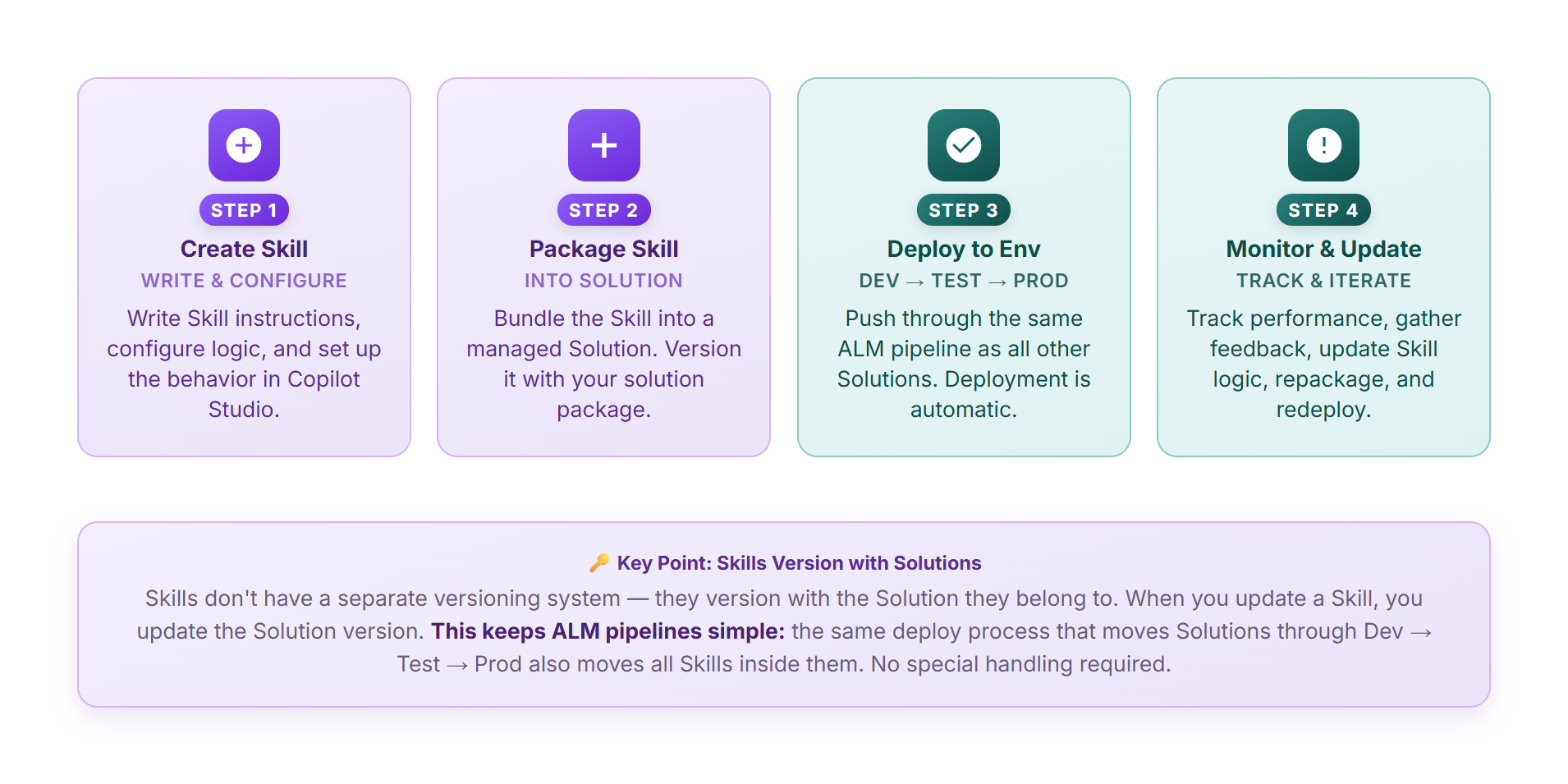
Skills travel with the agent through solutions and ALM. When you export the agent to another environment, Skills export too—no manual copy-paste needed.
Skills are not about doing more with less. They’re about keeping your agent sane as you ask it to do more.