


Ever asked an AI agent a question, gotten a confident answer, and only later found out it skipped something important sitting right next to it? That’s the failure this article is about.
A Copilot Studio agent with generative orchestration (the planning layer that decides, on its own, which tools and knowledge sources to call for a given question) will confidently answer a question using exactly one source — the first one whose name and description seem to match — even when a second source it also has access to contains information that changes the answer.
This is not a bug. It is the documented, expected behavior of the planner. Microsoft’s own guidance on authoring instructions for generative orchestration is explicit about this: the agent uses tool and knowledge source names and descriptions to decide what to call, and you only need to write instructions for the cases where that automatic choice is genuinely ambiguous. Left to its own devices, the orchestrator optimizes for “this source answers the question,” not for “this is the complete answer.” Those are not the same thing.
This article builds a small, fully reproducible scenario where that gap is visible, measurable, and fixable.
The Scenario: Expense Limits With a Standing Regional Carve-Out
An HR or Finance assistant that tells employees whether an expense falls within policy is a scenario almost every internal-tools builder has actually shipped. The agent built for this case study is called Expense Policy Assistant, and it has access to two sources:
🔧 Source A — GetExpenseLimit
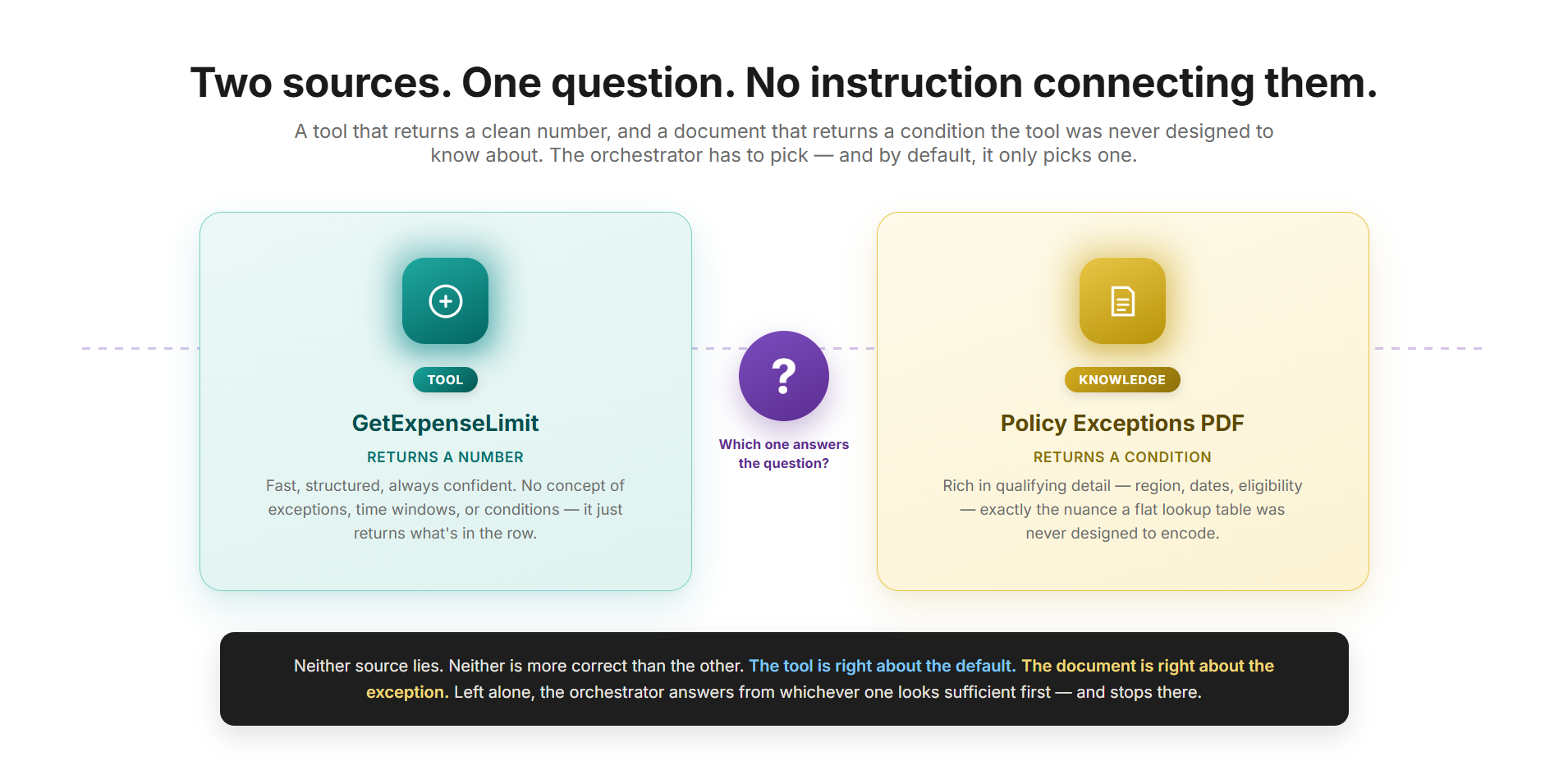
Action tool. Reads a lookup table and returns the current per-category spending limit. Fast, structured, always confident. No concept of exceptions, time windows, or regional carve-outs — it just returns whatever is in the row.
📄 Source B — Policy Exceptions PDF
Knowledge source. A short policy memo announcing a temporary exception: for Q3 2026, the Travel category limit is raised for one specific employee population. Rich in qualifying conditions a flat lookup table was never designed to encode.
Neither source lies. Neither source is “more correct” than the other. The tool tells the truth about the baseline. The PDF tells the truth about the exception. The correct answer requires both, read together, in the right order, with the exception explicitly checked.
| Source A: GetExpenseLimit | Source B: Policy Exceptions PDF | |
|---|---|---|
| Nature | Action / tool | Knowledge source (PDF) |
| Returns | Current baseline limit per category | Time-boxed exceptions with conditions |
| Travel limit it reports | $500 | “$750 for EMEA client-site travel, Q3 2026 only” |
| Knows about the other source? | No | No |
| Correct in isolation? | Yes, as a baseline | Yes, as a condition |
| Correct as a complete answer? | No | No |
This structure — a tool that’s right about the default and a document that’s right about the exception, with neither aware the other exists — is the general shape of a large number of real orchestration failures. Pricing overrides, temporary compliance rules, region-specific carve-outs: same pattern, different domain.
Why the Planner Stops at the First Match
Generative orchestration in Copilot Studio works by having an LLM-driven planning layer interpret the user’s request, decide which tools, topics, or knowledge sources to invoke, and assemble a plan before generating a response. Tool and knowledge source descriptions are the primary signal the planner uses to make that call. The cleaner and more specific a tool’s name and description, the more confidently the planner routes to it — and the less likely it is to also look elsewhere, unless something tells it to.
The tool doesn’t know the PDF exists. The PDF doesn’t know the tool exists. Only the instructions layer can connect them — and only if that connection is written down.
— vsgueradev.com
A tool named GetExpenseLimit with a description like “Returns the current spending limit for an expense category” is, from the planner’s point of view, a complete answer to “what’s my travel limit?” It did its job. It returned a number. There’s no signal in that tool’s response telling the orchestrator “by the way, go check if there’s an exception somewhere else.”
This is also why the failure is invisible during casual testing. The agent doesn’t error. It doesn’t hesitate. It returns a confident, well-formatted, completely plausible answer that happens to be wrong for a meaningful subset of users.
Watching the Failure Happen
Set up the agent with both sources attached but no instruction connecting them. This part matters as much as the fix that follows — without seeing the failure happen, there’s no way to tell whether the fix actually did anything, or whether the agent would have gotten it right anyway.
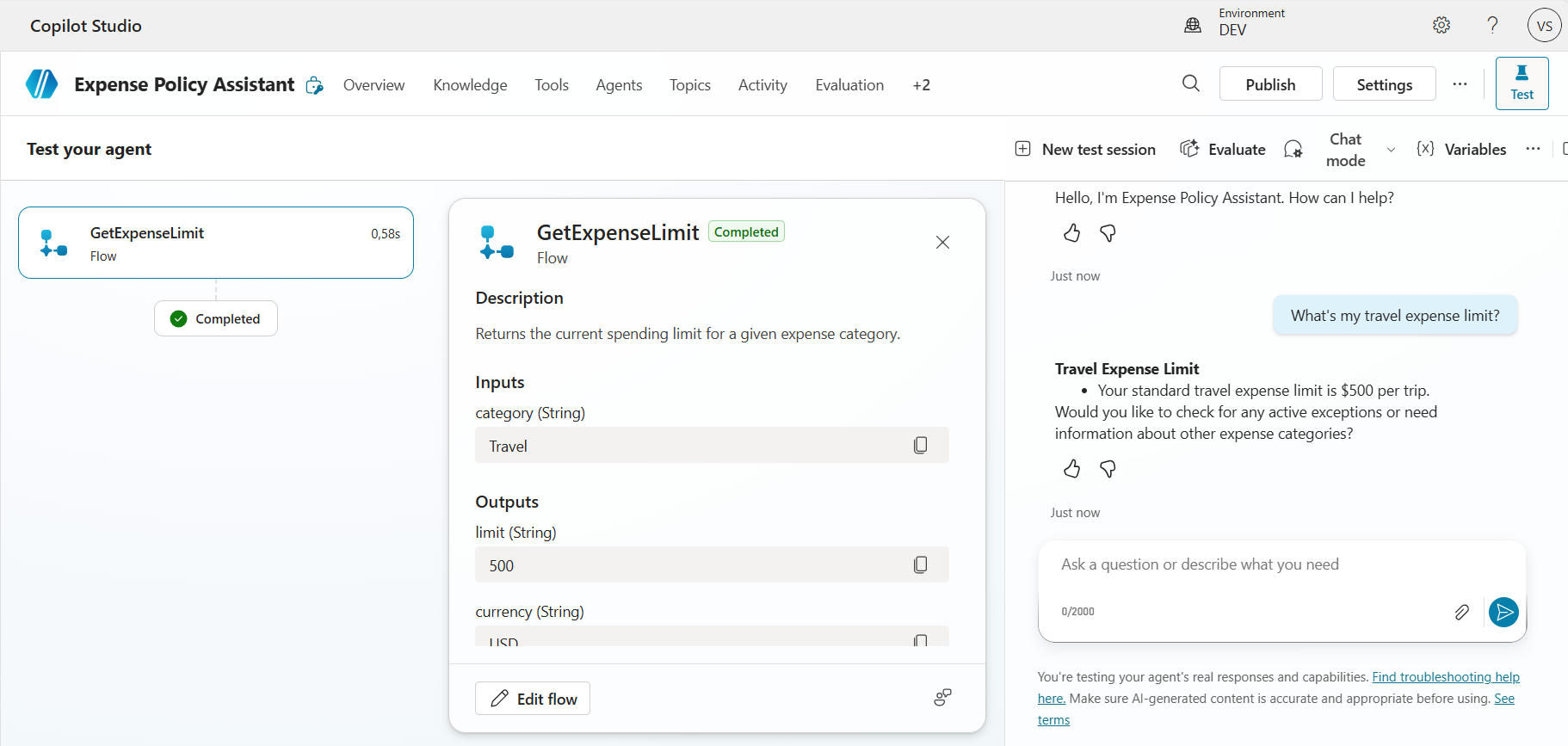
“What’s my travel expense limit?”
Test query
Observed behavior without instructions
This showed up in one of two ways, and both count as the same underlying failure.
The cleaner version: the orchestrator calls GetExpenseLimit, gets back $500, and answers immediately. The activity map shows a single step — the tool call. No knowledge search happens, because nothing told the planner this question might also need the policy document, and the tool’s response gave it no reason to think it was incomplete.
The more revealing version: the activity map shows the tool call, then a knowledge search against the policy PDF — and the final answer still only states $500, often closing with a polite line like “if you need information about exceptions, let me know.” Here the orchestrator did find the relevant content. It just didn’t treat finding it as a reason to change the answer. This is arguably the better failure to capture, because it isolates the exact gap this article is about: retrieval worked, synthesis didn’t.
⚠️ Result either way
“Your travel expense limit is $500.” Correct for most employees, wrong for anyone on an EMEA client-site engagement in Q3 2026 — and the agent has no way of knowing which group the user belongs to unless it surfaces what the PDF says.
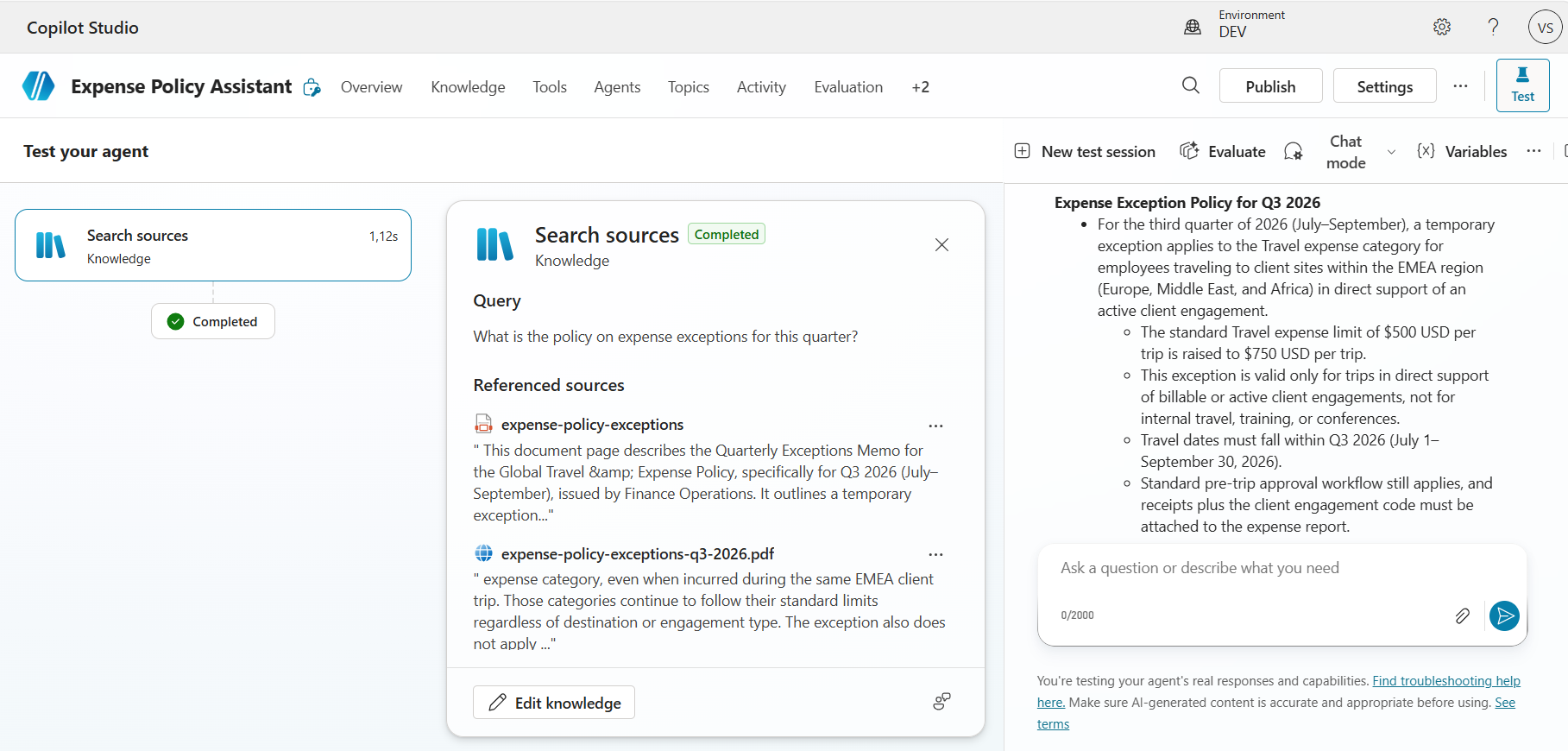
The sanity-check query
Used to isolate the knowledge source from the orchestration question:
“What’s the policy on expense exceptions this quarter?”
This one works correctly even without instructions, because the question has no obvious tool match — GetExpenseLimit doesn’t sound like it answers “what’s the policy,” so the planner routes to knowledge on its own. The query matters precisely because it isn’t about orchestration: a correct answer here confirms the knowledge source is reachable and searchable, which isolates the failure above to a planning problem rather than a configuration one.
Why Attaching the PDF Alone Doesn’t Fix It
It’s tempting to think the fix is simply attaching the PDF and trusting the model to be thorough. It won’t be, and that’s not a model weakness — it’s the documented design. Knowledge search and combining a result with a tool call in the same turn are two different planning decisions; the orchestrator has to decide a tool call alone isn’t sufficient before it will go looking for more, and nothing in the tool’s response signals that.
This is the same root cause Microsoft’s own orchestration documentation calls out directly: instructions are the layer to use specifically for the cases where the right source is ambiguous or where multiple sources need to be combined, because the model won’t infer that requirement from descriptions alone, no matter how good those descriptions are.
Anatomy of the Fix
Add the following to the agent’s Instructions field, replacing whatever is already there rather than appending to it:
When a user asks about an expense limit, spending limit, or budget
cap for any category:

1. Always call GetExpenseLimit first to retrieve the current
   baseline limit for that category.
2. Then check the "Expense Policy Exceptions" knowledge source
   for any active exception that applies to the same category
   and the current quarter.
3. If an exception exists and its conditions could plausibly
   apply to the user (for example, a named region, project
   type, or employee group), state the exception clearly,
   including its conditions and that it is temporary.
4. If no exception is found, state the baseline limit from
   GetExpenseLimit with no further caveats.
5. Never present the baseline limit alone for a category that
   has a known active exception — always surface the exception,
   even if you can’t confirm the user personally qualifies for it.
🎯 Replace, don’t append
If the agent was created from a natural-language description, Copilot Studio auto-generates a fuller instruction set — Purpose, Guidelines, Skills, Step-by-step sections — and these often look like they already cover the exception case, with a line like “check for active exceptions.” That line sounds right but isn’t operational: it doesn’t say which source to check, in what order relative to the tool call, or what to do if the two sources disagree. Layering the five-line block on top of that broader structure leaves the vague language and the precise rule competing, and which one wins isn’t reliable. A clean replacement removes the ambiguity outright.
Five things about why the instruction itself is written this way
- It names the trigger condition narrowly. “When a user asks about an expense limit…” scopes the instruction to the actual ambiguous case, rather than a blanket “always check knowledge for everything,” which would slow down every unrelated query.
- It specifies order, not just inclusion. The baseline number is what makes the exception meaningful (“$750 instead of $500”) — checking the PDF first risks presenting the exception as the whole answer and never stating what it’s an exception to.
- It states what to do when the sources disagree, not just to consult both. Step 5 is the actual fix for the “consulted but didn’t synthesize” failure seen earlier. Without it, an agent could call both sources and still default to the baseline.
- It keeps the volatile fact out of the instruction text. The instruction never says “$750 for EMEA” — that number lives only in the PDF. The instruction defines the behavior pattern; the knowledge source supplies the fact.
- It tells the agent how to handle uncertainty about applicability. Surfacing the exception conditionally, rather than silently suppressing or silently applying it, is the safer default for a policy-adjacent answer.
Watching the Fix Take Effect
Same query, same agent, same tool, same knowledge source — only the instructions changed.
“What’s my travel expense limit?”
Repeat query
Observed behavior with instructions: the activity map now shows two steps in sequence — a call to GetExpenseLimit, followed by a knowledge search against the policy PDF — and the response merges both: the standard limit, then the Q3 2026 exception with its conditions, explicitly flagging that the higher amount only applies to EMEA client-site travel during the current quarter.
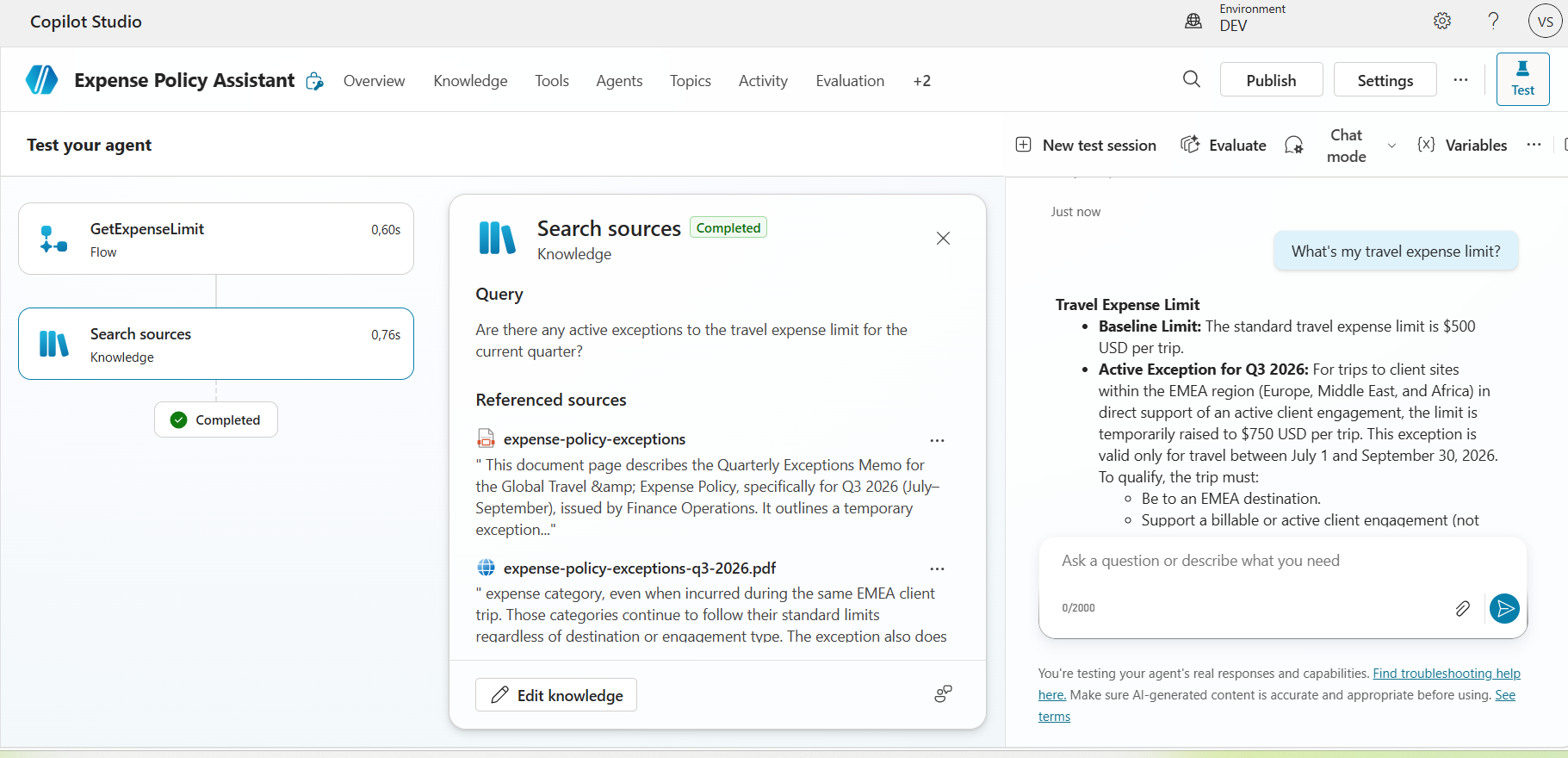
“Your standard travel expense limit is $500. There’s an active exception for Q3 2026, though: if you’re traveling for an EMEA client-site engagement, the limit is raised to $750 for this quarter only.”
— Expense Policy Assistant, after the fix
That’s a materially more useful and more defensible answer, and the only thing that changed between the two runs was five lines of plain-language instruction. No new tool. No new knowledge source. No code.
Two details worth noting on their own
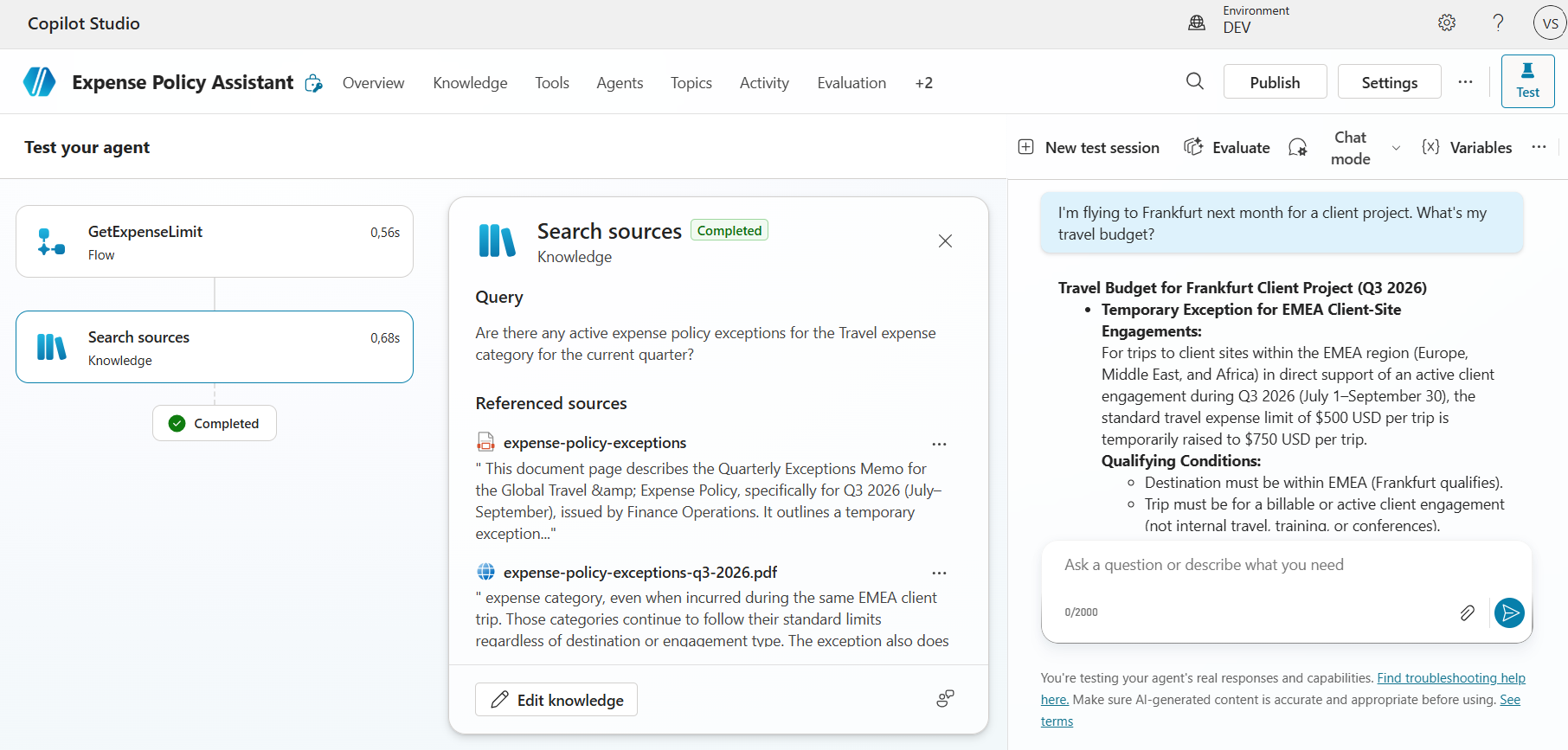
First, the orchestrator didn’t pass the user’s literal question into the knowledge search — it reformulated it into something more targeted (“Are there any active exceptions to the travel expense limit for the current quarter?”) before searching. The instruction shaped not just whether a search happened, but what was searched for.
Second, a follow-up question naming a specific destination — “I’m flying to Frankfurt next month for a client project, what’s my travel budget?” — produced an answer that resolved one of the PDF’s stated conditions against the user’s own detail: “Destination must be within EMEA (Frankfurt qualifies).” That’s reasoning the instruction never explicitly asked for; it asked the agent to surface conditions clearly, and checking a named city against “EMEA” is the model doing more synthesis than the literal text required — a sign the instruction is functioning as a behavior pattern, not a rigid checklist.
Scoping held up under negative controls, too
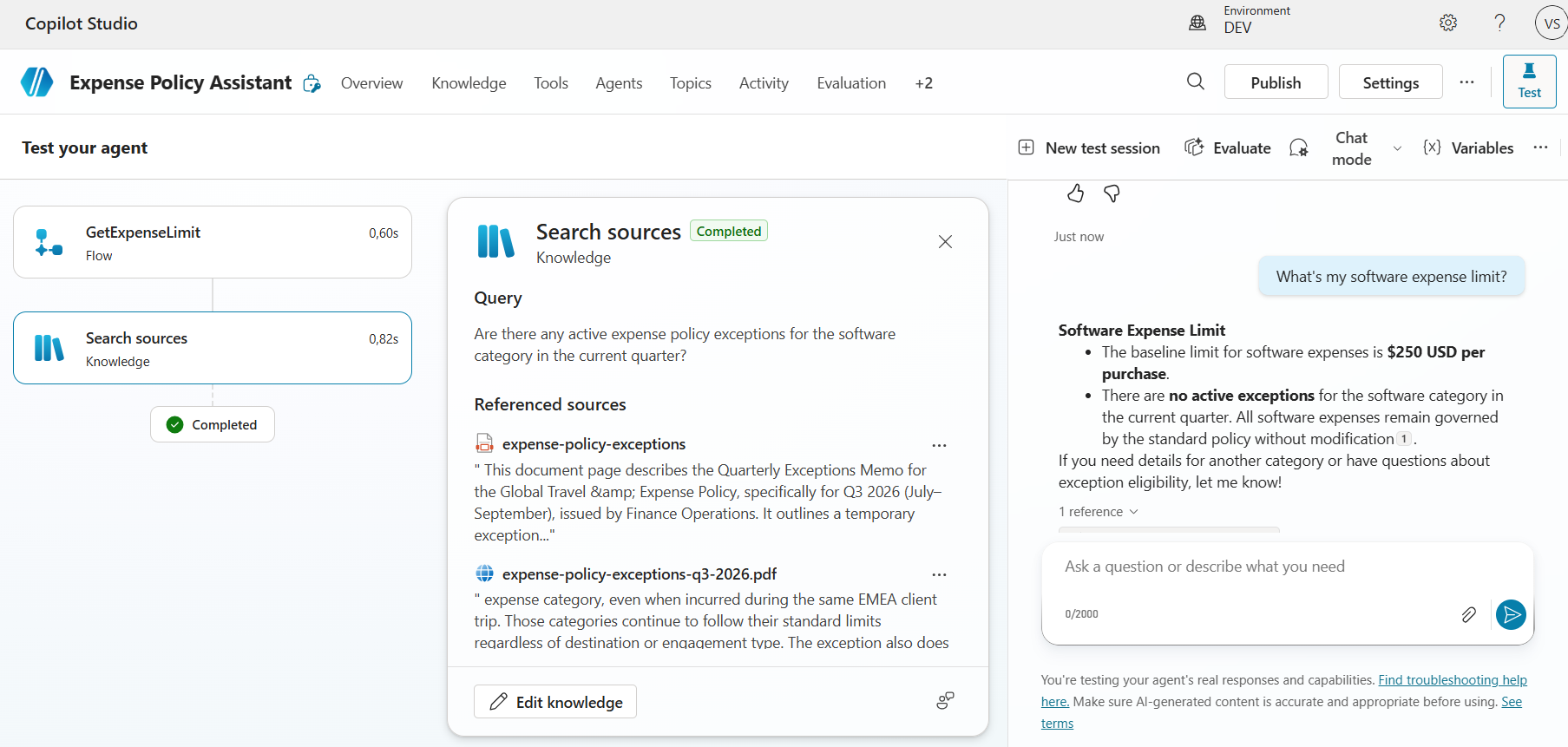
Two categories with no active exception — Software and Training — were tested specifically to check whether the instruction’s “check knowledge for any category” clause would cause the Travel exception to bleed into unrelated answers. It didn’t, on either: both produced the same two-step pattern (the knowledge check still runs, as instructed) and both came back clean — a stated baseline, an explicit note that no exception applies, nothing about EMEA or Q3 2026 anywhere in the response. An instruction that fixes the original case but contaminates an unrelated one isn’t actually fixed; it’s broken differently, which makes this result as load-bearing as the main fix itself.
Four Ways This Lab Can Go Sideways on You
Running this exact test in a different tenant may produce one of a few variants instead of the clean before/after above. Each has a different fix, and conflating them wastes time.
It calls knowledge first and skips the tool entirely
Usually means the knowledge source’s description is more specific or more confidently worded than the tool’s description for this query shape. Fix the tool’s description before touching instructions.
It calls both but still reports only the baseline
The “consulted but didn’t synthesize” failure, and exactly what the “never present the baseline alone” rule targets. Check the activity map: zero knowledge results usually means the PDF isn’t indexed yet.
The exception leaks into unrelated categories
Asking about Software and getting the Travel exception back means the instruction’s scoping is too broad in practice. Tightening the knowledge source’s description, or splitting documents by category, usually resolves this without touching the instruction.
Results shift between a fresh session and a long one
Generative orchestration can weigh prior conversation context when planning a response. Always test from a fresh session when comparing before/after — a context-loaded comparison gives a false read.
What to Carry Over Into a Real Agent
- Identify pairs of sources where one provides a current/structured value and another provides exceptions or conditions the first source has no way to encode.
- Write tool and knowledge source descriptions that are accurate and specific on their own — instructions should resolve genuine ambiguity, not patch a vague description.
- Name the instruction’s trigger condition narrowly (the type of question), not broadly (“always check everything”).
- Specify call order when order changes the meaning of the result, not just “use both.”
- State explicitly what the agent should do when the two sources disagree — this is usually the missing piece, not the act of consulting both.
- Keep the volatile fact inside the knowledge source, not inside the instruction text, so updates don’t require editing agent configuration.
- Test from a fresh conversation, not a continuation of a session used for debugging.
- Use the activity map during testing to confirm which sources were actually called and in what order — don’t infer it from the final answer alone.
Files for This Exercise
The before/after comparison described above is built on two files attached to this article:
The sections above cover the full sequence: testing with no instruction, the instruction itself, and what changes once it’s in place — including the negative controls that confirm the fix is scoped correctly rather than just broadly true.
The orchestrator isn’t lazy. It’s literal — and literal needs to be told.