



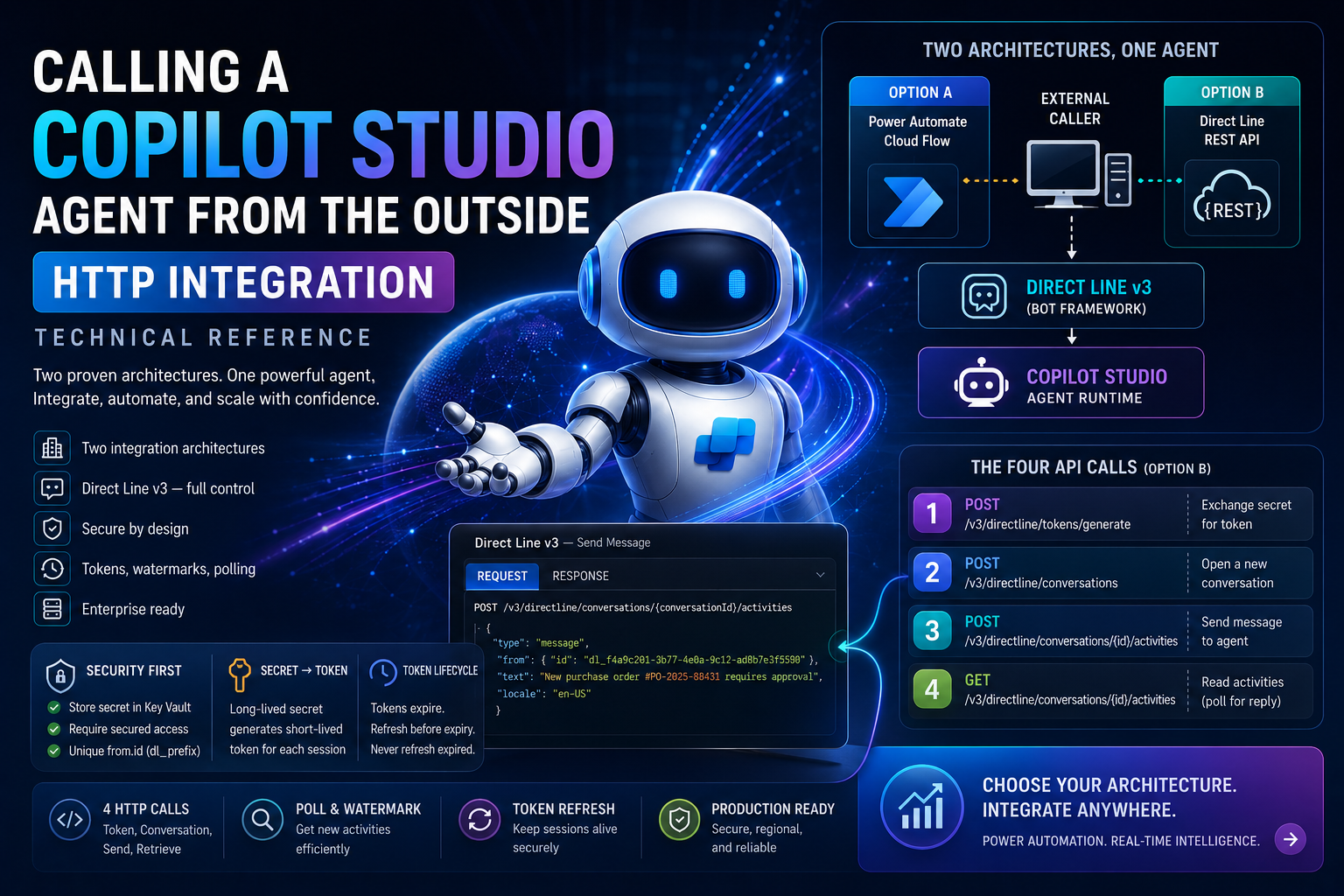
Most tutorials show you how to talk to a Copilot Studio agent through the built-in chat panel. That is the easy case. The scenarios that actually matter in enterprise integration are the ones where no human is sitting at a keyboard — a backend service detects a new record in Dataverse, a nightly batch job finishes, an IoT event arrives. Something needs to wake up the agent and hand it a payload programmatically. That is what this guide covers.
There are two integration paths. One routes through Power Automate. The other speaks directly to the Bot Framework REST API. Both converge on the same Direct Line channel underneath, but they make very different trade-offs on licensing, latency, setup complexity, and whether you can retrieve the agent’s reply synchronously.
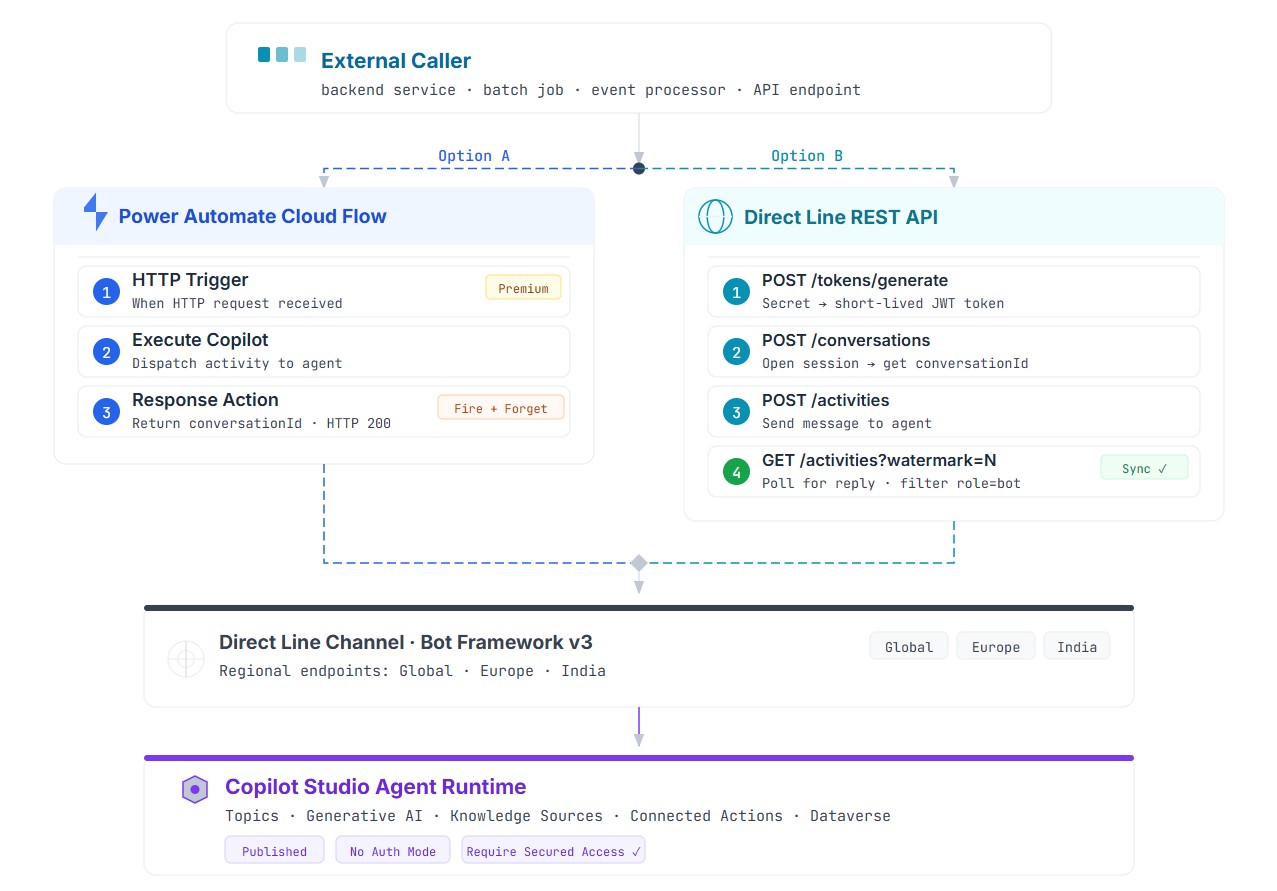
Diagram 01 — Both integration paths converge on Direct Line v3. Option A routes through Power Automate. Option B calls the REST API directly. Click to enlarge.
Terms You Need to Know Before the Code
Direct Line — the Bot Framework channel that exposes a Copilot Studio agent as an HTTP-accessible service. Direct Line v3 is the current version; v1 and v2 are deprecated.
Direct Line Secret — a long-lived credential from the Copilot Studio Web channel security panel. Its only legitimate use is to generate a short-lived token. It should never appear in application code.
Direct Line Token — a short-lived JWT scoped to a single conversation. This is what your code uses for all API calls. Tokens expire after 1800 seconds; they can be refreshed before expiry but cannot be revived once expired.
Conversation — a stateful session with a unique conversationId. All activities — messages sent and received — flow within this context until the session times out.
Activity — the unit of communication in the Direct Line protocol. A text message is an activity of type "message". Events, typing indicators, and end-of-conversation signals are also activities with different type values.
Watermark — a server-side cursor that marks your position in the activity log. Pass it with GET requests to retrieve only new activities since the last read. It is an opaque string — never parse or increment it manually.
Execute Copilot — a Power Automate connector action that invokes a published agent. It is fire-and-forget by design: it dispatches the message and returns the conversationId, but does not return the agent’s reply text.
BCP-47 — the language tag standard used in the locale field of activities. Examples: en-US, it-IT, fr-FR.
Agent Configuration — Required Before Any Integration
These steps happen once in Copilot Studio and apply to both Option A and Option B. Nothing works without them.
Step 1 — Publish the Agent
An unpublished agent is invisible to the Direct Line channel. Go through the standard Copilot Studio publish flow before attempting any external connection.
Step 2 — Set Authentication Mode
Navigate to Settings → Security. Set authentication to No Authentication. This setting controls whether end users must authenticate via an identity provider — it does not remove the Direct Line secret requirement. You are decoupling user identity from channel access, not removing security.
Step 3 — Configure Web Channel Security
Still in the Security panel, locate Web channel security. Copy the Direct Line secret — store it in Azure Key Vault, never in source code. Then enable “Require secured access” to force Direct Line to reject any request without a valid token.
⚠️ After toggling “Require secured access,” the change takes up to two hours to propagate across Microsoft’s infrastructure. The previous setting remains active during that window. Plan this in advance for production deployments.
Regional Endpoints
Direct Line exposes region-specific base URLs. Using the wrong one for your environment can cause routing errors or data residency violations.
| Region | Base URL |
|---|---|
| Global (default) | https://directline.botframework.com |
| Europe | https://europe.directline.botframework.com |
| India | https://india.directline.botframework.com |
Option A — Power Automate Cloud Flow
Your external system sends an HTTP POST to a Power Automate flow endpoint. The flow picks it up, invokes the agent via the Execute Copilot connector, and returns the conversationId with HTTP 200. The agent then runs asynchronously. The caller has already received its acknowledgment and moved on.
This is a fire-and-forget pattern. The caller is not blocked waiting for the agent to finish. It hands off the message payload and continues its own execution.
Activity Payload
{
  "type": "message",
  "from": {
    "id": "erp-system-invoker-001"
  },
  "text": "New purchase order #PO-2025-88431 requires approval",
  "locale": "en-US"
}| Field | Required | Description |
|---|---|---|
type | Yes | Always "message" for text-based triggers |
from.id | Yes | Logical identifier for the sending system |
text | Yes | The message or instruction sent to the agent |
locale | Recommended | BCP-47 language tag — influences language processing |
💡 The synchronous reply gap
Execute Copilot is fire-and-forget. It dispatches and completes immediately. If your system needs the agent’s actual reply text in the same transaction, combine Option A with a Direct Line polling call on the conversationId — or switch to Option B entirely.
Option B — Direct Line REST API
Option B removes the Power Platform layer entirely. Your code speaks directly to the Bot Framework REST API — four HTTP calls, deterministic latency, no Power Platform license dependency. More importantly, you can read the agent’s actual reply text within the same session, using a polling loop against the activities endpoint.
The Credential Chain
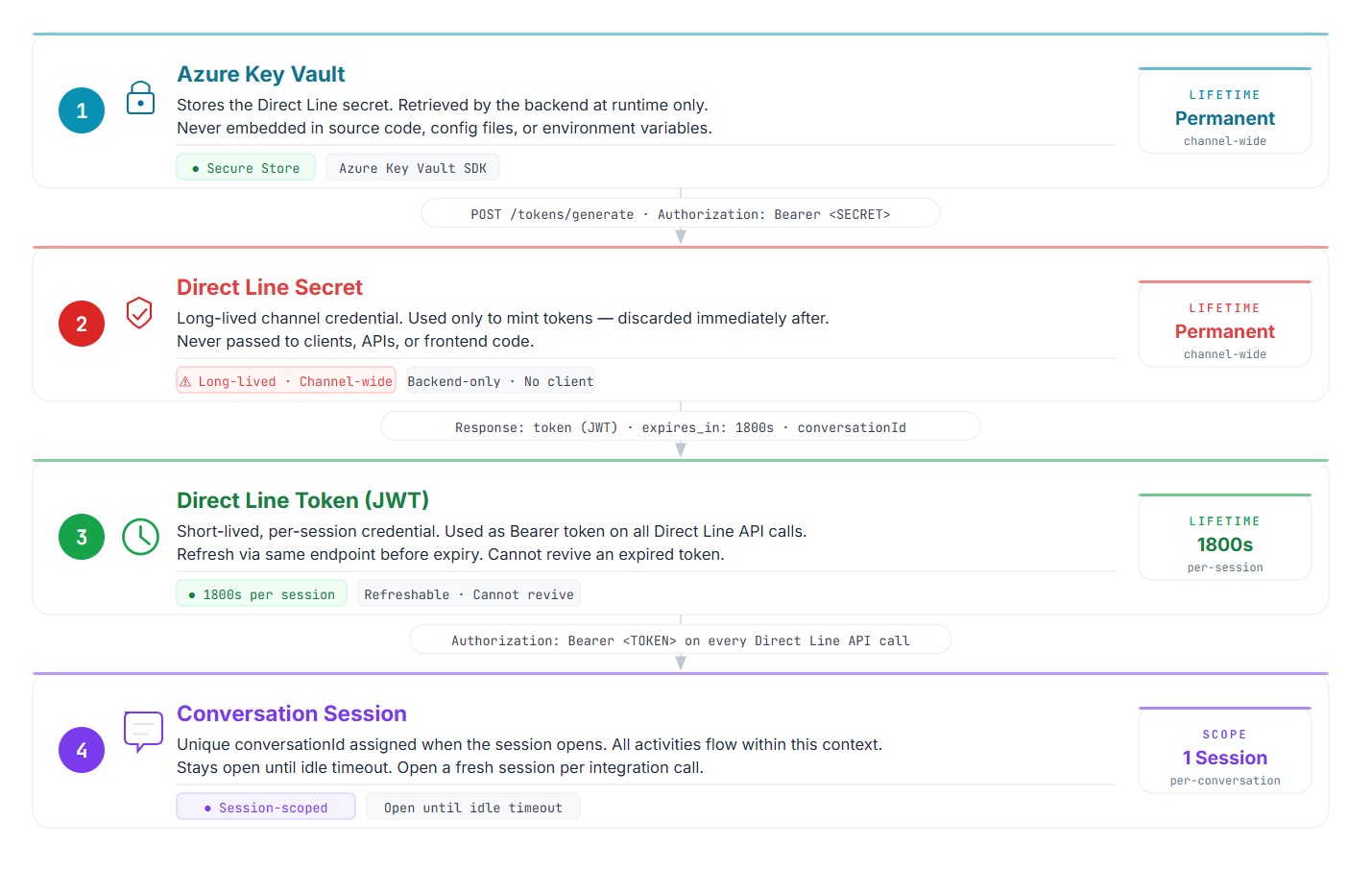
Diagram 02 — The secret generates the token; the token drives all API calls; neither is ever exposed outside its designated layer. Click to enlarge.
The rule is simple: the secret generates the token at runtime, then gets discarded from the execution context. The token does the actual work. Tokens can be refreshed before they expire by posting to /tokens/generate with the current token as Bearer — not the secret. Once a token expires, generate a new one from the secret.
The Four API Calls
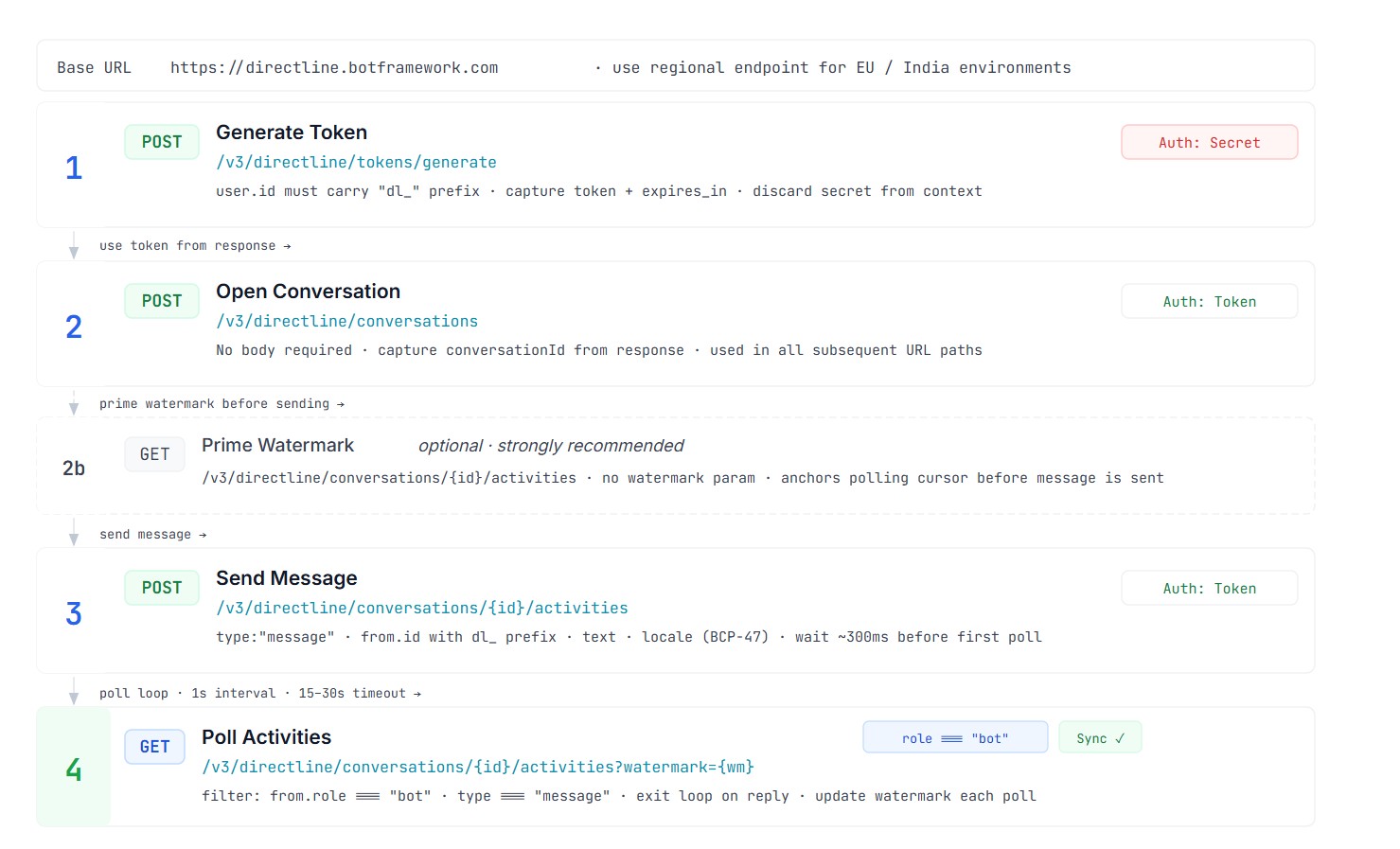
Diagram 03 — Full call sequence for Option B. Call 2b (prime watermark) is optional but strongly recommended. Click to enlarge.
Call 1 — Generate Token
POST /v3/directline/tokens/generate
Authorization: Bearer
Content-Type: application/json
{
"user": {
"id": "dl_f4a9c201-3b77-4e0a-9c12-ad8b7e3f5500",
"name": "Integration Service"
}
}⚠️ The user.id field must begin with the dl_ prefix. This is a Direct Line protocol requirement. A plain UUID or email without the prefix will fail validation.
Call 2 — Open Conversation
POST /v3/directline/conversations
Authorization: Bearer
No request body required. Capture the conversationId from the response — it is used in the URL path for all subsequent calls. The response also includes a streamUrl for WebSocket streaming, which you can ignore when using the polling approach.
Call 2b — Prime the Watermark
GET /v3/directline/conversations//activities
Authorization: Bearer
Run this GET immediately after opening the conversation, before sending the message. It anchors the watermark cursor at the correct starting position. Without this step, your first poll may return activities from the wrong point in the activity log.
Call 3 — Send the Message
POST /v3/directline/conversations//activities
Authorization: Bearer
Content-Type: application/json
{
"type": "message",
"from": { "id": "dl_f4a9c201-3b77-4e0a-9c12-ad8b7e3f5500" },
"text": "Process new onboarding request for account A-88231",
"locale": "en-US"
}This call returns immediately after message delivery. Wait approximately 300ms before the first poll to give the agent time to begin processing.
Call 4 — Poll for the Reply
GET /v3/directline/conversations//activities?watermark=
Authorization: Bearer
Filter the response by from.role === "bot" and type === "message" to isolate the agent’s reply. The replyToId field links the bot reply to the originating message. The inputHint: "acceptingInput" on the last activity confirms the agent’s turn is complete. Update the watermark from each response before the next poll.
How the Watermark Polling Loop Works
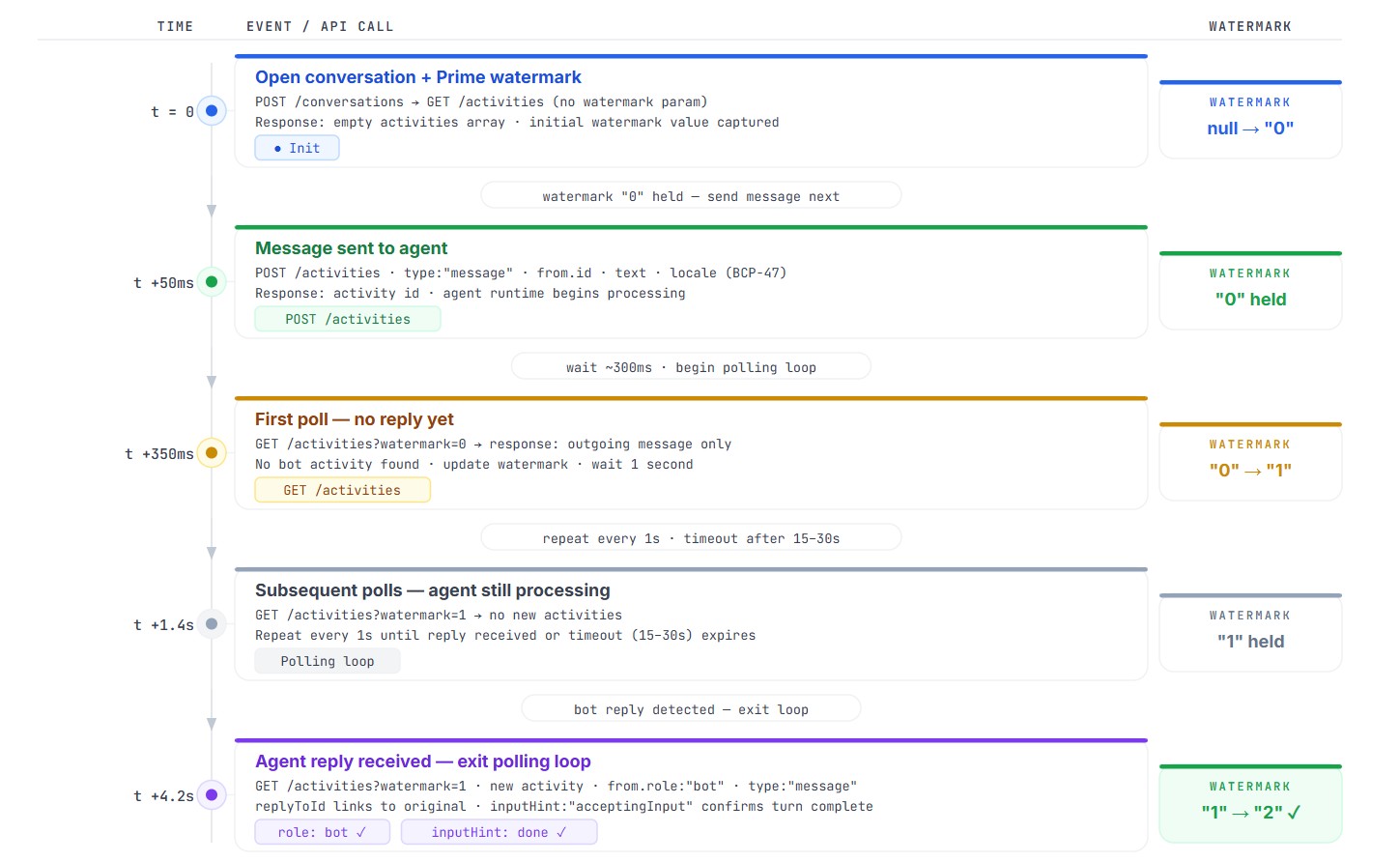
Diagram 04 — Five-step polling timeline. The watermark cursor advances with each GET call, returning only activities newer than the last read position. Click to enlarge.
The watermark is the key to clean polling. Without it, every GET returns the full conversation history from the beginning — you would reprocess the same messages on every retry. With it, each poll returns only what arrived since the last read.
Recommended sequence: open conversation → prime watermark (GET, no param) → send message → wait 300ms → poll loop at 1-second intervals → exit on bot reply or after 15–30 second timeout.
Testing with Postman
Before integrating Direct Line into your application, validate the call sequence manually with Postman. The collection below uses collection variables — Postman automatically propagates the token, conversationId, and watermark between requests via test scripts. No manual copy-pasting between calls.
Import via File → Import in Postman (drag the JSON or paste as raw text). Compatible with Postman v2.1 — works in both free and Enterprise tiers.
Collection Header and Variables
{
  "info": {
    "_postman_id": "cs-directline-2026",
    "name": "Copilot Studio — Direct Line Integration",
    "schema": "https://schema.getpostman.com/json/collection/v2.1.0/collection.json"
  },
  "variable": [
    { "key": "base_url",        "value": "https://directline.botframework.com" },
    { "key": "dl_secret",       "value": "<>" },
    { "key": "dl_token",        "value": "" },
    { "key": "conversation_id", "value": "" },
    { "key": "watermark",       "value": "" }
  ]
Call 1 — Generate Token
{
  "name": "Call 1 — Exchange secret for session token",
  "event": [{
    "listen": "test",
    "script": { "exec": [
      "const res = pm.response.json();",
      "pm.collectionVariables.set('dl_token', res.token);",
      "pm.collectionVariables.set('conversation_id', res.conversationId || '');",
      "pm.test('Token received', () => pm.expect(res.token).to.be.a('string'));",
      "console.log('Token acquired, expires in', res.expires_in, 's');"
    ]}
  }],
  "request": {
    "method": "POST",
    "header": [
      { "key": "Authorization", "value": "Bearer {{dl_secret}}" },
      { "key": "Content-Type",  "value": "application/json" }
    ],
    "body": {
      "mode": "raw",
      "raw": "{"user":{"id":"dl_test-caller-001","name":"Manual Test Session"}}",
      "options": { "raw": { "language": "json" } }
    },
    "url": "{{base_url}}/v3/directline/tokens/generate"
  }
}
Call 2 — Open Conversation
{
  "name": "Call 2 — Open conversation",
  "event": [{
    "listen": "test",
    "script": { "exec": [
      "const res = pm.response.json();",
      "pm.collectionVariables.set('conversation_id', res.conversationId);",
      "pm.test('Conversation opened', () => pm.expect(res.conversationId).to.be.a('string'));",
      "console.log('Conversation ID:', res.conversationId);"
    ]}
  }],
  "request": {
    "method": "POST",
    "header": [{ "key": "Authorization", "value": "Bearer {{dl_token}}" }],
    "url": "{{base_url}}/v3/directline/conversations"
  }
}
Call 2b — Prime Watermark
{
  "name": "Call 2b — Prime watermark (run before Call 3)",
  "event": [{
    "listen": "test",
    "script": { "exec": [
      "const res = pm.response.json();",
      "const wm = res.watermark !== undefined ? String(res.watermark) : '';",
      "pm.collectionVariables.set('watermark', wm);",
      "console.log('Watermark primed:', wm);"
    ]}
  }],
  "request": {
    "method": "GET",
    "header": [{ "key": "Authorization", "value": "Bearer {{dl_token}}" }],
    "url": "{{base_url}}/v3/directline/conversations/{{conversation_id}}/activities"
  }
}
Call 3 — Send Message
{
  "name": "Call 3 — Send message to agent",
  "request": {
    "method": "POST",
    "header": [
      { "key": "Authorization", "value": "Bearer {{dl_token}}" },
      { "key": "Content-Type",  "value": "application/json" }
    ],
    "body": {
      "mode": "raw",
      "raw": "{"type":"message","from":{"id":"dl_test-caller-001"},"text":"Hello — test message.","locale":"en-US"}",
      "options": { "raw": { "language": "json" } }
    },
    "url": "{{base_url}}/v3/directline/conversations/{{conversation_id}}/activities"
  }
}
Call 4 — Poll Activities
{
  "name": "Call 4 — Poll activities (with watermark)",
  "event": [{
    "listen": "test",
    "script": { "exec": [
      "const res = pm.response.json();",
      "if (res.watermark !== undefined) {",
      "  pm.collectionVariables.set('watermark', String(res.watermark));",
      "}",
      "const botReplies = (res.activities || []).filter(",
      "  a => a.type === 'message' && a.from && a.from.role === 'bot' && a.text",
      ");",
      "pm.test('Bot reply present', () => pm.expect(botReplies.length).to.be.above(0));",
      "if (botReplies.length > 0) {",
      "  console.log('Agent replied:', botReplies.map(a => a.text).join(' | '));",
      "} else {",
      "  console.warn('No bot reply yet — wait 1s and re-run Call 4.');",
      "}"
    ]}
  }],
  "request": {
    "method": "GET",
    "header": [{ "key": "Authorization", "value": "Bearer {{dl_token}}" }],
    "url": "{{base_url}}/v3/directline/conversations/{{conversation_id}}/activities?watermark={{watermark}}"
  }
}
Direct Line API Quick Reference
| Operation | Method | Path | Auth |
|---|---|---|---|
| Generate token (from secret) | POST | /v3/directline/tokens/generate | Secret |
| Refresh token (from token) | POST | /v3/directline/tokens/generate | Current token |
| Open conversation | POST | /v3/directline/conversations | Token |
| Send activity | POST | /v3/directline/conversations/{id}/activities | Token |
| Read activities | GET | /v3/directline/conversations/{id}/activities | Token |
Option A vs Option B — Which One to Choose
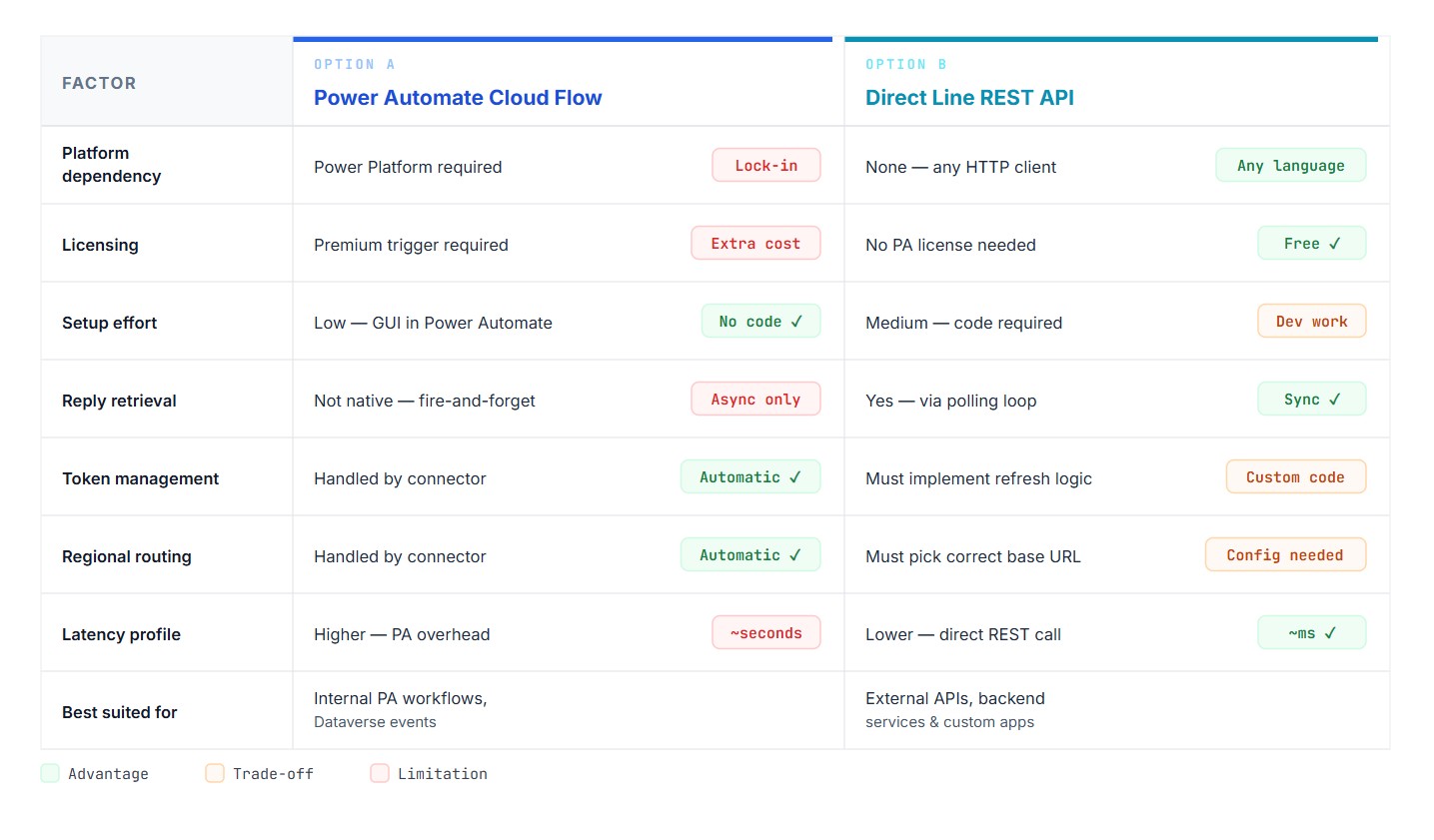
Diagram 05 — Decision matrix. Green = advantage, amber = trade-off, red = limitation. Click to enlarge.
Security Checklist for Production
Before going live, verify all of these:
- Direct Line secret stored in Azure Key Vault — never in source code or config files
- “Require secured access” toggle enabled in Copilot Studio Web channel security
- Token generated at session start — not cached across sessions or shared between callers
- Token refresh logic implemented for sessions that may exceed 1800 seconds
- Secret rotation schedule documented (quarterly minimum)
- Cloud Flow HTTP trigger URL treated as a credential — not logged, not shared
from.idvalues unique per logical sender — no shared identities across systems- Regional base URL matches the agent’s deployment environment
Troubleshooting — Real Error Patterns
HTTP 401 Unauthorized
Two likely causes. The secret is incorrect or was regenerated in Copilot Studio after the integration was built — verify the current secret in the Web channel security panel. Or “Require secured access” was recently toggled and the change has not propagated yet — the 2-hour window applies to both enabling and disabling this setting.
HTTP 403 After a Period of Inactivity
The session token has expired. Tokens cannot be refreshed once expired. Generate a new token from the secret and open a fresh conversation.
HTTP 404 on Conversation or Activities Endpoints
Usually a regional mismatch. If the agent is deployed in a European environment and you are using the global base URL, requests may route incorrectly. Switch to the region-specific base URL.
Activities Array Empty After Sending
The watermark priming step (Call 2b) was skipped. Perform an initial GET on the activities endpoint — no watermark param — immediately after opening the conversation and before sending the message. This anchors the cursor at the correct position in the activity log.
from.id Validation Error on Token Generation
The dl_ prefix is mandatory on user IDs in the token generation request. A plain UUID, email, or system name without the prefix will fail. Prepend dl_ followed by a UUID-v4.
Agent Replies With Partial or Truncated Text
Some agents split long responses across multiple activities. Do not exit the polling loop on the first bot activity — collect all bot activities within a reasonable window. The inputHint: "acceptingInput" field on the last activity in a turn signals that the agent has finished responding.
Execute Copilot Returns No Reply Text in Power Automate
This is by design. Execute Copilot is fire-and-forget. Use the returned conversationId to query the Direct Line activities endpoint directly, or move the integration to Option B.