


A Clarification Before We Start
I’ve sat through too many Copilot enablement sessions that spend forty minutes explaining you can ask Teams to summarize a meeting. If you’re reading vsgueradev.com, you already know that. You’ve probably been disappointed by it too — generated something technically fine, immediately deleted it, gone back to typing.
This post isn’t a feature overview. It’s what I’ve learned deploying M365 Copilot across banking, manufacturing, and public administration tenants: which combinations actually move the needle, what the governance traps look like from the inside, and the prompting patterns that separate people who use Copilot from people who’ve genuinely changed how they work because of it.
I’ll be direct about what’s worked and what hasn’t. Where I think something is overrated, I’ll say so. If you want neutral coverage, Microsoft Learn has that covered. This is something else.
The Misunderstanding That Explains Most Failed Deployments
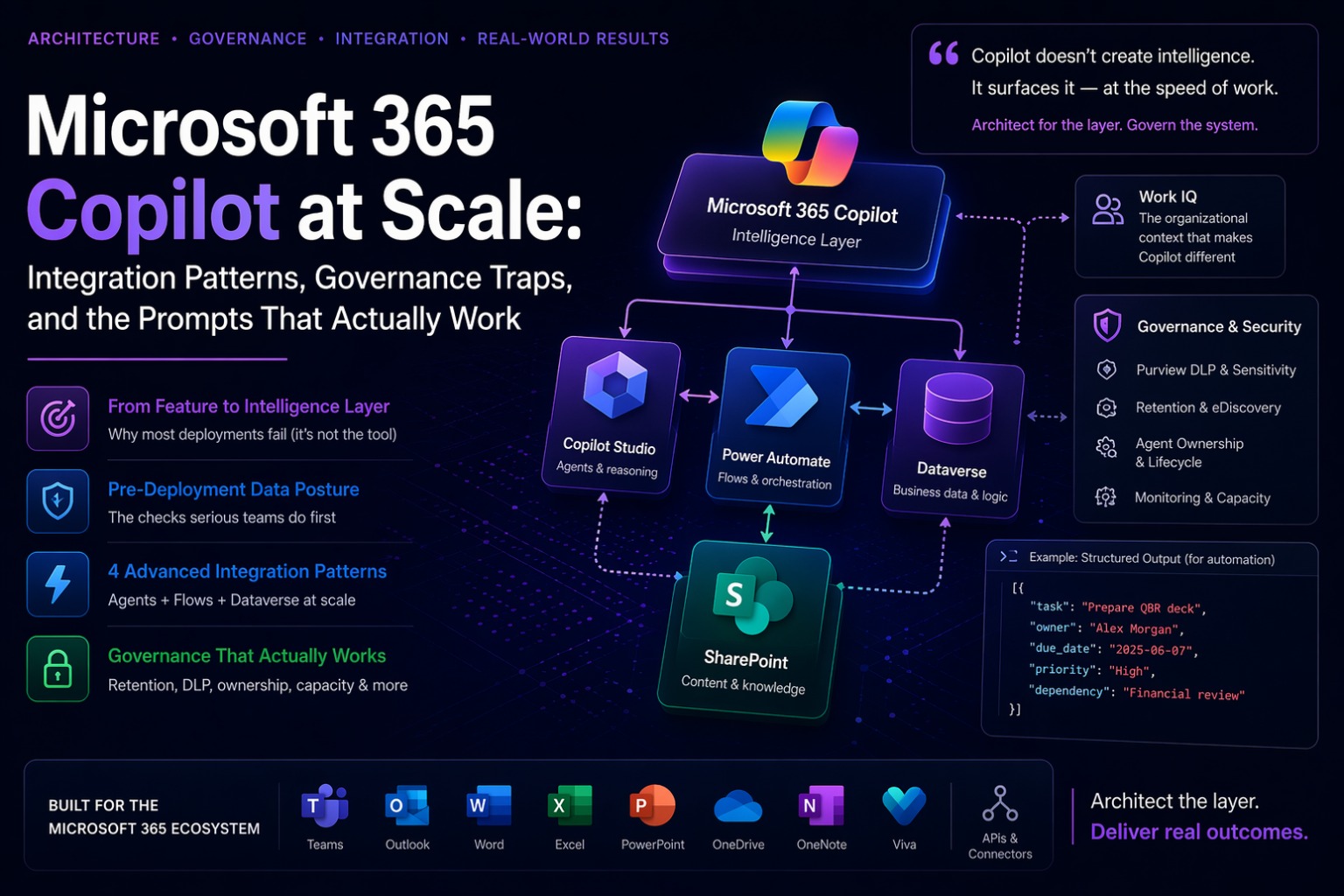
The single biggest mistake I see in enterprise Copilot programs isn’t technical. It’s conceptual. Organizations treat Copilot as a product feature to be deployed rather than an intelligence layer to be architected. That distinction sounds abstract until you’ve seen both outcomes in production.
When you treat it as a feature, you flip the switch, send a comms email, run a lunch-and-learn, and measure adoption by session counts. Three months later you have 40% of licensed users accessing it occasionally with no measurable impact on the metrics anyone cares about. Leadership asks why the ROI isn’t materializing. The answer is sitting in your SharePoint.
Work IQ — the organizational context layer that makes M365 Copilot categorically different from a general-purpose AI tool — is only as good as the data it can reach. And in most enterprise tenants, that data is a mess. Overshared. Stale. Inconsistently tagged. Partially archived.
Copilot doesn’t create intelligence. It surfaces it. If your SharePoint is a graveyard of documents from 2019 that contradict current policy, Copilot will surface those too — with full confidence, no expiration notice, no caveat. If your best institutional knowledge lives in individuals’ email threads that nobody else has access to, Copilot will never find it.
Your Copilot output quality is a direct readout of your tenant hygiene.
— vsgueradev.com
The Pre-Deployment Check Nobody Does
Before any production Copilot enablement, I run a data posture assessment. Not because a compliance checklist requires it — because the alternative is deploying an intelligence amplifier on top of a governance problem and then spending the next quarter wondering why the results feel random.
Oversharing exposure
Varonis’ analysis of real production tenants found the average M365 environment has over 27,000 sharing links, roughly half open to all employees. Copilot doesn’t have its own access model — it surfaces content based on the requesting user’s existing permissions. If an HR document containing salary bands is sitting in a SharePoint library that’s been shared too broadly, Copilot can surface it to anyone who inherited that access. At the speed of a chat interface, with no indication that anything unusual is happening.
The remediation tooling: SharePoint Advanced Management permission state reports to identify overshared sites, Purview Content Explorer to surface sensitive information types, and Restricted SharePoint Search to limit Copilot discovery to a curated site list while you work through the broader problem. Don’t treat this as optional.
Content freshness
Work IQ reasons over whatever it can reach. I’ve seen Copilot reference an obsolete procurement process with complete confidence because the 2019 document was still sitting in an accessible library, well-indexed, with no deprecation notice anywhere on it. The newer version was there too, two clicks away — but Copilot synthesized across both and produced an answer that was partially wrong in ways that weren’t obvious. Implement content lifecycle policies before enabling Copilot broadly. Archive stale content. Tag authoritative documents explicitly. This is unglamorous infrastructure work and it determines output quality more than any prompting technique you’ll read about.
Archive exclusion
One that consistently catches organizations off-guard: content in Microsoft 365 Archive is currently excluded from Copilot’s index. If your retention strategy has moved significant knowledge content to archive to manage storage costs, that content is invisible to Work IQ. Users will ask questions about things that definitely exist in the tenant and get back nothing, or worse, partial answers from older documents that haven’t been archived yet. Audit this before go-live, not after the first escalation.
cr8f2_field1 produce no signal for NL querying. Every table in scope needs meaningful display names before Copilot grounding is enabled.The Four Integration Patterns That Actually Deliver Value
The prompts in most Copilot guides are written for individual users working in isolation. That’s fine for personal productivity. It’s not where the enterprise leverage is.
The leverage is in combining Copilot with the rest of the Microsoft stack in ways that create new workflows — not just faster versions of existing ones. Here are the four patterns I’ve seen consistently deliver in production environments. Not in POCs. In production.
Agent
via
cr8f2_field1 produces dramatically worse NL results than a properly named column with a description.Work IQ
Pattern 1 — Copilot Studio Agent → Power Automate Flow
This is the highest-volume pattern in enterprise Copilot deployments right now, and the one with the most ways to get wrong.
The architecture: a Copilot Studio agent handles the conversational interface and reasoning, Power Automate handles the deterministic execution. Agents are designed for intent understanding and variability. Flows are designed for reliable, auditable, sequential execution with retry logic, error scoping, and run history. Combining them means each component does what it’s actually built for, rather than asking an agent to be reliable or a flow to be intelligent.
A concrete implementation I’ve deployed: an employee onboarding agent in Teams. The agent handles the intake conversation — understanding the new hire’s role, systems needed, start date, location. Once it has enough context, it calls a Power Automate flow that does the predictable sequential work: AD account creation, license provisioning, SharePoint access, equipment order, welcome email. The flow runs deterministically with scope-level retry policies. The agent handles the parts that require judgment. The flow handles the parts that require reliability. Neither tries to do the other’s job.
⚠️ Watch out — async toggle
The Asynchronous response toggle in the Respond to Agent action must be set to Off if you need the agent to wait for the flow result before replying to the user. This is not the default in every environment. Miss it and the agent continues the conversation without knowing what the flow produced. Also: the flow must respond within 100 seconds. Anything longer goes after the Respond to Copilot action, where it can run for up to 30 days.
Pattern 2 — Power Automate Flow → Execute Agent
The reverse of Pattern 1, and significantly less understood. A scheduled or event-triggered flow runs to a decision point that requires judgment — something too variable to encode as conditional logic — and calls a Copilot Studio agent via the Execute Agent action to handle that reasoning step before execution continues.
The canonical implementation: a nightly document processing flow across a SharePoint library. The flow handles the structured work — retrieving documents, checking modification dates, extracting metadata. When it reaches a document requiring categorization or routing based on unstructured content, it calls the agent, passes the document context, receives a structured decision, and continues. The agent contributes reasoning exactly where it’s needed. Everything else stays in the flow where it belongs.
The mistake I see architects make is trying to build the entire workflow inside an agent because it feels more modern. Agents have no reliable execution guarantee for sequential multi-step automation. They’re not flows. Don’t use them as flows.
Pattern 3 — M365 Copilot + Dataverse Grounding in Model-Driven Apps
This is the combination most Power Platform architects haven’t fully explored yet, and in my experience it’s where the gap between average and excellent implementations is widest.
Copilot uses column display names, table descriptions, and relationship definitions to understand what the data means. A table called cr8f2_projectrecord with columns named cr8f2_field1 through cr8f2_field47 produces dramatically worse natural language results than a properly named schema with meaningful display names and descriptions. This isn’t a limitation you work around with clever prompting. It’s a schema design issue you fix before deployment.
I add a Copilot grounding review to every Dataverse schema review I run now — checking display names, adding column descriptions, verifying relationship labels, testing natural language output against representative queries. Two to four hours per entity set. It changes output quality for the entire life of the deployment. That’s a reasonable trade.
One addition worth making: synonyms in Copilot Studio’s knowledge configuration. If your organization calls projects “engagements” or “initiatives,” the Copilot in your model-driven app won’t know that unless you explicitly tell it. This sounds trivial. In practice, it’s the first thing users complain about.
| Logical name | Display name | Description | NL quality |
|---|---|---|---|
| cr8f2_field1 | not set | not set | Poor |
| cr8f2_field2 | not set | not set | Poor |
| cr8f2_field3 | not set | not set | Poor |
| cr8f2_field4 | not set | not set | Poor |
| cr8f2_field5 | not set | not set | Poor |
| Logical name | Display name | Description | NL quality |
|---|---|---|---|
| cr8f2_field1 | Project name | Full title of the engagement or initiative | Ready |
| cr8f2_field2 | Priority | Business priority level: High, Medium, or Low | Ready |
| cr8f2_field3 | Delivery date | Committed delivery date agreed with the client | Ready |
| cr8f2_field4 | Project owner | Accountable delivery manager for this engagement | Ready |
| cr8f2_field5 | Budget (EUR) | Approved budget in euros — regulated data, restrict Copilot access | Restricted |
Pattern 4 — Researcher + SharePoint Knowledge Base → Policy Compliance Q&A
This pattern requires more upfront setup than the others, but it pays disproportionate dividends in organizations with serious compliance documentation requirements. Internal policies stored in a curated SharePoint site, indexed and surfaced to the Researcher agent via Work IQ, combined with web grounding for regulatory context.
The resulting capability: users ask “what’s our current policy on vendor data processing for contracts signed in Germany?” and get a cited answer that references the specific internal policy document and the relevant GDPR article, with section numbers.
The non-negotiable architectural requirement: the SharePoint knowledge base has to be curated. Outdated policies will be cited as confidently as current ones. I’ve learned to add a disclaimer topic in Copilot Studio that fires whenever the agent cites an internal document: “this references policy document [NAME], last updated [DATE] — verify currency before making compliance decisions.” That single safeguard has saved significant embarrassment in regulated environments. It costs about twenty minutes to implement.
Prompting as Architecture
The GCES framework — Goal, Context, Expectations, Source — is documented well enough that I won’t spend time on it here. It’s the baseline, not the ceiling. What follows are the patterns that actually change output quality at the professional level, the ones that aren’t on the Microsoft Learn prompting page.
The Organizational Boundary Declaration
The most consequential prompt modification for any compliance-adjacent use case, and the one most frequently skipped.
What are our current data retention policies?
Weak version: Copilot may blend org content with general GDPR best practice. You usually can’t tell which.
Answer using only content from our SharePoint policy library. If the answer isn’t in those documents, say ‘Not found in policy library.’ Do not supplement with general regulatory knowledge. Question: what are our current data retention policies for customer data processed in the EU?
Strong version: grounded, auditable, potentially discoverable. Write it as if it is.
Copilot interaction data is retained within Microsoft 365 services and is subject to your Purview retention policies — which means those responses are potentially discoverable. Write them as if they are.
Persona Calibration — Specificity Is the Whole Game
Role prompting is documented everywhere. What’s not documented is why it usually doesn’t work well: the role definition is too generic to shift anything.
Act as a CFO at a regulated financial services firm who has reviewed 60 investment proposals this year and approved 8. Your primary concerns: regulatory exposure from assumptions that wouldn’t survive a stress test, ROI projections that exclude total cost of ownership, and implementation timelines that depend on organizational change management being easier than it usually is. Tell me the three specific things that would make you decline before a second meeting. Don’t soften it.
Calibrated: approval rate + primary concerns + evaluation criteria. This is what shifts output quality.
Generic roles produce generic critique. The more precisely you describe the concerns, track record, and decision context of the role, the closer the output gets to the perspective you actually need.
The Structured Output Lock
For any prompt whose output will feed into a downstream process — a Power Automate flow, a Dataverse record, a reporting pipeline — structural consistency is non-negotiable. Most people don’t realize this until their flow breaks because Copilot formatted the output slightly differently this session.
Extract all action items from this [meeting transcript / document].
Return ONLY a JSON array. No preamble. No explanation.
Schema: [{"task":"","owner":"","due_date":"string or null","priority":"High|Medium|Low","dependency":"string or null"}]
Rules: owner unclear -> "TBD" | no date mentioned -> null | discussed but unresolved -> owner "Unassigned", append "(unresolved)" to task field.
That output goes directly into a Parse JSON action in Power Automate without modification. Every time. That’s the version you use when Copilot is part of a system, not just a conversation.
The Assumption Surface Pass
I run this before any high-stakes deliverable: a proposal that goes to a client, a risk assessment that goes to the board, an architecture document that will drive six months of build work.
Before you draft this, list every assumption you’re making that isn’t directly stated in the source materials. Then flag which assumptions are most likely to be wrong or require verification from me. After I confirm or correct them, you’ll produce the draft.
This technique surfaces the places where Copilot is filling in with general knowledge rather than evidence from the actual sources. In proposals and risk assessments, those gaps are exactly where the most embarrassing errors end up. The extra two minutes before drafting saves significantly more time in review.
The Three-Pass Pattern
Pass 1 — Generate with minimal constraints. Give it the GCES basics and see what comes back. The goal isn’t a good first draft. The goal is understanding what you’re actually dealing with.
Pass 2 — Apply targeted constraints based on what you see. Not “make it better.” Specific: which paragraphs to rewrite, what to cut, what to strengthen. Change nothing else.
Pass 3 — Final calibration. Length, tone, a specific section to tighten. Three focused passes consistently outperforms one over-engineered initial prompt.
Researcher + Analyst as a Sequential Pipeline
Most people treat Researcher and Analyst as alternatives to each other. The more powerful use is sequential. Researcher gathers the qualitative context — market landscape, vendor positioning, known challenges, analyst sentiment. Analyst works the quantitative side — cost comparison, anomaly detection, multi-year projections. Synthesis in Word produces the final decision brief for a CFO who hasn’t seen the underlying research.
The synthesis step is where the human judgment sits — verifying that the qualitative and quantitative data tell a coherent story before it goes to decision-makers. That verification isn’t optional.
What Architects Actually Own in the Governance Architecture
Most organizations design their Copilot program as a licensing and enablement exercise and discover — usually around month six — what they forgot to architect. Sensitive data appearing in Copilot chat transcripts that nobody planned to retain. Agent behaviors drifting from their original design as the knowledge base changes without anyone noticing. Power Automate flows calling agents without error handling for capacity limits or authentication failures.
📋 Prompt and response retention
Copilot interaction data — prompts, responses, referenced content — is stored within M365 services and subject to your Purview retention policies. It’s potentially discoverable. If you have a 7-year retention obligation on business records and your lawyers are using Copilot to draft contract language, those transcripts are part of your records. Assign them to a retention category before broad rollout.
🔒 Sensitivity label enforcement
Purview DLP policies can prevent Copilot from processing prompts matching specific sensitive information types or sensitivity labels. A DLP block fires silently — the agent returns no response, no explanation. Implement DLP policies before enabling Copilot access to content stores containing regulated data. Not after the first incident.
👤 Agent ownership and lifecycle
Every Copilot Studio agent that goes to production should have a named owner, a documented scope statement, a defined escalation path, and a quarterly review scheduled before it leaves the Copilot Control System. Agents without owners go stale. Stale agents give wrong answers with full confidence and nobody notices until someone in a meeting cites a policy that changed eight months ago.
⚠️ The EEA deployment problem
If you’re deploying in Europe: Copilot in the European Economic Area requires manual deployment through the M365 Apps admin center. Automatic deployment is disabled. The service works; the app doesn’t show up until you explicitly deploy it. I’ve seen this catch deployment teams on go-live day when everything was tested in a non-EEA dev tenant. And if you’re in a regulated sector with works council requirements — Germany, France, the Netherlands — plan months, not weeks, for the pre-deployment consultation.
The Honest Section — Where It Still Breaks Down
I’d rather write this section than pretend the tool is uniformly excellent.
Complex multi-entity Dataverse reasoning breaks down when queries span more than three or four related tables. The natural language to FetchXML translation is genuinely impressive for straightforward queries. When the join chain gets longer or the aggregation logic gets complex, you get either wrong results or an admission that it can’t compute this. Test your actual queries against your actual data complexity before committing to a Copilot-based reporting strategy.
Temporal synthesis is unreliable for anything that requires reconstructing a decision history across multiple meetings over an extended period, some of which were revised or superseded. Researcher handles this better than standard Copilot Chat, but I still wouldn’t rely on it for longitudinal decision archaeology without explicit verification.
Structured extraction from unstructured documents still carries a meaningful error rate. For any extraction feeding into an automated downstream process, build a confidence threshold into the flow and route low-confidence extractions to human review. The error rate isn’t high enough to make the automation useless. It’s high enough that you need the safety valve.
Prompt injection in agent workflows. If users can put arbitrary text into a Teams message or SharePoint document that an agent will process, they can potentially manipulate the agent’s behavior through that text. This isn’t theoretical. Scope restriction in system prompts, DLP controls on inputs, and behavioral testing against adversarial inputs are all necessary for agents that process user-generated content in production environments.
Three Things I Say Before Every Production Go-Live
Your Copilot is a readout of your tenant.
Not a standalone product. If you haven’t done the oversharing remediation, the content lifecycle work, and the schema review, you haven’t prepared to deploy Copilot. You’ve prepared to deploy the appearance of Copilot. The gap between those two things becomes visible in about three months.
A prompt library is infrastructure, not a nice-to-have.
A team of fifty people where five have figured out good prompts and forty-five haven’t is leaving most of the value on the table. Shared libraries, documented patterns for recurring deliverables, explicit onboarding on what works — this compounds over time in ways that individual experimentation doesn’t.
The governance questions are the architecture questions.
What data can this agent access? Who owns its behavior? What happens when it gives a wrong answer? How do we know when it’s drifting from its original design? These aren’t compliance checkboxes. They’re the design decisions that determine whether Copilot becomes a trusted enterprise tool or a liability you’re managing around.
The organizations I’ve seen get the most out of this platform treated it as a system to be designed. That’s the architect’s job — and it starts well before you flip the switch.
The Prompts I Actually Use in Production
These are production-tested. Variable parts in [BRACKETS].
Structured action item extraction — for automation pipelines
Extract all action items from this [meeting transcript / document].
Return ONLY a JSON array. No preamble. No explanation.
Schema: [{"task":"","owner":"","due_date":"string or null","priority":"High|Medium|Low","dependency":"string or null"}]
Rules: owner unclear -> "TBD" | no date mentioned -> null | discussed but unresolved -> owner "Unassigned", append "(unresolved)" to task field.
Architecture review — adversarial perspective
Act as a principal architect at a regulated enterprise.
You have reviewed 80 solution proposals in 3 years and approved roughly half.
Your primary failure patterns to catch: integration debt from isolated solutions,
operational complexity that's underestimated, security models not thought through
to data classification level.
Review [DOCUMENT]. Deliver:
1. Three design decisions you'd challenge immediately — and why
2. Questions you'd need answered before letting this go to build
3. The single most significant unacknowledged risk in the document
Be direct. Internal technical review, not a presentation.
Dataverse schema — Copilot readiness assessment
Review this Dataverse schema. For each table, assess:
- Column display names and descriptions: sufficient for NL querying? Flag gaps.
- Relationships: technically valid but ambiguous in plain English? Flag them.
- Regulated data candidates: columns likely containing PII, financial, or health data
- NL query readiness rating: Ready / Needs work / Significant gaps
Return as a table with a priority column: 1=fix before Copilot enablement, 2=fix before broad rollout, 3=improve over time.
Stakeholder communication — three-perspective tone pass
Read this draft from three distinct perspectives. Flag specific phrases only, not general impressions.
1. Recipient reading it now: what reads as blame deflection, excuse-making, or unintentional dismissiveness?
2. Sponsor reading it six months later as a project record: what creates a false expectation or will be misread out of context?
3. Communications coach: what is unnecessarily hedged, passive, or longer than it needs to be?
For each flagged phrase: quote it exactly, name the specific issue, suggest a rewrite.
Governance gap analysis — RAG format
Review [DOCUMENT] against these governance requirements: [LIST].
For each requirement, classify: Covered (evidence in doc) / Partial (gap description) / Missing (gap description).
For every Partial or Missing item: one-sentence description of the gap + minimum viable control that would address it.
Format: RAG table, one row per requirement.
Vendor technical due diligence
Act as a technical due diligence lead for enterprise M365 integration assessments.
Evaluate [VENDOR DOCUMENTATION] on exactly four dimensions:
1. Data residency — does any data leave our M365 tenant boundary, under any condition?
2. Permission model — does it require privileges beyond the requesting user's existing access?
3. Operational failure modes — what degrades or fails if [COMPONENT] is unavailable?
4. Production incident response — what does the vendor's support model actually cover at the SLA level?
Flag any claim you cannot verify from the documentation provided.
Return as a technical risk assessment, not a summary.
Pre-deployment data posture check
I'm preparing a Copilot deployment readiness assessment for a [INDUSTRY] M365 tenant.
Review [DOCUMENT/AUDIT DATA] and identify:
1. SharePoint sites with overly broad permissions — flag for pre-deployment restriction
2. Content libraries likely containing regulated data types (PII, financial, health, legal)
3. Stale or contradicted content that could produce misleading Copilot responses
4. Missing metadata that would impair Work IQ from surfacing content correctly
5. Archive content that users may expect Copilot to find but won't
Prioritize by risk. Flag anything requiring remediation before Copilot enablement — not after.
Post-incident agent behavior review
We've had an incident where Copilot/the agent returned [DESCRIPTION].
Review: the attached prompt, conversation history, and source documents referenced.
Identify:
1. The specific input conditions that produced this output
2. Whether this is reproducible — what class of inputs would trigger similar results?
3. Root cause classification: prompting issue / content quality issue / permissions issue / model behavior
4. Remediation recommendation per root cause
Format: technical post-mortem. One section per finding.
Where to Go From Here
If there’s one thing I’d want you to take from this post, it’s the framing in the second section: Copilot is an intelligence layer, not a feature. That framing changes every decision that follows — how you prepare the tenant, how you design the integrations, how you govern the agents, how you write the prompts.
Most organizations are still in the feature-deployment mindset. They’ll get modest results, attribute them to the tool, and either double down on licenses or conclude that “AI isn’t ready for enterprise yet.” Neither conclusion will be accurate. The tool will have been fine. The architecture around it will have been absent.
The patterns in this guide aren’t exhaustive. The Microsoft stack is moving fast enough that some of what’s written here will be outdated within a year — the Work IQ APIs just hit GA at Build 2026, the Researcher agent went multi-model in March, agent flows are still evolving. I update my approach as the platform evolves and I’ll document what changes here.
What doesn’t change: the governance questions are the architecture questions. What data can this reach? Who owns this behavior? What breaks when the context is wrong? These questions predate AI and they’ll outlast every product cycle.
If you’re working through a Copilot deployment right now — whether you’re hitting the governance complexity, the schema preparation work, or trying to figure out which integration pattern fits your scenario — drop a comment below or reach out directly. I find these conversations useful in both directions.
And if you’re a Power Platform architect who’s found patterns I haven’t covered here, I’m genuinely interested. The most valuable things I’ve learned about this platform have come from people who found the edge cases I hadn’t thought to look for.