


Technologies Covered
- Power Platform Well-Architected Framework (the five pillars)
- Microsoft Azure Well-Architected Framework (the foundation WAF is built on)
- Power Apps (Canvas and Model-Driven)
- Power Automate (cloud flows)
- Microsoft Dataverse
- Copilot Studio / Intelligent application workloads
- Microsoft Entra ID (identity, Conditional Access, MFA)
- Power Platform admin center (Managed Environments, DLP policies, security score)
- Microsoft Purview (data classification, sensitivity labels)
- Azure Monitor / Application Insights (observability)
- Power Platform admin center governance experiences (Inventory, Usage, Monitor, Actions)
- Center of Excellence (CoE) concept and the now-legacy CoE Starter Kit
- Agentic Center of Enablement (Agentic CoE), 2026 release wave
Why This Framework Exists
Every Power Platform tenant eventually hits the same wall. The first few apps and flows go up fast, the business loves them, and within a year there are hundreds of solutions running in production with no consistent pattern behind any of them. Some have proper environment separation. Some don’t. Some have a documented owner. Most don’t. This is not a Power Platform problem specifically — it is what happens to any low-code platform that succeeds at the thing it was built to do: remove friction between an idea and a working solution.
The Power Platform Well-Architected Framework (commonly shortened to “Power Platform WAF” or just “WAF”) is Microsoft’s answer to that growth problem. It is not a governance tool in the administrative sense — it doesn’t configure DLP policies or manage environment strategy by itself. It is a design framework: a structured way of thinking about individual workloads (a workload being a single app, flow, agent, or a connected group of these serving one business purpose) so that the decisions made at build time hold up once the workload is in production, used by real people, carrying real data, for years rather than weeks.
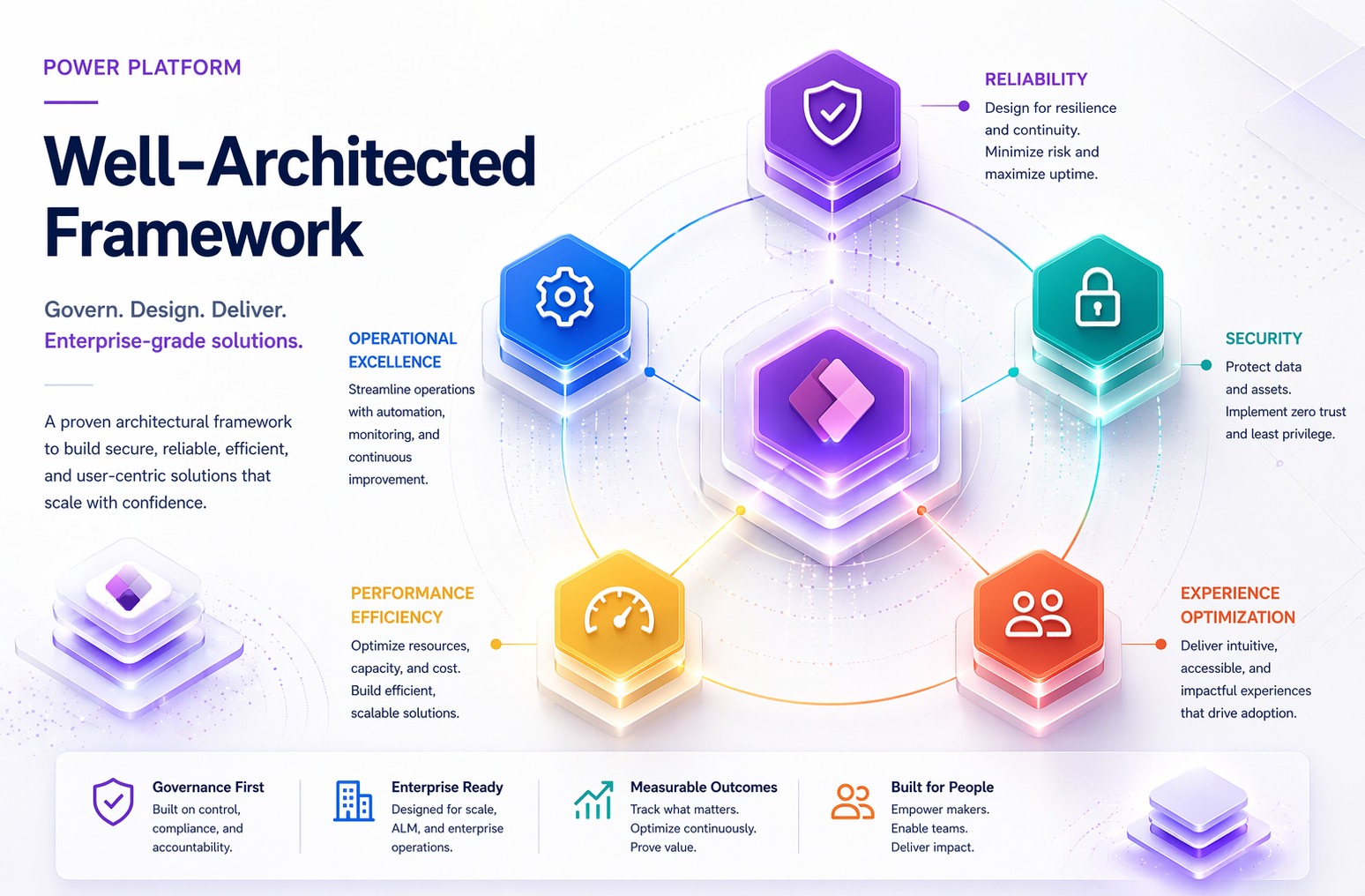
Microsoft officially describes the framework’s goal as helping a workload be reliable, be secure, support responsible development and operations, meet expectations of performance, and be easy to use. Five goals, five pillars. That mapping is intentional and worth remembering, because it’s the backbone of everything else in the framework.
Foundation: Power Platform WAF Is Not a Standalone Invention
This is the detail that gets missed most often, and it matters for architects who already work across both Power Platform and Azure: the Power Platform Well-Architected Framework is explicitly built on top of the Microsoft Azure Well-Architected Framework. Four of its five pillars — Reliability, Security, Operational Excellence, and Performance Efficiency — are direct adaptations of the equivalent Azure WAF pillars, reworked for the realities of low-code development. The fifth pillar, Experience Optimization, has no Azure equivalent. It was built specifically for Power Platform, and it exists because low-code workloads have a different relationship with their end users than most Azure-hosted services do — makers are frequently building for colleagues, not anonymous internet traffic, and the framework treats that as an architectural concern in its own right, not just a UX afterthought.
For organizations running both Power Platform and Azure, this shared foundation is a genuine advantage. An architect who already applies Azure WAF principles to an App Service or an AKS cluster does not need to learn a parallel philosophy for Power Platform — the underlying design principles transfer, and the documentation is structured so the two frameworks stay aligned.
Who This Framework Is Actually For
Microsoft’s documentation is deliberately broad here, and that’s worth taking seriously rather than skimming past: the framework is for anyone with the authority to make decisions within the scope of a workload — architect, developer, maker, or business stakeholder. It is not reserved for people with “architect” in their job title. A citizen developer building a departmental approval app with Power Automate is, in the eyes of this framework, a workload owner who can and should apply these principles, scaled appropriately to the size and criticality of what they’re building.
This inclusivity is also the reason WAF and a governance practice like a Center of Excellence (CoE) work so well together, and it’s worth being explicit about the distinction, because the two are often confused:
- A CoE (Center of Excellence) is an organizational governance structure — people, processes, and standards, not a single tool. It answers questions like: who can create environments, what connectors are allowed, how do we get visibility into the inventory of apps, flows, and agents across the tenant, how do we detect risky data exposure patterns at scale, and who owns a given solution once the person who built it has moved teams or left the company.
- Power Platform WAF is a workload-level design framework. It answers questions like: is this specific app resilient to a failed connector call, is this specific flow’s error handling adequate, does this agent’s architecture protect sensitive data appropriately.
Organizations that only invest in CoE tooling get visibility without quality — they can see all their apps but have no consistent way to judge whether any individual one is well built. Organizations that only think about WAF at the individual workload level, with no CoE oversight, end up with pockets of excellent architecture sitting inside an ungoverned, invisible sprawl. The frameworks are complementary, not competing, and a mature Power Platform practice needs both.
The Five Pillars
Figure 1 — The Five Pillars
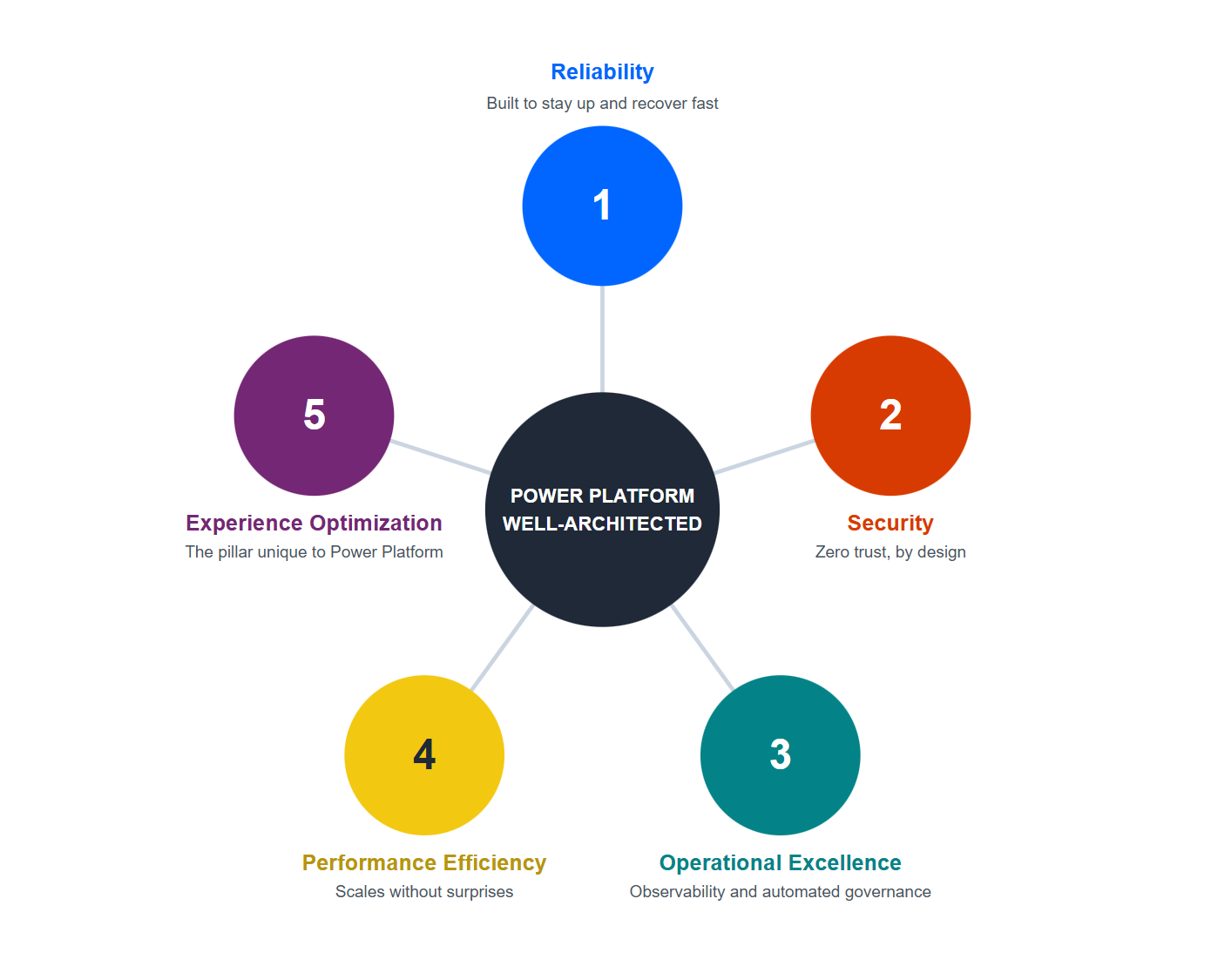
Each pillar follows the same three-layer structure, and understanding this structure is the key to actually using the framework rather than just reading about it:
- Design principles — the philosophical starting point. Each principle states a goal and explains why it matters.
- Checklist — a numbered set of concrete recommendations (coded, for example, RE:01 through RE:08 for Reliability, SE:01 onward for Security). This is the actionable layer — the list you walk through during a design review.
- Recommendation guides — one or more detailed how-to articles attached to each checklist item, explaining the specific strategies to achieve it.
Layered on top of all three are tradeoffs and risks, each marked with its own icon in the official documentation. This is one of the framework’s more mature ideas: it never pretends that following every recommendation in every pillar simultaneously is free. Optimizing hard for Performance Efficiency can work against Reliability. Locking down Security aggressively can damage Experience Optimization. The framework asks architects to make those tradeoffs consciously, document them, and revisit them as the workload evolves — rather than discovering the tradeoff by accident in production.
Pillar 1 — Reliability
Goal: ensure the workload meets its uptime and recovery targets by building redundancy and resiliency at scale.
A reliable workload, in Microsoft’s framing, must do two things: detect and recover from outages and malfunctions while consistently delivering functionality, and remain available so users can access it during the agreed timeframe at the agreed quality level. Skipping reliability design doesn’t usually announce itself early — a workload built without these principles will look fine in testing and then fail unpredictably in production, often during the exact high-load moment when it matters most.
The design principles for this pillar are:
- Design for business requirements. Collect and understand business needs with a clear focus on expected use — user experience, workflows, data, and workload-specific features, agreed with stakeholders against a real budget.
- Design for resilience. The workload must respond to failures and continue operating, even in a reduced state, rather than failing completely. Users should be informed of system state when degradation occurs.
- Design for recovery. The workload must be able to recover from failure with minimal disruption. This means structured, tested, and documented recovery plans — not improvisation during an actual outage.
- Design for operations. The workload must be observable, and the team must be able to learn from failures through monitoring and meaningful alerts.
- Keep it simple. Avoid overengineering. Remove anything that isn’t tied to an actual business requirement, and lean on platform-provided features rather than reinventing them.
The Reliability checklist translates these principles into eight concrete recommendations, coded RE:01 through RE:08:
| Code | Recommendation |
|---|---|
| RE:01 | Design the workload to align with business objectives and avoid unnecessary complexity. |
| RE:02 | Identify and rate user and system flows using a criticality scale tied to business requirements. |
| RE:03 | Use failure mode analysis (FMA) to identify and prioritize potential failures, assessing risk and impact for each. |
| RE:04 | Define reliability and recovery targets for components, flows, and the overall solution — and build a health model around them (healthy / degraded / unhealthy states). |
| RE:05 | Strengthen resiliency through error handling and transient fault handling for component failures and transient errors. |
| RE:06 | Test for resiliency and availability using chaos-engineering principles in test and production environments. |
| RE:07 | Implement structured, tested, and documented business continuity and disaster recovery (BCDR) plans aligned with recovery targets. |
| RE:08 | Measure and publish the solution’s health indicators continuously — uptime data from the whole workload and from individual components. |
For Power Platform specifically, this pillar has very concrete translations: retry policies on Power Automate actions, designing around transient connector failures rather than assuming every API call succeeds on the first attempt, and choosing Dataverse over more fragile storage options when a workload genuinely needs resilient, transactional data behavior.
Pillar 2 — Security
Goal: protect the workload from attacks by maintaining confidentiality, integrity, and availability of data and systems — the classic CIA triad.
This is the pillar where Microsoft’s language gets noticeably more direct, and for good reason: a Well-Architected workload “must be built with a zero-trust approach to security.” There’s no soft framing here. The documentation explicitly states that any security incident has the potential to become a major breach damaging brand and reputation, and that in many mission-critical workloads, security sits alongside reliability as the primary concern — because some attack vectors, like data exfiltration, don’t show up as a reliability problem at all. The system can be perfectly “up” while quietly leaking data.
The system can be perfectly “up” while quietly leaking data.
— Power Platform Well-Architected, Security pillar
Zero Trust, as defined for Power Platform, rests on three principles:
- Verify explicitly — always authenticate and authorize based on all available data points.
- Use least privilege — limit access with just-in-time and just-enough-access models, risk-based adaptive policies, and data protection.
- Assume breach — minimize blast radius, segment access, verify end-to-end encryption, and use analytics for visibility into activity and threat detection.
The Security checklist begins with:
| Code | Recommendation |
|---|---|
| SE:01 | Establish a security baseline aligned to compliance requirements, industry standards, and platform recommendations — and measure against it regularly. |
| SE:02 | Maintain a secure development lifecycle (SDL) using a hardened, mostly automated, auditable software supply chain, incorporating threat modeling during design. |
| SE:03 | Classify and consistently apply sensitivity and information-type labels on all workload data and systems involved in data processing. |
| SE:04 | Create intentional segmentation and perimeters across networks, roles and responsibilities, workload identities, and resource organization. |
A security baseline, in this context, is not a one-time checklist item. It’s defined as a living set of minimum-security standards and best practices applied consistently across the tenant — covering tenant-level configuration (access, network), Power Platform resource-level configuration (Power Pages settings, environment permissions, security groups), and workload-specific configuration (how a given app or flow is shared). Notably, the framework calls out GxP-regulated industries (life sciences — Good Clinical, Laboratory, and Manufacturing Practices) as an example where the baseline must explicitly account for regulatory compliance, not just generic security hygiene.
The Secure Development Lifecycle recommendation is worth dwelling on for technical teams specifically. It asks architects to evaluate the platform-provided affordances before building custom logic — for example, using native data policies to govern connector usage rather than building custom monitoring logic to detect unapproved connector patterns after the fact. The principle: don’t duplicate what Power Platform already secures natively, because duplicated security logic is itself a maintenance and consistency risk. Developers are also expected to understand Dataverse’s least-privilege security model, content security policies that restrict model-driven app embedding to trusted domains, and connector and on-premises gateway authentication methods as baseline competencies — these aren’t “advanced” topics in WAF’s view, they’re table stakes for a workload that touches real data.
💡 Pro Tip — Shadow IT Is a Security Risk, Not Just an Annoyance
One quietly important line from the official guidance: when security protocols are too cumbersome or poorly understood, users attempt to bypass them — creating Shadow IT. The framework explicitly treats overly heavy-handed security as a security risk in itself, not just a usability annoyance, because it pushes makers toward unmanaged workarounds. The goal is “healthy friction” — security controls that make a maker pause and think at the right moment, without making the legitimate path so painful that an unmanaged one becomes more attractive.
Pillar 3 — Operational Excellence
Goal: reduce issues in production by building holistic observability and automated systems.
Operational Excellence is the pillar most directly tied to ALM (Application Lifecycle Management) — and it’s where Power Platform’s low-code nature creates real friction if ignored, because “I’ll just fix it directly in production” is dangerously easy to do in a maker tool, and dangerously easy to regret.
Design principles:
- Optimize for consistent, quality-gated processes. Standardize development through coding standards, style guides, and tooling that drives consistency and easier maintenance, with quality assurance emphasizing testing early in the lifecycle rather than at the end.
- Gain visibility through monitoring. Build a monitoring system that tracks every relevant aspect of the workload and collects data the team can actually learn from.
- Build a workload supply chain. Enable consistent deployment across all environments, choosing tooling capable of automation, testing, monitoring, and versioning — aiming for immutable, automated deployments that avoid configuration drift and manual changes creeping into downstream environments.
- Automate repetitive tasks. Identify time-consuming, error-prone manual work and design automation for it using the same WAF principles applied to the workload itself — automation isn’t exempt from security or reliability scrutiny just because it’s “just a script.”
- Standardize safe deployment. Use automated deployment pipelines with rigorous testing at each stage, plus a clear mitigation strategy for failed deployments (rollback, feature disablement, or native deployment-pattern recovery).
Selected checklist items reflect this directly: formalize routine, as-needed, and emergency operational tasks through documentation, checklists, or automation, following a “shift-left” approach; formalize software ideation and planning with a shared, prioritized backlog; and standardize deployment practices around small, incremental, quality-gated releases — explicitly accounting for both routine deployments and emergency hotfixes as separate, defined paths.
Microsoft’s supporting guidance recommends concrete velocity metrics to track here, borrowed directly from DevOps practice: lead time (how long a task takes from backlog to production deployment), mean time to resolution (average time spent fixing bugs), and change failure rate (percentage of changes resulting in failure). These aren’t abstract — they’re the same DevOps Research and Assessment (DORA)-style metrics professional engineering teams use, applied to low-code delivery. If a Power Platform team can’t answer “what’s our change failure rate this quarter,” Operational Excellence isn’t really being practiced yet, regardless of how many flows are in production.
Pillar 4 — Performance Efficiency
Goal: adjust to changes in demand through horizontal scaling and by testing changes before deploying to production.
This pillar’s central tension, stated plainly in the official guidance: without a clear understanding of performance expectations, a team either over-spends on resources it doesn’t need or under-spends and fails to satisfy real user needs. Neither outcome is acceptable, and the framework treats performance as a continuous discipline rather than a launch-day checkbox — any change to requirements, configuration, code, or even underlying product features can move the needle, so testing and optimization repeat throughout the workload’s life, not just once.
Design principles:
- Negotiate realistic performance targets. Start the design process with clear, numerical performance targets tied to business needs — defined collaboratively with business stakeholders, not just as a technical metric in isolation.
- Design to meet capacity requirements. Select the right services to hit performance targets, and proactively measure rather than waiting for users to report slowness.
- Achieve and maintain performance. Protect against degradation as the system evolves — performance work doesn’t end at go-live.
- Improve through optimization. Establish a performance culture where developers actually have time allocated for optimization work, adjusting targets based on real user experience and continuously evaluating new platform features that could move performance forward.
The checklist’s framing is notable for naming the full cost of performance work honestly: it asks teams to weigh efficiency and effectiveness not just against raw speed, but against cost, complexity, supporting new requirements, technical debt, reporting, and toil — and to accept that for every system there’s a ceiling to how far it scales without a redesign, a workaround, or simply more human involvement. Numerical performance targets, tied directly to workload requirements rather than left as vague aspirations, are the starting checklist item.
Pillar 5 — Experience Optimization (the pillar unique to Power Platform)
Goal: create meaningful and useful experiences that ensure successful business outcomes.
This is the pillar with no Azure WAF equivalent, and it exists because Power Platform’s audience skews toward internal business users far more than typical cloud-hosted services do. The framework’s stated intent: understand the needs, experiences, expected outcomes, and desires of the workload’s users, and tailor the design specifically to those requirements — not to generic UX best practice divorced from who’s actually going to be clicking the buttons.
The supporting design-standards guidance for this pillar makes an interesting claim worth quoting in spirit rather than verbatim: well-established design standards and conventions account for roughly 80% of what makes an interface well-designed, with genuine creative design principle work covering the remaining 20% gap that standards alone can’t close. In other words, most of “good UX” in an enterprise low-code app is disciplined consistency, not creative flair — a useful reality check for architects who assume good design requires a design team.
Topics this pillar’s checklist explicitly covers: designing for the user and for simplicity, designing for efficiency, adhering to design standards, implementing a coherent information architecture, prioritizing usability, optimizing visuals, designing for different usage contexts, providing clear directions, and — added as a dedicated checklist item, XO:10, in a recent update to the framework — designing conversational user experiences, giving teams concrete strategies for effective conversational AI design specifically because so much new Power Platform work in 2026 is a Copilot Studio agent rather than a canvas screen.
Accessibility gets explicit, detailed treatment here, not as an afterthought. The guidance calls out keyboard navigation and visible focus indicators for users relying on screen readers, clear state-change announcements for error recovery, and the native theming capabilities in both canvas apps (full brand palette control across controls) and model-driven apps (header colors, links, some form icons) as the concrete mechanisms for achieving this — plus reusable, solution-aware components that keep accessibility consistent across apps rather than reinventing it each time.
Bringing the Five Pillars Together for Intelligent Application Workloads
Worth flagging up front: this is one of the newest parts of the framework. Intelligent application workload guidance — covering Copilot Studio agents and AI-infused Power Apps/Power Automate solutions specifically — was added to Power Platform WAF in a recent documentation update, alongside refreshed recommendations across all five pillars to account for Copilot Studio features. If an architect’s mental model of WAF still treats it as “five pillars for traditional apps and flows,” that model is already out of date.
Microsoft’s own training content extends this framework explicitly to intelligent application workloads, and the mapping is directly relevant for anyone building agents today:
| Pillar | What it means for an agent / intelligent workload |
|---|---|
| Reliability | Resilient architecture for AI models and workflows, with robust error handling so a model timeout or failed call doesn’t take down the whole conversation. |
| Security | Safeguarding sensitive data used and generated by AI models — encryption, access controls, regular security audits, since agents frequently touch more sensitive data surface area than a typical form-based app. |
| Operational Excellence | Continuous monitoring with tools like Azure Monitor, Log Analytics, and Application Insights, watching specifically for anomalies in model behavior, not just uptime. |
| Performance Efficiency | Understanding target conversation/message volumes up front — this validates both the target architecture and the licensing model, since generative AI capacity and Dataverse storage for conversation transcripts both scale with usage in ways that are easy to underestimate at design time. |
| Experience Optimization | Effective, precise prompt design and dynamic topic chaining, reducing reliance on rigid, manually predefined topic trees so the agent recognizes user intent more naturally. |
For Retrieval Augmented Generation (RAG) scenarios specifically, the additional recommendation is to keep source data clean and well-structured, build efficient embeddings and indexes for fast retrieval, and put monitoring and feedback loops in place so the workload’s accuracy improves over time rather than degrading silently as source content drifts.
This matters because agentic workloads are exactly the kind of solution most likely to be built fast, under pressure, with governance as an afterthought — which is precisely the failure mode the Well-Architected Framework as a whole exists to prevent.
Workload Teams, Centralized Teams, and Where Governance Actually Lives
Figure 2 — Workload Team vs. Centralized Team
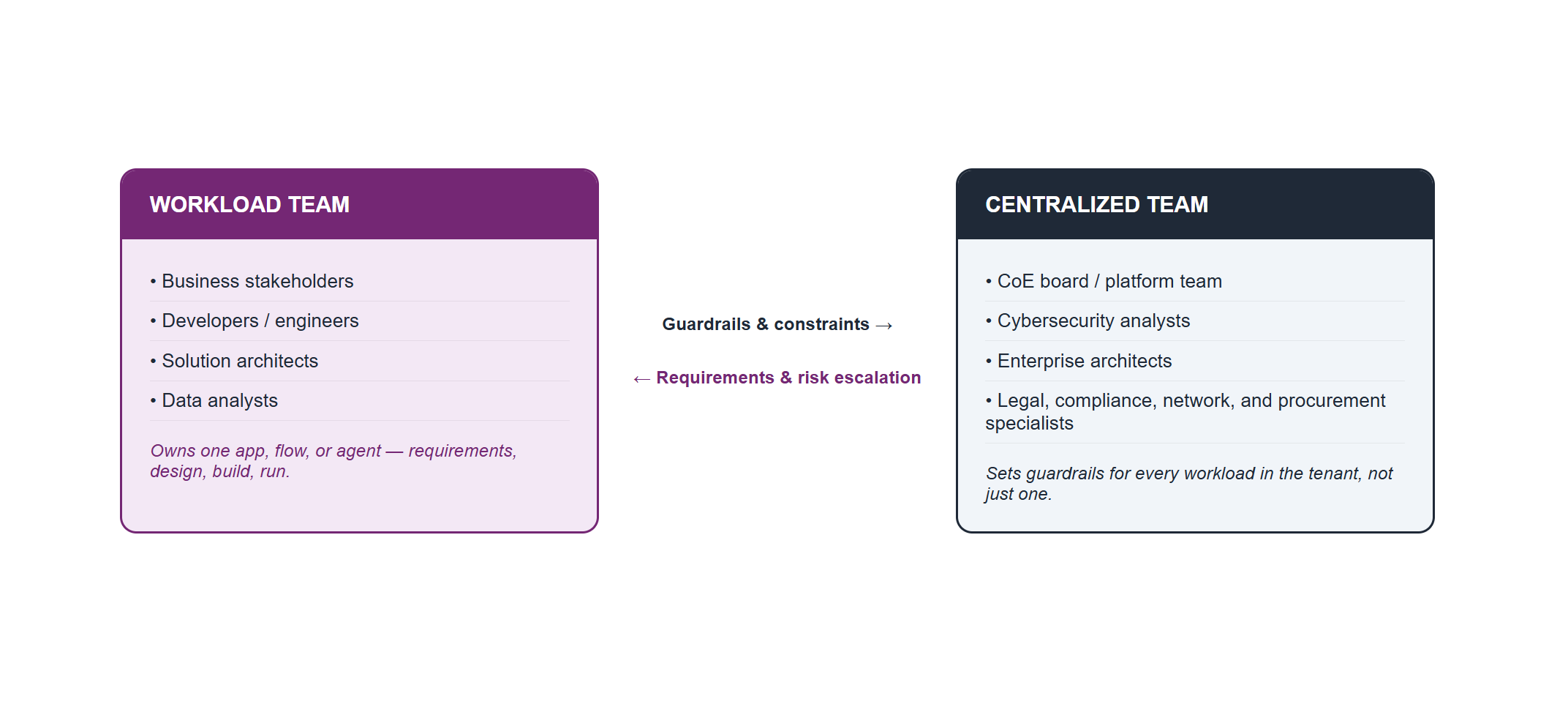
Microsoft’s “Workloads” guidance draws a clean line between two groups that every Power Platform organization eventually needs to define, and getting this distinction wrong is one of the most common sources of governance friction:
- The workload team — the people directly responsible for a specific app, flow, or agent. They own the requirements, the design decisions, the build, and the day-to-day operation of that one workload. This team typically pulls from business stakeholders, developers or software engineers, solution architects, and data analysts.
- The centralized team — the people who support diverse workloads across the tenant using shared core capabilities and infrastructure, and who, by necessity, implement some uniformity and constraints on what’s offered. Microsoft’s own guidance lists a notably wide bench of roles that can sit on the centralized side: business intelligence analysts, business stakeholders, the Center of Excellence (CoE) board, the platform team, cybersecurity analysts, database administrators, enterprise architects, business analysts, infrastructure engineers, legal and compliance officers, network engineers, procurement specialists, and project managers. Not every organization needs all of these as distinct people — but the list is a useful checklist for “who should at least be consulted” before a workload’s governance model is considered complete.
The framework is explicit that recommendations aren’t prescriptive about which team performs a given obligation — that mapping depends on workload type and criticality, and each organization decides it deliberately rather than by accident. What it does insist on is that workload teams understand the constraints set by centralized teams and partner with enterprise architects who know those constraints well, rather than discovering them after a design is already locked in. When a workload’s requirement collides with a platform limitation or a vague SLA from the centralized team, that collision is itself classified as a risk that needs to be surfaced and negotiated — not silently absorbed by the workload team through a workaround.
This is the structural link between WAF and an organization’s governance practice — and that practice has shifted meaningfully and recently. For years, the standard reference implementation for the centralized-team side of this picture was the CoE Starter Kit, a free, low-code reference solution built by Microsoft’s Power CAT team (never an official, supported Microsoft product) that gave organizations inventory, usage, and governance automation built entirely out of Power Apps, Power Automate, Power BI, and Dataverse components.
⚠️ Important — The CoE Starter Kit Is No Longer Maintained
As of May 2026, the CoE Starter Kit is no longer actively maintained. Microsoft has stated plainly that it no longer receives feature investment or bug fixes — existing installations keep working, but the monthly release cadence that ran for years has stopped.
This is not Microsoft abandoning Power Platform governance; it’s the opposite. The core scenarios the Starter Kit used to cover have been absorbed natively into the Power Platform admin center, through four in-product experiences: Inventory (view and govern every app, flow, and agent across the tenant), Usage (track adoption and identify top resources and owners), Monitor (track operational health of heavily used resources), and Actions (surface risks and best-practice recommendations, with the ability to act on them directly). For most organizations starting fresh today, these native experiences are the right starting point rather than deploying the legacy kit.
There is a real gap worth naming honestly, though: native visibility is not the same thing as governance. The admin center can show what exists in a tenant; it can’t decide who should own a widely shared app, what happens when the maker behind it leaves the company, or when a personal side project has quietly become business-critical and needs to be formally adopted. Those are organizational decisions, not product features — which is exactly why the concept of a CoE (people, standards, and a board that makes these calls) remains necessary even as the specific tooling underneath it changes. Microsoft’s own response to this gap, announced at Ignite 2025 and rolling out across the 2026 release wave, is the Agentic Center of Enablement (Agentic CoE) — a set of “guardian agents” intended to answer exactly these ownership and risk questions by reasoning over the same tenant inventory data the admin center already collects, rather than relying on a maker manually configuring flows to do it.
🎯 Key Takeaway
For an architect or governance lead reading this in mid-2026, the practical takeaway is simple: don’t start a new governance initiative by deploying the CoE Starter Kit. Start with the native Power Platform admin center experiences, and track the Agentic CoE rollout as the next layer on top of it.
Tradeoffs, Risks, and the Assessment Tool
The framework treats tradeoffs as a first-class concept rather than a footnote. Every architectural decision involves considerations that represent accepted compromises balancing different pillars against each other — and the documentation marks these explicitly with dedicated tradeoff and risk icons throughout, rather than burying the caveat in prose. A recent documentation update extended the tradeoffs articles for every pillar to specifically cover interactions with Performance Efficiency, which had previously been under-documented relative to the other pillars.
A few concrete, real examples from the official tradeoffs guidance are worth keeping close, because they show how non-obvious these collisions can get in practice:
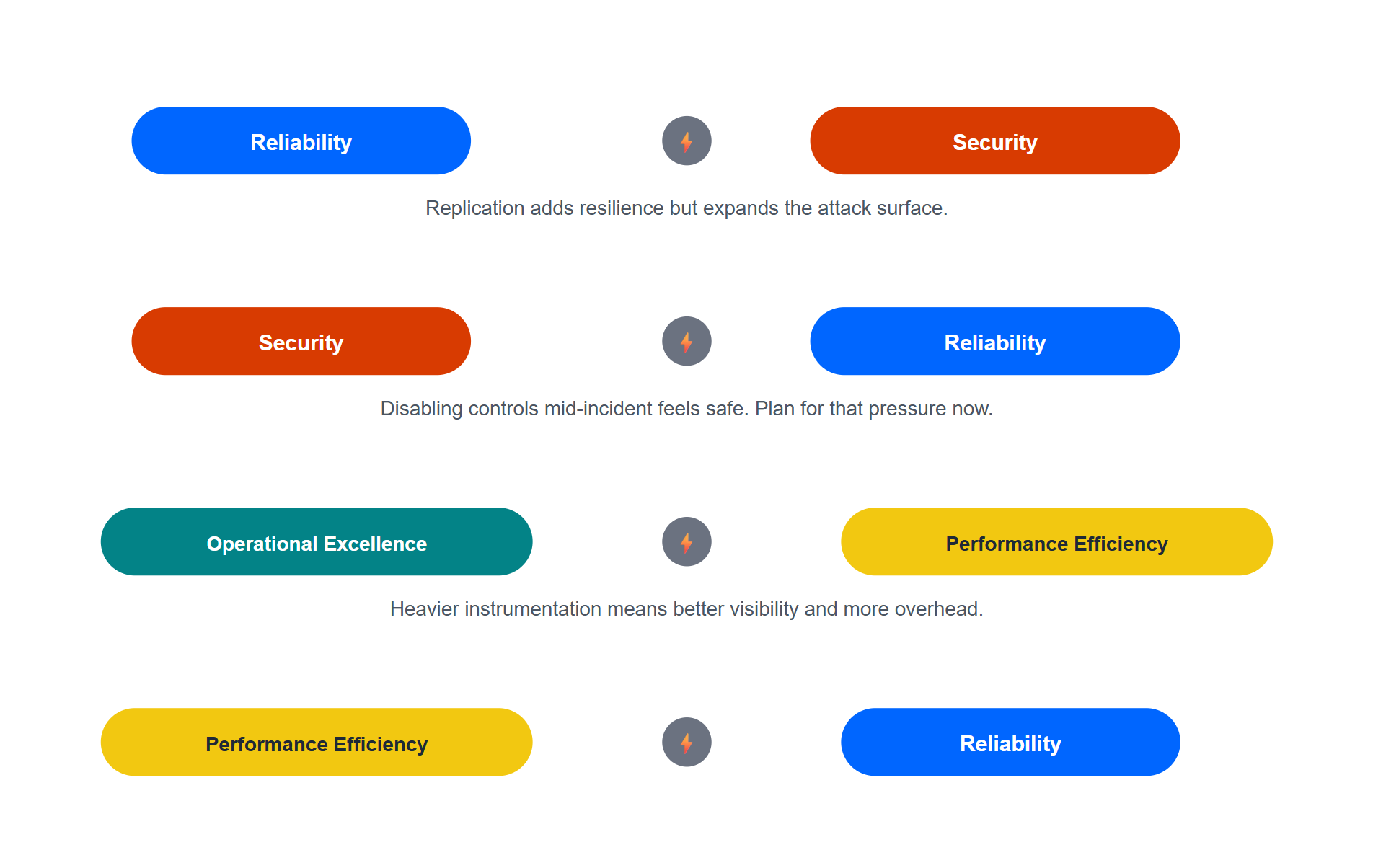
- Reliability vs. Security. Reliability is often achieved through replication — at the component, data, or geographic level. Every replica is a new piece of surface area that has to be secured, monitored, and patched, directly working against Security’s preference for a small, contained footprint.
- Security control bypass during incidents. This one is uncomfortable but realistic: when a workload is in the middle of an active reliability incident, the pressure to restore service creates a real temptation to temporarily disable security controls “just to get it back up.” The framework calls this out explicitly as a risk to plan for before an incident happens, not something to improvise under pressure.
- “Get current, stay current” vs. stability. Security’s patching discipline means applying vendor and platform updates promptly. But updates can disrupt a previously stable component. Delaying patches avoids that short-term reliability risk while leaving the system exposed to known threats — there’s no fully free option here, only a documented choice.
- Observability vs. performance. A serious monitoring strategy means instrumenting components to collect logs and metrics, which consumes compute and network resources. Push performance optimization too far by stripping telemetry to save resources, and the team loses the very data it needs to detect the next reliability or security incident.
Figure 3 — Four Real Tradeoffs Between Pillars
To operationalize the whole framework, Microsoft provides a Power Platform Well-Architected Assessment — a structured set of questions built directly from the key recommendations in each pillar. Completing it produces specific recommendations with links to the supporting guidance needed to act on them, and results can be exported to feed directly into operational improvement processes.
Two details about the assessment tool are worth knowing before a team relies on it:
- Assessments are tied to a Microsoft Learn profile and cannot be transferred between profiles — worth knowing before an architect runs an assessment under a personal account that should really belong to a team or service identity.
- The tool supports milestones, letting a team track the same workload’s assessment over time, using a prior milestone as the baseline for measuring change. This turns the assessment from a one-time snapshot into a maturity curve — which aligns with the framework’s own stated philosophy that the guidance is meant for iterative use, not a single pass-or-fail gate.
For Security specifically, Microsoft frames workload maturity in three explicit levels — initial, capable, efficient — giving teams a vocabulary for where they currently stand and what “next” looks like, rather than treating security as a binary compliant/non-compliant state.
How to Actually Start Using This Framework
For an architect or team that hasn’t engaged with WAF before, the practical entry sequence Microsoft’s own documentation implies — and that holds up well in practice — looks like this:
- Pick one real, in-flight or recently shipped workload. Not a hypothetical one. WAF’s value comes from confronting an actual design with actual tradeoffs already baked in.
- Run the design principles for each pillar as a conversation, not a quiz. For each principle, ask honestly whether the workload’s current design reflects it, and if not, why that gap exists — sometimes the answer is a legitimate, accepted tradeoff; sometimes it’s simply an oversight.
- Walk the checklist codes pillar by pillar (RE:01 through RE:08, SE:01 onward, and so on) and mark each as met, partially met, or not addressed.
- Run the official Assessment tool to validate the manual review and get a structured set of recommendations with direct links to guidance.
- Set a milestone, and revisit the same workload’s assessment after the next significant change or every few months — treating the score as a trend line, not a one-time grade.
- Feed systemic gaps back to the centralized team / CoE. If the same checklist item fails across multiple workloads — say, every team is skipping RE:07 (documented BCDR plans) — that’s not five separate workload problems. That’s a platform-level training or tooling gap the centralized team needs to close.
Conclusion
This framework rewards organizations that treat it as a recurring design conversation rather than a one-time audit. The five pillars give architects a shared vocabulary across Power Apps, Power Automate, Dataverse, and Copilot Studio agents alike — and the explicit tradeoff/risk language gives teams permission to make imperfect, documented decisions instead of pretending every pillar can be maximized simultaneously. Combined with a governance layer built on the native Power Platform admin center experiences (and, increasingly, the Agentic Center of Enablement), Power Platform WAF is the closest thing Microsoft currently offers to a complete answer for “how do we let citizen developers build fast without the platform turning into chaos within eighteen months.”
Well-architected isn’t a badge you earn once — it’s a question you keep asking.